Mastering Reverse Image Search: Uncover Image Origins and Discover Visual Wonders with Tophinhanhdep.com
In today’s visually-driven digital landscape, images are everywhere. From stunning wallpapers and inspiring photography to intricate digital art and everyday social media posts, our online experience is rich with visual content. But what if you encounter an image and want to know more about it? Where did it come from? Who created it? Is there a higher resolution version available? Or perhaps you need to verify its authenticity for a crucial project. This is where the invaluable tool of reverse image search comes into play. On Tophinhanhdep.com, we understand the profound importance of visual content, not just for aesthetic appeal but for information, verification, and creative inspiration. This comprehensive guide will delve into how to effectively reverse search an image on Google, integrating Tophinhanhdep.com’s vast resources and illustrating how this powerful technique can serve everyone from casual browsers to professional photographers and designers.
Understanding the Power of Visual Search
The traditional way of searching involves typing keywords into a search bar. Reverse image search flips this concept on its head, allowing you to use an image itself as your query. Instead of describing what you’re looking for, you show the search engine the image, and it returns visually similar images, information about the image, and websites where that image appears. This innovative approach has revolutionized how we interact with visual content online, providing a gateway to a wealth of information that text-based searches simply cannot unlock.
What Exactly is Reverse Image Search?
At its core, a reverse image search is the process of using an image as the input for a search engine to find related information online. When you upload an image or provide its URL, the search engine employs sophisticated algorithms to analyze its visual characteristics – colors, shapes, textures, patterns, and even specific objects within the image. It then compares these features to billions of images indexed across the web. The results typically include:
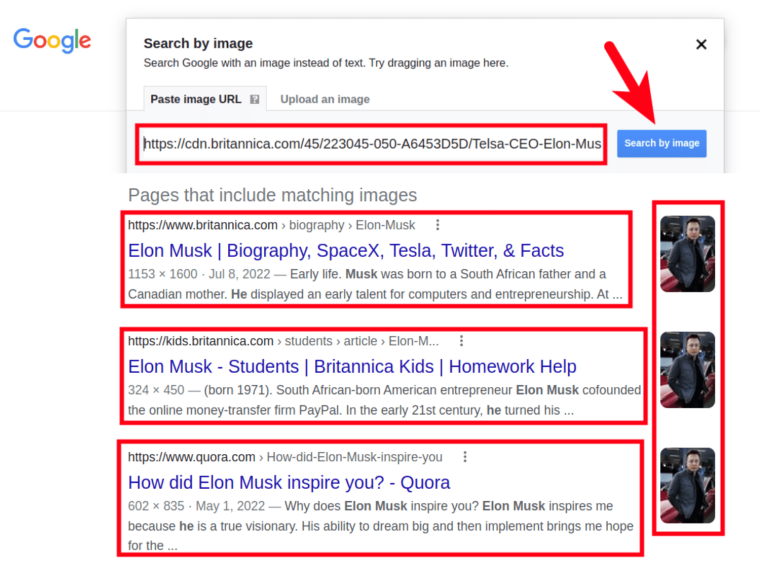
- Identical images: Exact copies of the image you searched for.
- Visually similar images: Photos that share significant visual elements or themes, even if they are not identical.
- Websites featuring the image: Pages where the image has been published, providing context and potential sources.
- Different sizes or resolutions: Often allowing you to find higher-quality versions of an image.
- Related information: Captions, articles, or product details associated with the image.
Imagine discovering a breathtaking landscape photograph. A reverse image search could tell you the location, the photographer, and even provide links to similar nature wallpapers on Tophinhanhdep.com. Or perhaps you’ve stumbled upon an intriguing piece of digital art; a reverse search might lead you to the artist’s portfolio, revealing more of their creative ideas and editing styles.
The Multifaceted Applications of Reverse Image Search
The utility of reverse image search extends far beyond simply finding the origin of a picture. Its applications are diverse, touching upon various aspects of our digital lives, especially relevant to the thematic pillars of Tophinhanhdep.com:
- Verifying Authenticity and Fact-Checking: In an era of misinformation, reverse image search is a critical tool for verifying the legitimacy of images. You can check if a photo has been taken out of context, manipulated, or used to spread false narratives. This is particularly useful for scrutinizing images presented as news or evidence.
- Identifying Image Sources and Protecting Intellectual Property: For photographers, digital artists, and content creators, this tool is indispensable for monitoring unauthorized use of their work. If you suspect someone is using your high-resolution photography or unique visual design without permission, a reverse search can help you track down infringements and take appropriate action. Tophinhanhdep.com emphasizes responsible image usage, and this tool aligns perfectly with that ethos.
- Finding Higher Quality Versions: Ever loved an aesthetic background or a stunning wallpaper only to find it in low resolution? Reverse image search often leads to larger, clearer versions, perfect for enhancing your screens or visual projects. Tophinhanhdep.com’s commitment to high-resolution images makes this a sought-after feature.
- Discovering Similar Visual Content: Whether you’re looking for more sad/emotional imagery for a mood board, exploring different abstract art styles, or seeking thematic collections for creative inspiration, reverse image search can introduce you to a vast array of related visuals.
- Product Identification and Shopping: If you see a product you like in an image – be it a unique piece of furniture, a fashion item, or a gadget – a reverse image search can often identify the item and lead you to places where you can purchase it, or find cheaper, similar versions.
- Enhancing SEO and Content Strategy: For website owners and digital marketers, tracking where your images are used can identify linking opportunities, measure content impact, and help you understand which visual trends resonate with your audience. This can inform your future photography choices and visual design strategies.
- Avoiding Duplicate Stock Photos: When selecting stock photos for your website or graphic design projects, a quick reverse search can ensure you’re not using an image that’s already saturated the market or prominently featured by a competitor, helping your brand stand out.
Performing a Reverse Image Search Across Devices
Google, the most prominent search engine, offers robust reverse image search capabilities, and these methods are easily accessible across various devices. While other platforms and specialized tools exist, for simplicity and effectiveness, we’ll focus on Google’s integrated features, which Tophinhanhdep.com recommends for its comprehensive results.
Reverse Image Search on Desktop Computers
Performing a reverse image search on a desktop or laptop is straightforward, offering several convenient methods:
-
Directly from an Image on a Webpage (Chrome, Firefox, Edge):
- Navigate to the webpage containing the image you wish to search.
- Right-click on the image.
- From the context menu, select “Search Google for Image” (or “Search Image with Google Lens” in newer Chrome versions, or similar options in other browsers).
- A new tab or sidebar will open, displaying the search results, including visually similar images and websites where the image appears. This is arguably the easiest and most frequently used method.
-
Using the Google Images Website (images.google.com):
- Open your web browser and go to
images.google.com. - You will see a camera icon in the search bar. Click on this icon.
- Two options will appear:
- “Paste image link”: If you have the direct URL of an image (e.g., from a shared link or by right-clicking an image and selecting “Copy image address”), paste it into this field and click “Search.”
- “Upload an image”: Click “Choose file” to browse your computer’s files and select the image you want to search. Alternatively, you can drag and drop the image directly into the “Drop image here” section.
- Once the image is uploaded or the URL is provided, Google will process it and display the search results.
- Open your web browser and go to

- Browser Extensions and Tophinhanhdep.com’s Recommended Tools:
- For a more streamlined experience, browser extensions are available that integrate reverse image search functionality directly into your workflow. For instance, many extensions offer similar capabilities to the built-in right-click option, sometimes providing results from multiple search engines simultaneously. Tophinhanhdep.com suggests exploring reputable extensions that enhance your visual research, often linking directly to image analysis tools or services.
Reverse Image Search on Mobile Devices
The process for mobile devices (smartphones and tablets) has become increasingly intuitive, primarily thanks to the Google app and Chrome browser.
-
Using the Google App (iOS and Android):
- Download and open the official Google app.
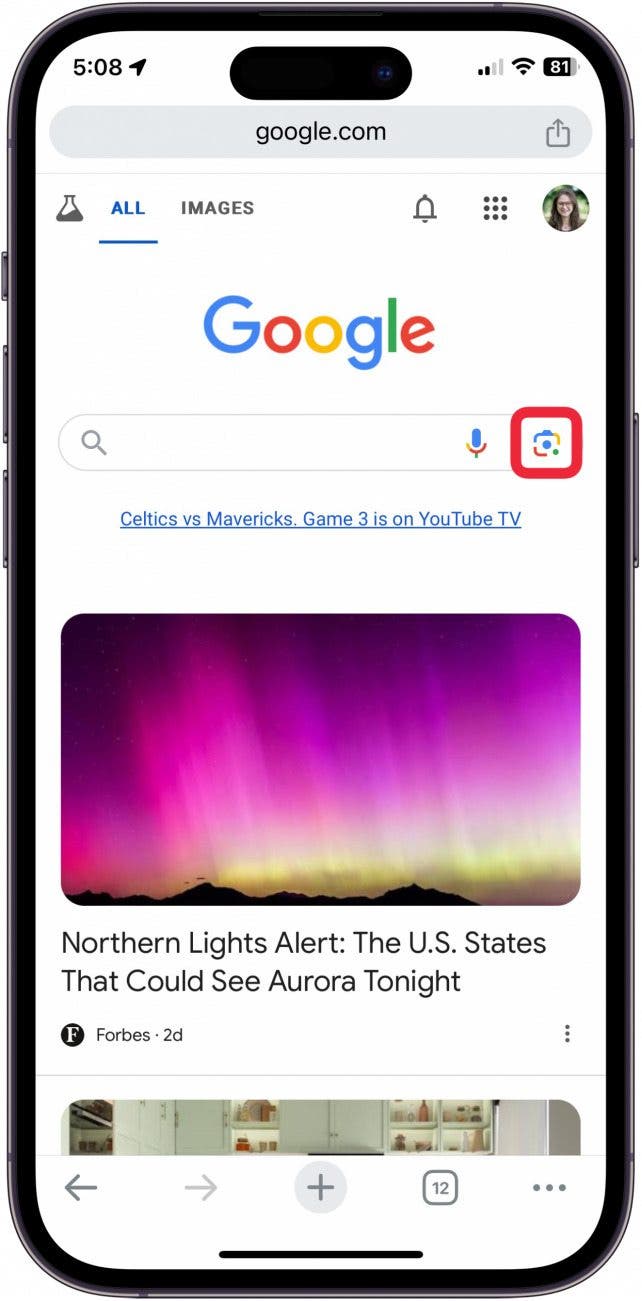
- In the search bar, you’ll find a camera icon (Google Lens). Tap it.
- You’ll be presented with several options:
- “Search with your camera”: Point your phone’s camera at a real-world object or image, and tap the shutter button. Google Lens will analyze it and provide search results. This is fantastic for identifying real-life objects, artworks, or even text.
- Select an image from your gallery: Images from your camera roll or photo gallery will appear below the camera view. Tap the image you want to search. Google Lens will then analyze the image and present related content. It might even allow you to select specific elements within the image (like a shirt or a pair of pants) to refine your search.
- Scroll through the results to find similar images, sources, and related information.
-
Using Google Chrome on Mobile (Android):
- Open the Chrome browser and navigate to the webpage containing the image.
- Long-press (tap and hold) on the image until a context menu appears.
- Select “Search Google for this image.”
- A new tab will open with the search results.
-
Using Google Chrome on Mobile (iOS - via Request Desktop Site):
- Open Chrome or Safari and go to the webpage with the image.
- Save the image to your device’s photo library by long-pressing and selecting “Save Image.”
- Open a new tab and go to
images.google.com. - Tap the Share button (square with an arrow pointing up).
- Scroll right through the options and select “Request Desktop Site.”
- The page will refresh to the desktop version. Tap the camera icon in the search bar.
- Choose “Upload an image” and then “Photo Library” to select the saved image from your phone.
- The search results will then appear. This method is a workaround for iOS’s default mobile browser limitations but works reliably.
-
Searching Images from Search Results (Google App/Chrome):
- Perform a regular text search on Google or Google Images for something specific.
- Tap the “Images” tab to view image results.
- Tap on an image you want to investigate further.
- Look for a small camera icon (Google Lens) in the bottom-left corner of the selected image preview. Tap it to perform a reverse image search on that specific result.
Leveraging Tophinhanhdep.com’s Integrated Solutions
While Google provides the fundamental reverse image search engine, Tophinhanhdep.com acts as a central hub, curating and optimizing your visual discovery journey. We integrate the best practices for reverse image searching and provide context and further tools for whatever you uncover. For example:
- Curated Collections: If your reverse search leads you to a beautiful nature scene, Tophinhanhdep.com can offer curated collections of similar wallpapers, backgrounds, or even direct you to other stunning photography by the same artists.
- Image Tools Integration: Found a low-resolution version of an abstract art piece you love? Tophinhanhdep.com’s
Image Toolssection featuresAI Upscalersto enhance quality,Compressorsto optimize for web use, orConvertersif you need a different format. - Visual Design Resources: For graphic designers and digital artists, identifying sources via reverse search can lead to discovering new
editing stylesorcreative ideasthat are then discussed and supported by resources on Tophinhanhdep.com. - Inspiration & Learning: Tophinhanhdep.com often provides articles and guides on
Photo Ideas,Mood Boards, andTrending Styles, which are perfectly complemented by insights gained from reverse image searches.
Unlocking Deeper Insights: Why Reverse Search Matters
Beyond the technical steps, understanding the “why” behind reverse image search reveals its true value in the digital age. It’s a tool that empowers users to navigate the complex world of online imagery with greater confidence, creativity, and discernment.
Protecting Your Creative Works and Battling Misinformation
One of the most critical uses of reverse image search revolves around authenticity and intellectual property.
- For Creators (Photography, Digital Art, Visual Design): Your original
beautiful photographyor uniquedigital artrepresents time, skill, and effort. Reverse image search allows you to actively monitor where yourhigh-resolutionimages are being used online. This is vital forstock photosyou license, orphoto manipulationpieces you’ve crafted. If you discover unauthorized usage, particularly without credit or permission, you can take steps to protect your copyright, request attribution, or even initiate takedown notices. Tophinhanhdep.com champions creators and encourages them to utilize these tools to safeguard their portfolios. - For Consumers (Verifying Information): The ease with which images can be shared and repurposed means they are often stripped of their original context, or worse, outright faked or manipulated. Reverse image search is a journalist’s, researcher’s, or even a casual user’s best friend for
image fact-checking. For instance, an image claiming to show a recent natural disaster might, through a reverse search, reveal it was actually taken years ago in a different location. This capability is paramount in combating “catfishing” scams, where individuals use fake profiles and stolen images to deceive others. By simply uploading a profile picture, you can quickly determine if the person is who they claim to be, thus promoting safer online interactions. Tophinhanhdep.com advocates for media literacy and critical thinking when encountering online visuals.
Enhancing Your Visual Design and Content Strategy
For anyone involved in Visual Design, Graphic Design, or simply curating Image Collections, reverse image search is a goldmine for inspiration and efficiency.
- Finding Optimal Visuals: You might find an
aesthetic backgroundor anabstractimage that perfectly fits a project, but it’s too small. A reverse search can unearthhigh-resolutionversions, saving you time and ensuring professional quality. This directly ties into Tophinhanhdep.com’s focus on providingwallpapersandbackgroundsof exceptional quality. - Inspiration and Creative Ideas: Seeing an
editing styleyou admire in a piece ofdigital photography? A reverse search can lead you to the artist’s other works, tutorials, or discussions about their techniques, fueling yourcreative ideasand expanding yourphoto ideasrepertoire. Tophinhanhdep.com regularly featurestrending stylesand thematic collections to spark this creativity. - Competitive Analysis and Brand Consistency: Before using a generic
stock photo, a reverse search can show you if competitors are using the exact same image. This helps you maintain a unique visual identity and avoid brand confusion. Understanding thecontextual understandingof where and how images similar to yours are used can also inform your brand’s overall visual messaging.
Discovering Inspiration and Curating Collections
Beyond practical applications, reverse image search is an incredible tool for pure discovery and enrichment, perfectly aligning with Tophinhanhdep.com’s mission to be a source of Image Inspiration.
- Building Mood Boards and Thematic Collections: Whether you’re designing a room, planning an event, or developing a creative project,
mood boardsare essential. If you find onesad/emotionalimage that resonates, a reverse search can quickly populate your board with other images sharing similar tones, colors, or subjects, creating cohesivethematic collections. - Exploring
NatureandAbstractImagery: A reverse search on a captivatingnaturephotograph can lead you to an entire series by the same photographer or other photos from the same region, expanding your appreciation for the natural world. Similarly, forabstractart, it can reveal different interpretations of shapes and colors. - Connecting with
Beautiful Photography: Reverse image search can be a powerful way to discover new artists whose work aligns with your taste. You might find a single image compelling, and the search reveals an entire portfolio ofbeautiful photographythat becomes a new source ofimage inspiration.
The Evolving Landscape of Image Search Technology
Reverse image search is not static; it’s a constantly evolving field driven by advancements in artificial intelligence and machine learning. These developments promise even more sophisticated and precise visual searches in the future.
AI-Powered Precision and Advanced Detection
Modern search algorithms, especially those leveraged by powerful platforms, are increasingly powered by AI and machine learning. This means:
- Enhanced Accuracy: AI can recognize intricate patterns, specific objects,
editing styles, and even perceived emotions within images with greater precision, leading to more contextually relevant and accurate search results. This reduces instances where visually similar but contextually unrelated images are returned. - Image Editing Detection: Advanced AI tools can now pinpoint subtle edits, manipulations, or annotations within an image. This capability is invaluable for verifying the authenticity of images, detecting
photo manipulation, and ensuring the originality ofdigital artforphotographersandgraphic designers. - Real-time AR Integration: Augmented Reality (AR) applications are beginning to integrate real-time reverse image search. Imagine pointing your phone camera at a real-world object – a unique plant, a piece of clothing, or an artwork – and instantly receiving search results that identify it, provide information, or suggest where to find similar items. This blurs the line between the physical and digital search experience.
Tophinhanhdep.com actively monitors these technological advancements, aiming to provide resources and tools that help users harness these cutting-edge capabilities, such as integrating AI Upscalers for found images.
Current Limitations and Future Potential
While incredibly powerful, reverse image search is not without its limitations:
- Accuracy Challenges: Despite AI advancements, algorithms can sometimes still return results that are visually similar but semantically unrelated. Slight cropping, heavy
photo manipulation, or extensiveediting stylescan sometimes confuse the algorithms, leading to missed matches or irrelevant outcomes. - Resolution Dependency: The quality of the input image significantly impacts the search results.
High-resolutionimages with clear details are more likely to yield precise matches.Low-resolutionor pixelated images often result in less accurate outcomes due to the lack of sufficient visual data for the algorithm to analyze effectively. - Database Limitations: The success of any reverse image search is inherently tied to the size and scope of the search engine’s indexed database. If an image or its specific variations haven’t been indexed by the search engine, it won’t be found. This means that while Google has an enormous database, niche images or very recently uploaded content might not immediately appear in results. Specialized
Image Collectionson Tophinhanhdep.com, however, can provide a more focused search within curated categories.
Despite these limitations, the trajectory of reverse image search technology is one of continuous improvement. We can anticipate even more robust image tools, finer AI Upscalers integrated directly into search, and broader database indexing. The future holds promise for features like more nuanced image-to-text capabilities within searches, allowing for even richer contextual understanding.
In conclusion, reverse image search is an indispensable tool in our visually saturated world. Whether you are a casual browser looking for beautiful photography, a content creator seeking image inspiration for your visual design, or a professional protecting your digital photography, understanding and utilizing this powerful function is key. Tophinhanhdep.com stands as your comprehensive resource, providing not only an abundance of wallpapers, backgrounds, and thematic collections but also the knowledge and tools to expertly navigate the vast ocean of online imagery. By mastering how to reverse search an image on Google, you unlock a new dimension of visual discovery, verification, and creative potential.