Mastering Image Weight in Midjourney: Crafting Your Vision with Precision
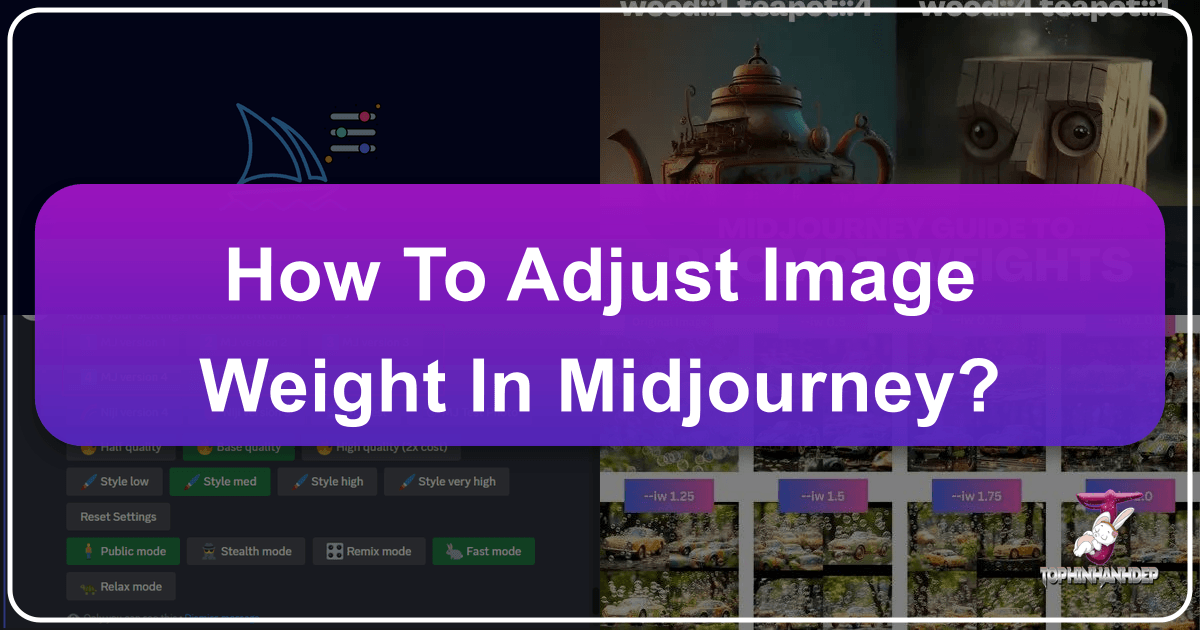
In the dynamic world of AI-generated imagery, Midjourney stands out as a powerful tool for artists, designers, and enthusiasts alike. Beyond simple text prompts, Midjourney offers sophisticated controls to fine-tune your creations, allowing for a remarkable fusion of textual instruction and visual inspiration. Among these advanced parameters, the “image weight” parameter, denoted by --iw, is an indispensable feature for anyone looking to achieve a perfect balance between a reference image and a guiding text prompt. Without a proper understanding and application of this crucial parameter, the use of images in your prompts can lead to unpredictable or less-than-ideal outcomes, especially when aiming for specific aesthetics or detailed compositions.
This comprehensive guide from Tophinhanhdep.com delves deep into the mechanics of Midjourney’s image weight, explaining how to leverage it to transform your creative ideas into stunning visual realities. Whether you’re looking to generate beautiful photography, create unique wallpapers, or develop complex digital art pieces, mastering --iw will empower you to achieve unparalleled precision and consistency in your AI-generated images.
Decoding Midjourney Image Weight: The Foundation of Visual Control
To truly harness the power of AI in visual creation, it’s essential to understand the core mechanisms that influence the output. Midjourney’s image weight is one such fundamental concept, acting as a crucial dial in your creative toolkit.
Definition and Purpose
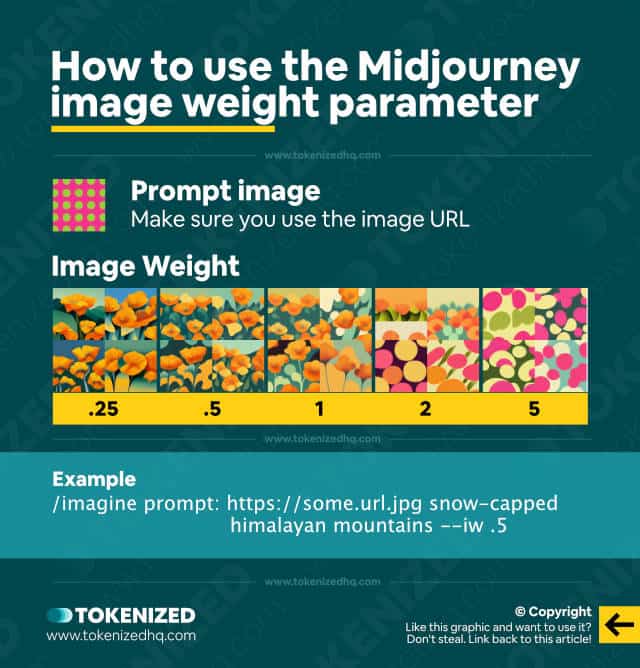
Image weight (--iw 0-3) is a dedicated parameter within Midjourney’s prompting system designed to determine the influence a specific image prompt has in relation to the accompanying text prompt. When you provide both an image and text to Midjourney, this parameter allows you to control which element the AI should prioritize during the generation process.
By default, Midjourney typically assigns an --iw value of 1. This means that, without explicit instruction, the AI gives equal consideration to both your visual reference and your descriptive text. However, by adjusting this value, you gain direct control over the interplay:
- Lower
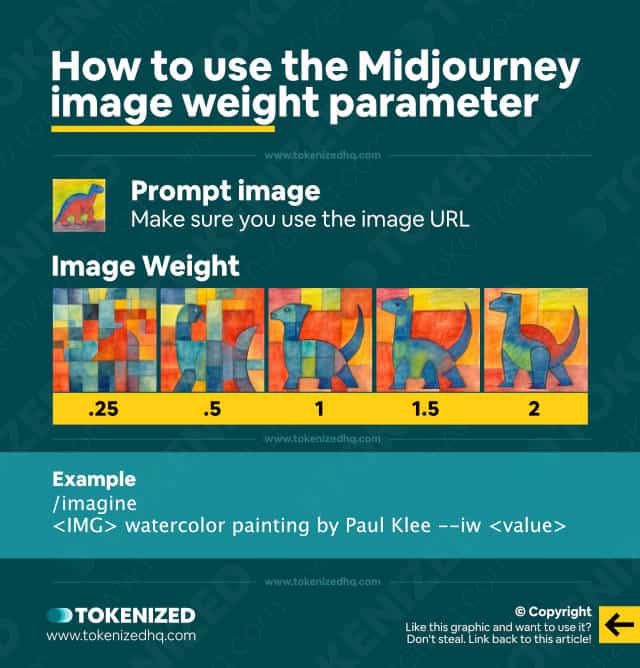
--iwvalues (e.g., 0.25, 0.5) instruct Midjourney to emphasize the textual description more heavily. The generated image will draw inspiration from the reference but prioritize the creative interpretation offered by the text. This is ideal when you want subtle aesthetic cues from an image but primarily wish to explore new compositions or themes based on your words. - Higher
--iwvalues (e.g., 2, 3) signal to Midjourney that the image prompt should exert a greater influence on the final output. The AI will lean more heavily on the composition, color palette, and visual elements of your reference image, while the text prompt serves more as a modifier or a secondary detail. This is perfect for maintaining strong visual adherence, such as when creating consistent characters or replicating a specific photographic style.
For users of Tophinhanhdep.com focused on creating unique wallpapers or backgrounds, or those exploring specific aesthetic trends, understanding this balance is paramount. It allows you to transform existing images into new interpretations while preserving their core visual identity, or conversely, to guide the AI with a strong textual idea while only subtly hinting at a visual reference.
Why Control Image Influence? Achieving Creative Intent
The ability to control image weight is not merely a technicality; it’s a gateway to advanced creative expression. For digital artists, graphic designers, and photographers, this parameter offers several key advantages:
- Creative Direction: When you have a clear vision for composition, color palette, or the overall form of a subject, higher image weights ensure that Midjourney stays faithful to your reference. This is invaluable for maintaining artistic integrity in digital art projects or photo manipulation where a source image dictates the foundational look. For example, if you’re trying to generate a series of abstract images with a consistent color scheme derived from a specific reference photo, a higher
--iwvalue will help preserve that palette across all generations. - Exploration and Innovation: Conversely, lower image weights provide the AI with more freedom to interpret your text prompt. This encourages novel compositions and unexpected variations that still carry a subtle nod to your original image. It’s an excellent approach for discovering new photo ideas or experimenting with trending styles where you want a fresh take on an existing visual. Imagine starting with a nature photography reference but wanting Midjourney to generate entirely new landscapes inspired by the textural and atmospheric qualities of your input, rather than replicating its exact layout.
- Consistency Across Collections: For projects requiring visual consistency, such as creating a series of images for a mood board or a thematic collection, pinpointing the ideal image weight is critical. It helps maintain a signature look, whether for character studies, aesthetic backgrounds, or a collection of beautiful photography. This ensures that all generated images, despite varying text prompts, feel part of a cohesive set, a vital aspect for professional visual design and image collections on Tophinhanhdep.com.
Understanding Image Weight Across Midjourney Versions
Midjourney is a continuously evolving platform, and the capabilities of its image weight parameter have developed alongside its model versions. It’s crucial to be aware that different versions of Midjourney may support varying ranges for --iw.
| Version | Image Weight Default | Image Weight Range |
|---|---|---|
| Version 7 | 1 | 0-3 |
| Version 6 | 1 | 0-3 |
| Version 5 | 1 | 0-2 |
| Version 4 | NA | NA |
| Niji 6 | 1 | 0-3 |
| Niji 5 | 1 | 0-2 |
The evolution, particularly with Version 7 (V7), reflects Midjourney’s ongoing commitment to granting creators ever-greater control. Newer versions typically offer a broader range and more nuanced responsiveness to --iw adjustments, allowing for finer stylistic shifts. This means that a value of --iw 0.5 in V7 might produce a more noticeable difference than in an older model, enabling more precise manipulation of image elements, from wallpapers to high-resolution stock photos. Understanding these version-specific capabilities is key to maximizing your outputs and integrating seamlessly with any image tools you might use.
The Evolution of Image Weight: Midjourney’s Advanced Features
Midjourney’s continuous updates not only refine existing functionalities but also introduce groundbreaking features that further enhance the power of image weight. Recent developments, particularly with Version 7, have significantly reshaped how users can leverage visual inputs.
Impact of Recent Midjourney Updates: V7 and Omni-Reference
The generative AI landscape is rapidly advancing, and Midjourney remains at the forefront by consistently updating its models and tools. Two significant developments have particularly impacted the performance and potential of weighted images:
- V7 Alpha Launch (April 2025): The introduction of the V7 model brought with it a host of improvements, including sharper detail, faster rendering, and a more nuanced style fusion. Critically for image weight, V7 makes adjustments more pronounced. This means that even small incremental changes to the
--iwparameter can lead to significant stylistic shifts in the generated output. For graphic designers and digital artists, this offers an unprecedented level of granular control, allowing for subtle yet impactful modifications to their creative ideas. Whether you’re aiming for a specific high-resolution look or experimenting with a new editing style, V7’s responsiveness to--iwis a game-changer. - Omni-Reference Feature (Rolling out May 2025): This innovative feature allows users to integrate multiple image references seamlessly within a single prompt. When combined with the power of differential weights for each reference, creators can orchestrate incredibly complex compositions. Imagine a mood board or thematic collection where you want certain elements from one image to be more prominent than others. Omni-Reference, coupled with carefully assigned image weights, makes this possible. You can assign a heavier weight to a primary image that defines the main subject or composition and lighter weights to supplementary images that contribute only specific textures, colors, or aesthetic cues. This capability truly pushes the boundaries of photo manipulation and visual design, enabling sophisticated blends that were previously unachievable.
Additionally, a new Aesthetics Parameter (--exp) primarily aims at tweaking creativity levels, but it interacts dynamically with --iw. Boosting detail with --exp can amplify image influence when combined with a higher image weight, providing another layer of control for creators on Tophinhanhdep.com seeking detailed and refined outputs.
Unlocking V7 Personalization for Tailored Results
Before fully diving into advanced weight experiments with Midjourney V7, users have the opportunity to unlock their V7 Global Personalization Profile. This involves ranking approximately 200 image pairs within Discord. This crucial step allows V7 to learn and adapt to your unique aesthetic tastes, tailoring its outputs to align more closely with your personal style.
This personalization makes --iw adjustments feel significantly more intuitive. When the AI understands your preferences, your attempts to balance image and text influence will yield results that are not only accurate to your prompt but also resonate with your artistic vision. For creators developing personal photo ideas, aesthetic images, or even entire collections of digital photography, this personalization feature ensures that the powerful --iw parameter helps to create truly unique and personal masterpieces.
Practical Application: Adjusting Image Weight Step-by-Step
Adjusting image weight in Midjourney is a straightforward process once you understand the basic syntax and principles. However, effective use truly shines through deliberate experimentation and an iterative approach. Here’s a step-by-step guide to help you master this critical parameter.
Step 1: Preparing Your Visual Reference
The journey begins with selecting or generating the image that will serve as your visual inspiration. The quality and relevance of this reference image are crucial for the final output. Tophinhanhdep.com emphasizes the importance of high-resolution images and quality photography, as these provide the AI with richer data to draw from.
- Option A – Utilize an Existing Image: If you have an image you wish to use as a reference, upload it directly to Discord. Once uploaded, right-click on the image and select “Copy Image Link.” This URL will be integrated into your Midjourney prompt. Ensure the image is accessible via a direct link.
- Option B – Generate an Initial Image with Midjourney: You can also generate an initial image using a text-only prompt in Midjourney. Once generated, select the desired image from the grid (U1, U2, U3, or U4 for upscale) and then right-click on the upscaled image to “Copy Image Link.” This is a common practice for artists creating a base image before refining it with further weighted prompts, allowing for consistent characters or foundational visual design elements.
Step 2: Structuring Your Prompt with the --iw Parameter
Once you have your image URL, the next step is to construct your Midjourney prompt. The syntax for incorporating an image prompt along with image weight is precise:
/imagine <Image_URL> <Text Prompt> --iw <Weight_Value>Let’s illustrate with an example:
Suppose your image URL is https://i.imgur.com/example.png, and your text prompt is “a futuristic cityscape at dusk, cinematic lighting.” If you want the image to have a moderate influence, you might set the image weight to 2:
/imagine https://i.imgur.com/example.png a futuristic cityscape at dusk, cinematic lighting --iw 2
This command tells Midjourney to generate an image that combines the visual cues from https://i.imgur.com/example.png with the descriptive text, placing twice the emphasis on the reference image compared to the default. Remember that for multi-part text prompts, some users prefer separating them with :: (e.g., a futuristic cityscape:: at dusk:: cinematic lighting) for finer control, although --iw directly affects the overall image versus text balance.
Step 3: Experimenting with Weight Values for Desired Outcomes
The true artistry of using --iw comes from experimenting with different values. The effects of image weight are not always linear and can interact with your text prompt and chosen model version in unique ways.
- Lower Weights (0.25 – 0.75): Use these values when you want the AI to emphasize the text prompt significantly more. The reference image will act more as a subtle stylistic guide, influencing color palettes or general mood rather than explicit composition. This is excellent for exploring new photo ideas or abstract concepts while still maintaining a cohesive aesthetic.
- Mid-range Weights (1 – 1.5): This range offers a balanced influence between your image and text. It’s often a good starting point for most scenarios, allowing the AI to interpret both inputs fairly. You’ll see elements from both the image and text blend harmoniously, suitable for generating aesthetic images or refined digital photography.
- Higher Weights (2 – 3+): These values ensure strong visual adherence to your reference image. The outputs will closely mirror the style, composition, and often the subject form of the original. This is invaluable for maintaining visual consistency, replicating a specific artistic style for graphic design, or ensuring specific elements from your reference image are clearly represented. Keep in mind the maximum value supported by your Midjourney model version (e.g., V6 supports up to 3, V5 caps at 2).
Advanced Techniques: Weighting Multiple Images and Style References
Midjourney doesn’t limit you to a single image reference or just --iw. Advanced users can combine parameters for even greater control, essential for complex visual design and photo manipulation projects.
- Assigning Weight to Multiple Images: If your vision requires drawing inspiration from more than one image, Midjourney’s multi-prompt delimiter (
::) allows you to assign relative weights to each image URL.In this example,/imagine <URL1>::2 <URL2>::1 a futuristic cityscape --iw 1URL1will exert twice the influence ofURL2, even though the overall image influence (--iw 1) is balanced against the text. This technique offers surgical precision, letting you blend specific elements from different sources, creating rich and layered visual experiences for thematic collections. - Using Weights with Style References (–sw): Beyond raw image content, Midjourney also offers the Style Reference parameter (
--sw) to extract the aesthetic style of one image and apply it to another generation. You can powerfully mix--swand--iwtogether:Here, the style from/imagine <STYLE_IMAGE_URL> --sw 200 <CONTENT_IMAGE_URL> --iw 0.5 a serene lake at dawnSTYLE_IMAGE_URLis strongly applied (with a high--swvalue), while theCONTENT_IMAGE_URLlightly informs the scene’s composition or elements (with a low--iwvalue). The text prompt guides the core subject. This combination is a masterstroke for digital art and creating unique visual content where a specific artistic style needs to be transferred onto new subjects.
Automating Weight Testing for Efficiency
For those seeking to optimize their workflow and quickly identify the best --iw values, automating the testing process is highly beneficial. By running batches of prompts with incremental changes to the --iw parameter (e.g., --iw 0.5, --iw 1.0, --iw 1.5, etc.), you can generate multiple outputs simultaneously. This facilitates a rapid A/B testing workflow, allowing you to compare results side-by-side and quickly discern the impact of each weight adjustment. Consider systematically naming your jobs (e.g., city_0.5, city_1.0) to keep track of variations, a practice highly recommended for graphic designers and content optimizers on Tophinhanhdep.com.
Best Practices and Troubleshooting for Optimal Image Weight Usage
Achieving professional-quality results with image weight in Midjourney demands not only understanding its mechanics but also adopting a strategic, iterative approach. Whether you’re aiming for beautiful photography or abstract art, these practices will guide you.
Strategies for Balancing Image and Text Influence
Mastering the balance between your visual and textual inputs is key to unlocking Midjourney’s full potential.
- Start at Default for a Baseline: Always begin your experimentation with
--iw 1. This establishes a neutral baseline, allowing you to see how your image and text prompts interact without any preferential weighting. From this point, you can make informed decisions about whether to increase or decrease the influence of your reference image. - Incremental Tweaks: Rather than making drastic changes, modify the
--iwvalue in small steps (e.g., 0.25 or 0.5). This helps you isolate the effect of each adjustment and understand how Midjourney responds. This is particularly useful for fine-tuning aesthetic details or specific editing styles. - Pair Testing for Comparison: For each
--iwvalue you test, generate multiple outputs. Comparing these variations side-by-side helps you identify subtle differences and choose the direction that best aligns with your creative vision. This method is akin to reviewing different takes in traditional photography or visual design. - Use Complementary Parameters: Image weight doesn’t operate in a vacuum. Combine it with other Midjourney parameters like
--stylize(--s) to control how artistic the AI’s interpretation is, or--chaosto influence the variety of initial grid images. For instance, a high--iwcombined with a low--smight yield a faithful but less artistic rendition, while a high--scould introduce more creative flair. This holistic approach is essential for crafting unique wallpapers, backgrounds, and general visual design elements.
Version-Specific Considerations for Refined Control
As Midjourney models evolve, so does their response to parameters. Being aware of these nuances is vital.
- V6 vs. V7 Responsiveness: While both Midjourney V6 and V7 support
--iwon a 0-3 scale, V7 often feels more responsive and nuanced, especially at lower increments. You might find that small adjustments like--iw 0.8or--iw 1.2in V7 yield more distinct results than they would in V6. This improved sensitivity offers greater precision for artists creating high-resolution digital photography or intricate graphic design. - Niji Models and Stylization: Niji models, known for their anime and illustrative styles, typically cap
--iwat 3. However, heavier image weights in Niji can sometimes override its inherent stylization in unpredictable ways. Experimentation is crucial to find the sweet spot where your image reference informs the content without completely losing the signature Niji aesthetic, which is important for specific types of digital art and creative ideas.
Cultivating an Iterative Approach
Consistent success in AI art often comes from a methodical, iterative workflow.
- Document Your Settings: Maintain a simple spreadsheet or log of the
--iwvalues you’ve used, along with the corresponding prompts and a brief description of the results. This creates a valuable reference library, helping you recall which combinations worked best for specific styles, subjects, or thematic collections on Tophinhanhdep.com. - Leverage Personalization: As you continue to fine-tune weights and generate images, Midjourney V7’s personalization profile will adapt to your preferences. Remember to save your top-performing prompts to Discord threads or your own prompt library. This reinforces the AI’s understanding of your aesthetic, making future
--iwadjustments even more effective for your unique photo ideas. - Community Feedback: Engage with the broader AI art community on platforms like Discord or Reddit’s r/midjourney. Sharing your weighted-image experiments and observing how others balance their prompts can provide invaluable insights and inspiration, fostering new creative ideas and trending styles.
Common Issues and Their Solutions
Even with a solid understanding, you might encounter challenges. Here’s how to troubleshoot common --iw-related problems:
- Over-reliance on Reference: If your generated image appears almost identical to your reference image, your
--iwvalue is likely too high. Solution: Lower the--iwparameter significantly or introduce more descriptive text to guide the AI towards new interpretations. This allows for more creative exploration rather than mere replication. - Too Abstract or Unrecognizable: Conversely, if the generated image bears little to no resemblance to your reference, your
--iwmight be too low, giving the text prompt overwhelming influence. Solution: Increase the--iwparameter to give your reference image more weight, or simplify your text prompt to reduce conflicting instructions. This helps to anchor the AI’s output closer to your intended visual input, essential for consistent visual design. - Inconsistent Results Across Versions: If you’re switching between Midjourney versions (e.g., from V6 to V7), you might notice inconsistencies in how
--iwbehaves. Solution: Always verify that you are using the intended model by adding parameters like--v 7or--v 6.1to your prompt. Each version handles weighting differently, and explicit versioning ensures predictable results, particularly important for maintaining the quality of high-resolution images or stock photos.
Conclusion
Mastering the --iw parameter is more than just learning a command; it’s about gaining granular control over your creative process in Midjourney. This parameter is a cornerstone for creators on Tophinhanhdep.com who aim to produce high-quality, intention-driven visual content, from compelling wallpapers and aesthetic backgrounds to intricate digital art and professional photography.
By understanding its definition, purpose, and evolution across Midjourney versions, you empower yourself to strike the perfect balance between visual inspiration and textual guidance. Leveraging advanced features like Omni-Reference and adopting best practices such as incremental testing and documenting your results will further refine your artistic output. Always stay informed of platform updates and continually experiment, as the world of AI art is ever-changing. With these strategies, your AI-generated images will transcend generic outputs, achieving a remarkable equilibrium between your vision and Midjourney’s innovative capabilities, transforming your creative ideas into truly personalized masterpieces.