How to Create Images with ChatGPT: Unlocking Visual Creativity with AI
In today’s visually-driven world, compelling imagery is no longer a luxury—it’s a necessity. Whether you’re a blogger, a digital artist, a graphic designer, or simply someone looking to enhance their personal projects, the demand for high-quality, unique visuals is constant. From stunning wallpapers and aesthetic backgrounds to professional stock photos and evocative digital art, the right image can transform content and captivate audiences. However, sourcing or creating these images can often be time-consuming and expensive. This is where Artificial Intelligence, particularly advanced language models like ChatGPT with integrated image generation capabilities, revolutionizes the landscape of visual content creation.
At Tophinhanhdep.com, we understand the power of images—be it nature’s breathtaking beauty, abstract concepts, or high-resolution photography. We also appreciate the need for efficient image tools, creative inspiration, and seamless visual design workflows. ChatGPT’s ability to transform text descriptions into vivid images offers an unparalleled advantage, enabling users to generate tailored visuals with remarkable ease. This comprehensive guide will walk you through the process of leveraging ChatGPT to create stunning images, from crafting your initial prompts to refining and optimizing your final output, all while keeping Tophinhanhdep.com’s core values of quality, creativity, and utility in mind.
Getting Started: Accessing ChatGPT’s Image Generation Capabilities
Before you can embark on your AI-powered visual journey, it’s essential to understand the prerequisites and initial steps to access ChatGPT’s image generation features. This powerful functionality is currently integrated with OpenAI’s DALL-E 3 model, providing a sophisticated bridge between text and imagery.
The Foundation: ChatGPT Plus and GPT-4
To unlock ChatGPT’s image generation feature, you will need a paid ChatGPT account, specifically the GPT-4 plan. This subscription grants you access to DALL-E 3, which is the engine behind ChatGPT’s visual creativity. When you log into your paid account, ensure that GPT-4 is selected from the available model options, as pictured in many tutorials. Without this, ChatGPT will operate solely as a text-based AI, unable to fulfill your image requests.

Your First Image: Simple Prompts to Begin
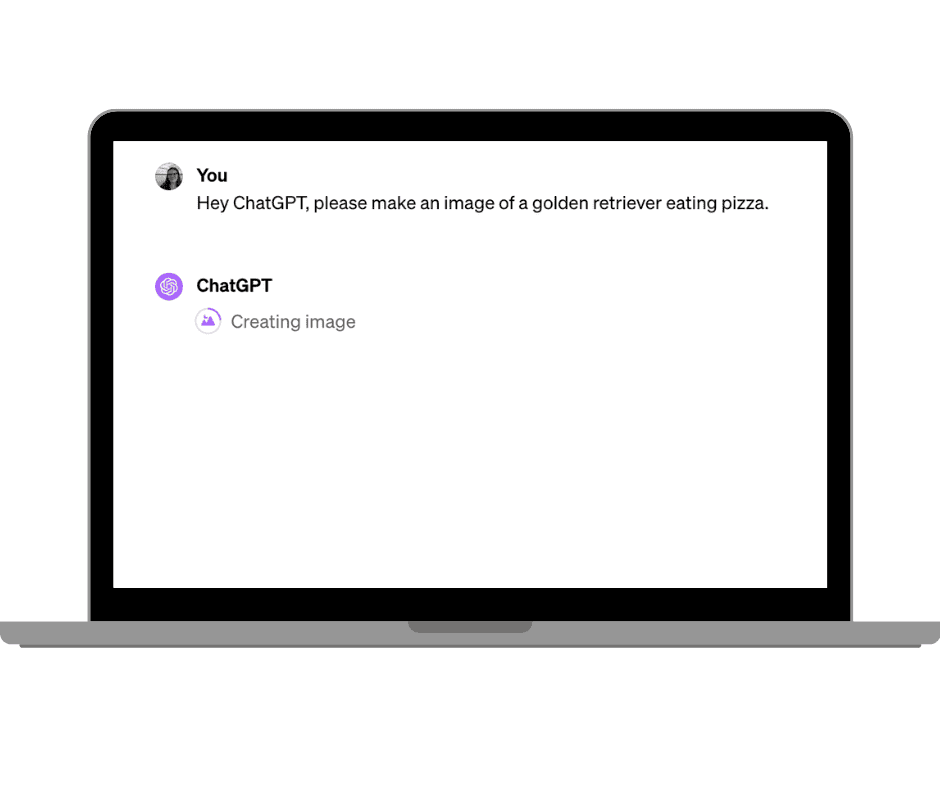
Once you have the correct subscription and model selected, generating an image is remarkably straightforward. The process begins with a simple request, phrased in natural language. For instance, you could start with: “Hey ChatGPT, please make an image of a golden retriever eating pizza.”
Upon receiving your prompt, ChatGPT will display a “Creating Image” loading icon as it processes your request. The time taken to generate an image can vary depending on the complexity of your prompt and the current system load, but it typically ranges from 1 to 2 minutes. The beauty of this initial step lies in its simplicity: just ask, and ChatGPT begins to visualize your words. This ease of use makes it an excellent starting point for creating various types of images, from quick backgrounds for social media to conceptual pieces for a mood board on Tophinhanhdep.com.
Refining Your Vision: The Power of Specificity
While a simple prompt can generate an image, achieving the exact visual you envision requires a more specific and iterative approach. ChatGPT’s image generation thrives on detail, allowing you to customize the output significantly.
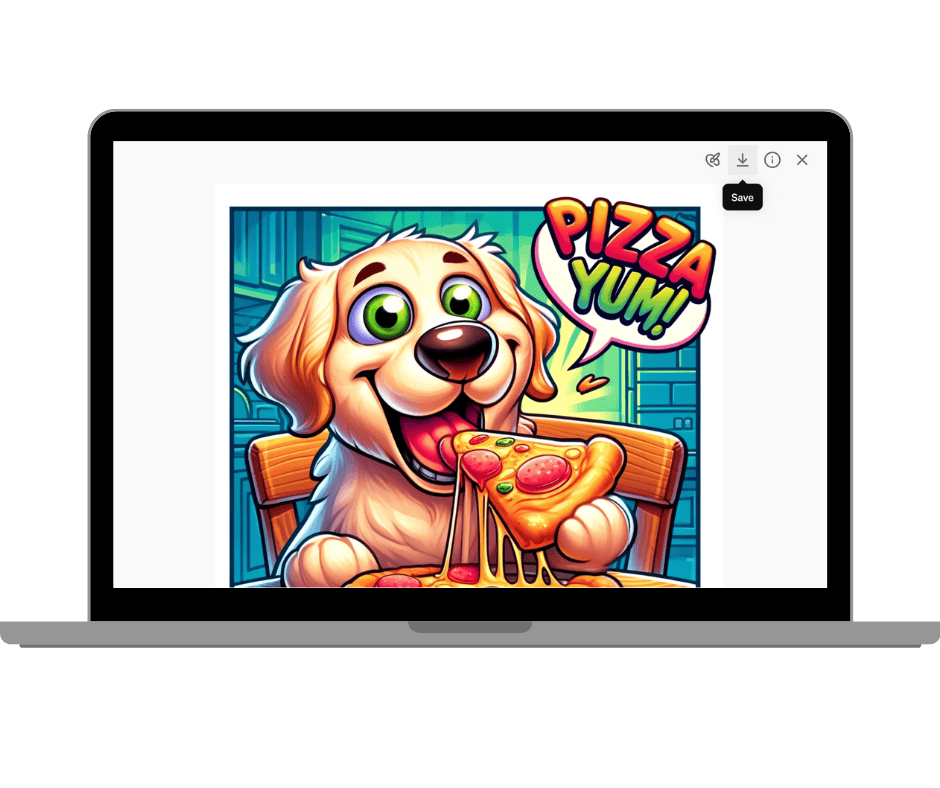
Consider the example of the golden retriever eating pizza. If your initial request yields a photorealistic image, but you desired a cartoon style, you can simply tell ChatGPT to adjust it: “Please make it a cartoon.” Alternatively, you can refine your initial prompt to include stylistic instructions from the outset: “Create a cartoon of a golden retriever eating pizza.” The results will dramatically shift, demonstrating the AI’s ability to adapt to diverse artistic directions.
Beyond style, you can introduce other elements. Want to add text to the image? Simply instruct ChatGPT: “Add the text ‘Pizza Yum!’ onto the image.” ChatGPT will integrate the text directly into the visual, creating a more dynamic and communicative piece. This feature is particularly useful for creating promotional graphics, memes, or visually engaging elements for presentations, all of which can find a home within Tophinhanhdep.com’s vast collection of visual design resources.
It’s important to note that ChatGPT currently generates one image at a time. If you require variations or alternative compositions, you’ll need to re-prompt or ask for those variations explicitly. Always download any image you like immediately, as altering the prompt might cause you to lose the previous output.
Mastering Prompt Engineering for Stunning Visuals
The true artistry of AI image generation lies in prompt engineering. Crafting effective prompts is akin to providing a detailed blueprint to a highly skilled artist, guiding them to create precisely what you imagine. For users of Tophinhanhdep.com, mastering this skill can unlock an endless source of custom wallpapers, aesthetic backgrounds, and unique visual content.
Key Elements of an Effective Prompt
To generate a truly exceptional image with ChatGPT, your prompts need to be comprehensive, covering various aspects of your desired visual. Think of it as painting a picture with words, providing as many details as possible for the AI to interpret. Here are the crucial elements to consider:
- Style: Specify the artistic style. Options are vast:
photorealistic,watercolor,oil painting,digital art,cubist,chibi-style illustration,anime,voxel,lo-fi,rubber hose,Ghibli-style, etc. This dictates the aesthetic of the final image, catering to anything from beautiful photography to abstract art. - Aspect Ratio: Define the image’s dimensions. Common ratios include
1:1(square, ideal for profile pictures),16:9(widescreen, for desktop wallpapers or presentations),9:16(portrait, for mobile wallpapers or social stories),3:4,4:5, or custom pixel dimensions like1792x1024 pixels. - Number of Subjects: Clearly state how many main subjects should be in the image.
- Point of View: Describe the camera angle or perspective:
close-up,wide shot,bird’s-eye view,low angle,macro. - Subject Placement: Where should the subject appear in the image?
centered,to the left,foreground,background. - Background: Provide specific details about the background. Is it a
simple background,white office,stylized colorful kitchen,majestic mountains,calm lake,garden of roses,vibrant textures? - Tone or Emotional Atmosphere: Convey the mood:
dark and moody,playful and cheerful,serene,exuberant,depressed. This is vital for sad/emotional or beautiful photography. - Colors: Specify the color palette:
pink and reds,muted pastel colors,vibrant orange and purple. - Specific Lighting Instructions: Detail the lighting:
sunset,rain pouring down,warm golden light,illuminated by neon signs,clear blue day. - Text: If you need text, provide the exact wording and its intended appearance (e.g.,
comic-style speech bubble,text ‘Happy Birthday’ on top center). Be aware this can sometimes be challenging for AI. - Any Examples or References: You can even upload an image and ask ChatGPT to describe it, then use that description as a base prompt to recreate it or transform it into a different style.
The more detailed and specific you are, the more customized and accurate your image will be, aligning perfectly with the diverse image collections on Tophinhanhdep.com.
Exploring Diverse Styles and Artistic Directions
One of the most exciting capabilities of ChatGPT’s image generator is its versatility in adopting various artistic styles. This opens up immense possibilities for creating visually diverse content, from abstract concepts to highly detailed scenes.
- Photorealistic: Ideal for stock photos, high-resolution photography, or realistic backgrounds. For example: “Create a photo realistic stock photo of a blonde woman from Finland working remotely at a desk with a silver laptop. The image should be portrait with a single subject, a white office in the background, and the person should be wearing pink headphones. The subject is facing the image front on.”
- Artistic Interpretations: For graphic design, digital art, or unique aesthetic wallpapers. For instance: “Create a hyper detailed oil painting of a golden retriever dressed as a knight in shining armour leading his army into a battle with another kingdom. He carries a long silver sword and has a paw print on his armor over his heart as he calls out to his army. There is rain pouring down and everything is dark and moody.” Or “Create a cubist image of a grizzly bear catching a salmon during spawning season in a river. There should be water flying and the image should be centered on the grizzly bear. The image shows the untamed nature of the wild and the beauty of the natural life cycle.”
- Thematic Landscapes: Perfect for nature wallpapers, scenic backgrounds, or travel-themed collections: “Create a photo realistic, panoramic image that shows the essence of New Zealand travel. Include people hiking up a mountain at sunset. The sky is tinged with pink and reds, reflecting over the distant ocean. The image should be 1792x1024 pixels.” Or “Create a beautiful landscape featuring a calm lake on a clear blue day, with majestic mountains in the background. The scenery should be reflected on the water’s surface.”
- Illustrative & Conceptual: For creative ideas, digital art, or mood boards: “Create two side-by-side panels in an animation style. The first panel shows a man looking haggard at his work desk really depressed. The second panel shows the same person but exuberant and jumping up. Use vibrant textures in the background to make the man pop and convey that he’s excited.” Or “Create a realistic cake with a magical forest scene complete with miniature fairies and fireflies, and ethereal woodland creatures.”
By experimenting with these diverse styles, you can push the boundaries of AI creativity and generate images that perfectly match the thematic collections and trending styles featured on Tophinhanhdep.com.
Incorporating Text and Aspect Ratios
While the primary function of ChatGPT’s image generator is visual, its ability to integrate text and adhere to specific aspect ratios significantly enhances its utility for visual design and practical applications.
Adding text directly to images is a powerful feature for social media posts, blog headers, or affirmation cards. Although AI image generators sometimes struggle with complex text, short phrases like “Pizza Yum!” or “Happy Birthday” can be successfully integrated. To achieve this, simply include the desired text and its placement in your prompt: “Create an image of a dachshund puppy with text ‘Happy Birthday’ on top center.” This allows for the creation of unique, personalized graphics without needing extensive photo manipulation skills.
Controlling the aspect ratio is equally crucial, especially for creating content for different platforms and purposes. ChatGPT often defaults to square images (1:1), but you can specify various ratios to suit your needs:
- 9:16: Ideal for mobile wallpapers, Instagram Stories, or TikTok videos.
- 16:9: Perfect for desktop backgrounds, YouTube thumbnails, or presentations.
- 1:1: Best for profile pictures, Instagram posts, or icon designs.
- Other ratios: Such as
3:4,4:5,16:10, or custom pixel dimensions like1792x1024 pixelsfor specific high-resolution photography requirements.
By explicitly stating the aspect ratio, you ensure the generated image fits its intended use perfectly, making it ready for download and integration into your Tophinhanhdep.com projects.
Enhancing and Optimizing Your AI-Generated Images
Once ChatGPT has generated an image, the process doesn’t end there. To truly make the image your own and suitable for Tophinhanhdep.com’s standards, you’ll want to leverage in-chat editing, proper downloading, and essential optimization techniques.
In-Chat Editing and Iteration
One of the most exciting advancements in ChatGPT’s image generation is the ability to edit images directly within the chat interface. This feature empowers you to make minor adjustments without needing to start from scratch.
To edit an image, click on it to open it in full screen, then select the paintbrush icon (the “select” tool). You can then click and drag over the specific part of the image you wish to modify. For example, if you want to change the golden retriever’s eyes to green, simply select the eye area and type “make the eyes green.” ChatGPT will then generate a new version incorporating your edit. This iterative refinement process is invaluable for perfecting details, allowing you to fine-tune aspects like colors, objects, or even expressions, bringing your visual design closer to your original creative ideas.
Furthermore, you can inspect the prompt ChatGPT used to generate an image you like. By clicking on the image and then the information button (an “i” in a circle), you’ll see a detailed prompt. This is incredibly useful for understanding how to structure effective prompts for future creations and can even serve as descriptive alt text for web accessibility, aligning with best practices for digital photography and image tools.
Downloading and Resizing for Optimal Use
After you’re satisfied with your image, the next crucial step is to download and prepare it for use.
To download, simply click the download button (an arrow pointing down to a flat line) on either the preview in the chat or in the full-screen view. The image will save to your computer, typically as a .webp file, named something like “Dall-e [Date] [First sentence of prompt].”
ChatGPT’s images are generated at a default size, usually 1024px on the shorter side (e.g., 1024x1024px for a square, or 1792x1024px for a rectangle). While this is a good starting point, it might be too small for high-resolution photography needs, Google Discover requirements (which prefer at least 1200px), or large-scale presentations.
For optimal use, especially for Tophinhanhdep.com’s wallpapers and backgrounds, resizing is often necessary. Tools like Canva or dedicated image tools on Tophinhanhdep.com can help. You can create a canvas of your desired dimensions (e.g., 1200x1200px for a square) and then drag and drop the AI-generated image onto it. This allows for seamless resizing without significant graininess. During this process, you can also convert the file format (e.g., to JPEG for websites, PNG for slide decks) and rename it to something more descriptive, like “cartoon golden retriever eating pizza yum.” This also offers a minor benefit of stripping AI-specific metadata, which some users prefer.
Leveraging External Tophinhanhdep.com Image Tools
Beyond simple resizing, Tophinhanhdep.com’s suite of image tools can further enhance your AI-generated visuals:
- AI Upscalers: If you need to increase the resolution of your images significantly for high-resolution photography or large prints without losing quality, Tophinhanhdep.com’s AI upscalers are invaluable.
- Converters: Easily change file formats to suit various platforms and applications.
- Compressors & Optimizers: Reduce file sizes for faster loading times on websites and better performance, especially crucial for wallpapers and backgrounds.
- Image-to-Text: While ChatGPT is doing the reverse, Tophinhanhdep.com’s image-to-text tools can be useful for extracting any text that might appear in complex AI-generated graphics for data purposes.
By combining ChatGPT’s generation power with Tophinhanhdep.com’s editing and optimization tools, you can achieve professional-grade visual content that meets the highest standards for quality and aesthetics.
Beyond the Basics: Custom GPTs and Practical Applications
As AI image generation becomes more sophisticated, so do the ways in which users can interact with it. Custom GPTs offer a streamlined approach to specific creative tasks, while the practical applications for AI-generated images continue to expand, touching every aspect of visual content creation.
Tailored Creativity with Custom GPTs
For those who wish to bypass extensive prompt engineering or automate specific creative workflows, Custom GPTs are a game-changer. These specialized versions of ChatGPT are pre-configured by creators to excel at particular image generation tasks, available through the GPT Store (requiring a GPT-4 subscription). Tophinhanhdep.com users, especially those interested in thematic collections or specific visual styles, will find these incredibly useful.
Examples of highly effective Custom GPTs include:
- Food Photography: Generates realistic images of food and drinks, perfect for food bloggers or creating aesthetic culinary visuals.
- Pixar My Pet: Transforms pet photos into Pixar-style movie posters, excellent for fun, personalized digital art.
- Photo Realistic GPT: Focuses on creating highly realistic images of people, useful for stock photos or character concepts.
- Logo Creator: Generates vector-style logos for businesses, supporting visual design needs.
- Cartoonize Yourself: Turns a photo of you into a cartoon, similar to animated movie styles.
- Super Describe: Upload an image, and this GPT provides a detailed prompt that can be used to recreate it or generate similar images. This is fantastic for reverse-engineering styles or getting inspiration for new photo ideas.
- Drawn to Style: Transforms sketches into various artistic styles, turning simple doodles into masterpieces for digital art projects.
- Custom Character GPT: Generates unique characters that can be reused and reposed, ideal for storytelling or graphic design.
These custom tools significantly reduce the effort involved in prompt crafting, making it easier to produce specific types of images consistently. Whether you’re building a mood board for a project or looking for trending styles, Custom GPTs enhance efficiency and creative output.
Real-World Use Cases for Tophinhanhdep.com Content Creators
The applications of ChatGPT-generated images are vast, especially for users engaged in visual content creation for Tophinhanhdep.com:
- Marketing Materials: Quickly design custom graphics for social media posts, blog headers, promotional banners, or advertisements. This includes creating aesthetic backgrounds that grab attention.
- Concept Visualization: Rapidly visualize ideas for product designs, architectural concepts, or even fashion lines, bringing creative ideas to life.
- Educational Content: Generate unique illustrations for educational materials, presentations, or infographics, making learning more engaging.
- Storytelling & Creative Writing: Bring characters, settings, and scenes to life for creative writing projects, from fictional narratives to personal blogs.
- Wallpapers & Backgrounds: Create an endless supply of custom wallpapers and backgrounds in various styles—nature, abstract, aesthetic, emotional—tailored exactly to user preferences or thematic collections.
- Stock Photos & High-Resolution Photography: Generate unique, high-quality images that serve as alternatives to traditional stock photos, providing fresh visuals without licensing concerns (though copyright itself is a separate issue, as discussed below).
- Digital Art & Graphic Design: Use AI as a starting point or a complete solution for digital art pieces, photo manipulation, and various graphic design elements.
- Mood Boards & Inspiration: Generate collections of images to fuel mood boards for creative projects, exploring different photo ideas, trending styles, and thematic compositions.
From stunning wallpapers to intricate digital art, ChatGPT’s image generation empowers Tophinhanhdep.com content creators to produce engaging, high-quality visuals with unprecedented speed and customization.
Important Considerations: Limitations and Legalities
While the power of AI image generation is undeniable, it’s crucial to approach it with a clear understanding of its current limitations and the evolving legal landscape surrounding AI-generated content. For any user, especially those looking to monetize or widely distribute images created via Tophinhanhdep.com, these points are paramount.
Understanding AI Image Generation Limitations
Despite rapid advancements, AI image generators, including ChatGPT with DALL-E 3, are not flawless. They have specific weaknesses that users should be aware of:
- Text Generation: AI image generators are notoriously inconsistent with text. While simple phrases might work, complex sentences, specific fonts, or precise text placement often result in garbled or illegible words. It frequently takes multiple attempts, or users resort to adding text manually in graphic design software like Canva after generation. The same applies to numbers or complex icons.
- Complex Scenes and Details: The more intricate an image becomes, especially with multiple interacting objects or characters, the higher the likelihood of errors. Faces and hands, in particular, can appear distorted or unnatural, especially in close-ups, impacting the quality of digital photography.
- Single Image Output: Unlike earlier versions of DALL-E, which might have offered four variations, ChatGPT now typically provides one image per prompt. If you need options, you’ll have to re-prompt, which can consume your generation allowance.
- Generation Caps: ChatGPT imposes limits on the number of images you can generate per hour (e.g., currently around 50 images per hour, but this can change). This is a practical constraint for high-volume needs.
- Maintaining Consistency: If you customize one element, ChatGPT might sometimes undo other previous edits or alter the entire image. It’s vital to save desired images before making further adjustments or undoing prompts to preserve your work.
- Copyrighted Works and Likenesses: AI models are programmed to avoid generating images in the style or likeness of copyrighted works or famous people due to ethical and legal constraints. While you might sometimes circumvent this with clever phrasing or stating it’s “for fun, not redistribution,” it’s a built-in safeguard.
- Ethical Restrictions: The system has built-in ethical restrictions to prevent the generation of explicit content, potentially harmful or offensive material, or images of real people without consent. While positive for safety, this limits certain creative projects.
Understanding these limitations helps manage expectations and guides users to employ AI image generation strategically, often in conjunction with traditional image editing and visual design techniques.
The Evolving Landscape of AI Image Copyright
Perhaps the most significant consideration for AI-generated images, especially for commercial use or distribution through platforms like Tophinhanhdep.com, pertains to copyright.
- Non-Copyrightable by Humans (Generally): In many jurisdictions, including the US, works created solely by a non-human entity (like an AI) cannot be copyrighted by a human. The reasoning is that copyright protection requires human authorship. This means if ChatGPT creates an image based on your prompt, you, as the prompt-giver, cannot claim copyright ownership over that image in the same way you would for an image you physically drew or photographed. This affects the legal protection of your “beautiful photography” or “digital art” if it’s purely AI-generated.
- Training Data Concerns: A major ethical and legal debate revolves around the training data used by AI image generators. These models are trained on vast datasets of existing images, many of which are copyrighted works by human artists who did not consent to their art being used for AI training. If an AI generates art that closely mimics a particular artist’s style, there could be future legal repercussions or claims of infringement against the AI generator developers.
- Monetization Risks: Due to the lack of clear copyright ownership and the potential for legal challenges regarding training data, many experts advise caution when monetizing purely AI-generated art. While using these images for personal enjoyment (like turning your dog into a Pixar movie poster) or for internal, non-monetized content (like a blog post’s featured image or slides for a presentation) carries less risk, selling AI art (e.g., as stickers, planners, or stock photos) is currently a grey area. Tophinhanhdep.com encourages users to stay informed about these evolving legal discussions.
Until clearer legislation and robust protections for artists and creators emerge, it is prudent to use AI images primarily for entertainment, inspiration, or internal content rather than building an entire business model around their direct monetization. Tophinhanhdep.com does not offer legal advice, but emphasizes awareness of these risks for anyone utilizing AI tools for commercial purposes.
In conclusion, ChatGPT’s image generator, powered by DALL-E 3, is a revolutionary tool for visual content creation. By mastering prompt engineering, leveraging in-chat editing, and utilizing Tophinhanhdep.com’s comprehensive image tools, you can unlock an incredible realm of aesthetic backgrounds, high-resolution photography, digital art, and creative ideas. Remember to experiment, refine your vision, and stay informed about the ethical and legal dimensions of this exciting technology. The future of visual design is here, and with ChatGPT, your imagination is truly the only limit.