How to Optimize Images for Web and Performance
In the digital realm, where visual content reigns supreme, images are the lifeblood of any captivating website. From stunning wallpapers and immersive backgrounds to intricate digital art and beautiful photography showcasing nature or abstract concepts, images draw users in, convey emotions, and breathe life into your online presence. However, the very power that makes images indispensable can also become a significant bottleneck if not managed correctly. Large, unoptimized image files are notorious for slowing down page load times, creating a frustrating user experience, diminishing your search engine rankings, and unnecessarily consuming bandwidth and server resources.
At Tophinhanhdep.com, we understand the delicate balance between visual excellence and peak website performance. Our mission is to empower creators, photographers, and webmasters with the knowledge and tools to ensure their images – whether high-resolution stock photos, aesthetic digital photography, or thematic collections – not only look incredible but also load at lightning speed. This comprehensive guide will delve into the essential techniques, strategies, and tools available, guiding you through the process of optimizing your images for the web without compromising their intrinsic beauty or impact.

The Imperative of Image Optimization for Modern Websites
In today’s fast-paced digital landscape, user attention spans are fleeting, and website speed is paramount. Studies consistently show that even a one-second delay in page load time can lead to a significant drop in page views, lower customer satisfaction, and a higher bounce rate. Images, while crucial for visual engagement and conveying complex ideas far more effectively than text, often represent the largest portion of a webpage’s total weight. This makes image optimization not just a best practice, but a critical component of successful website management.
Understanding Image Optimization: Speed, UX, and SEO
Image optimization is the strategic process of reducing image file sizes while maintaining an acceptable level of visual quality. This involves a combination of techniques, from choosing the correct file format and compression type to resizing and leveraging modern web technologies. The benefits extend across several key areas:
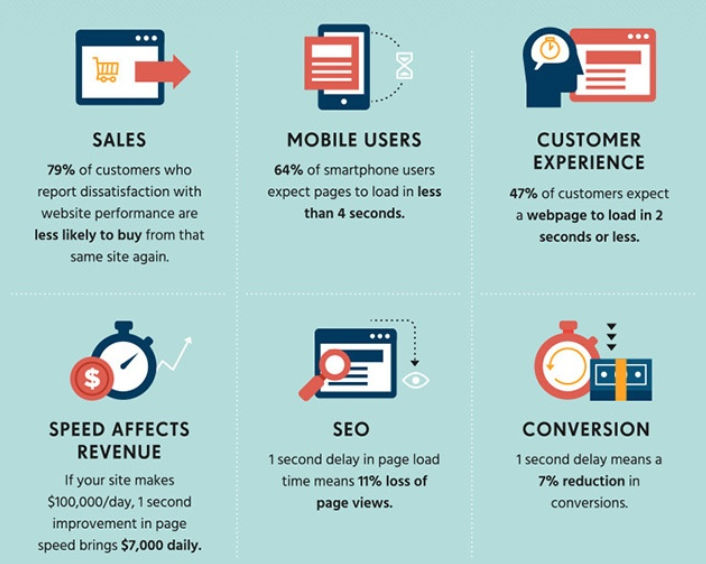
- Faster Loading Speeds: This is the most direct and impactful benefit. Smaller image files mean less data needs to be transferred, resulting in quicker page renders and a more responsive website. For websites rich in visual content, such as those featuring extensive wallpaper collections or high-resolution nature photography, optimizing images can drastically cut down load times.
- Improved User Experience (UX): A fast-loading site is a pleasure to navigate. Visitors are more likely to stay engaged, explore more pages, and convert into loyal users or customers. Conversely, slow sites lead to frustration and abandonment, impacting key metrics like bounce rate and time on site.
- Better Search Engine Optimization (SEO) Rankings: Search engines like Google prioritize fast-loading websites, incorporating page speed as a ranking factor. Optimized images contribute directly to a faster site, indirectly boosting your visibility in search engine results. Furthermore, Google can crawl and index your images more efficiently for image search, a valuable source of traffic, especially for sites dedicated to visual content like Tophinhanhdep.com.
- Reduced Bandwidth and Storage Costs: Smaller image files consume less server storage and bandwidth. This is particularly beneficial for large websites with vast collections of images, such as those offering thousands of backgrounds or stock photos, leading to cost savings and more efficient resource utilization.
- Enhanced Mobile-Friendliness: With a growing majority of users accessing the internet via mobile devices, responsive and fast-loading websites are non-negotiable. Optimized images ensure your site performs equally well on smaller screens and varying network conditions.
The Critical Role of Images in Web Performance
Images, on average, account for a substantial percentage of a webpage’s total weight – often more than scripts and fonts combined. This makes them the primary target for optimization efforts after video content. Many website owners, despite recognizing the visual appeal of high-resolution digital photography or intricate digital art, overlook the impact of unoptimized images on their site’s overall health. A proper image optimization workflow is surprisingly easy to implement, yet its potential for performance gains is immense. For platforms like Tophinhanhdep.com, where images are the core product, this workflow is not just a recommendation but a foundational necessity.
Mastering Image Formats and Compression
The journey to perfectly optimized images begins with understanding the fundamental differences between image file formats and the types of compression they employ. By making informed choices here, you can achieve significant reductions in file size while preserving the visual integrity of your beautiful photography or graphic design elements.
Choosing the Right Image File Format for Every Visual
Different image formats are designed for different purposes, offering varying compromises between quality, file size, and feature support (like transparency or animation). Selecting the optimal format for each image is a crucial first step.
- JPEG (Joint Photographic Experts Group): The workhorse for web images, JPEG is ideal for photographs, complex images with gradients, and images with a rich spectrum of colors, such as nature photography, landscapes, or aesthetic wallpapers. It offers excellent compression for these types of visuals, allowing you to fine-tune the quality level for a good balance between fidelity and file size. However, it’s generally not suitable for images requiring transparency or crisp lines.
- PNG (Portable Network Graphics): PNG excels where transparency is needed, making it perfect for logos, icons, illustrations, and images with sharp edges or areas of solid color, common in abstract art or graphic design. It typically produces higher-quality images than JPEG, especially for graphics, but often results in larger file sizes. PNG supports both lossless and lossy compression, though it was originally designed as a lossless format.
- GIF (Graphics Interchange Format): Limited to 256 colors, GIF is primarily used for simple animations. For static images, its constrained color palette makes it less ideal than JPEG or PNG, often leading to larger files for comparable visual quality. GIF only uses lossless compression.
- WebP: Developed by Google, WebP is a modern image format that provides superior compression compared to JPEG and PNG, resulting in significantly smaller file sizes with comparable quality. It supports both lossy and lossless compression, as well as transparency and animation. WebP is widely supported by modern browsers and should be used whenever possible for maximum performance gains, especially for high-resolution images or backgrounds. Tophinhanhdep.com recommends converting images to WebP using our suite of image tools whenever feasible.
- AVIF: An even newer format, AVIF offers exceptional compression and quality, often outperforming WebP. While browser support is growing, it’s not yet as universal as WebP. For cutting-edge performance, Tophinhanhdep.com’s optimizers can help you explore AVIF when appropriate.
- SVG (Scalable Vector Graphics): Unlike raster images (JPEG, PNG, GIF, WebP), SVGs are vector-based. This means they are resolution-independent and can be scaled to any size without losing quality, making them perfect for logos, icons, text, and simple illustrations (visual design elements). SVGs are typically small in file size and are indexed by search engines, offering both performance and SEO advantages.
For general photos and screenshots, JPG remains a strong choice. For high detail and transparency, PNG is preferred. For animation, GIF is the go-to. But for optimal performance across the board, Tophinhanhdep.com’s image tools encourage the adoption of WebP and AVIF.
Navigating Lossy vs. Lossless Compression
Once you’ve selected your file format, the next consideration is the type of compression:
- Lossy Compression: This method intelligently discards some of the image data deemed less critical to visual perception. While it degrades the image quality to some extent, it can achieve substantial reductions in file size – often by as much as 5 to 10 times for a negligible perceived quality loss. Lossy compression is excellent for photographs and complex visuals where some data can be safely removed without making the image “ugly.” Tools within Tophinhanhdep.com’s Image Tools, or external image editors, allow you to control the degree of lossy compression.
- Lossless Compression: This technique compresses the image data without eliminating any information. The image quality remains perfectly intact, but the file size reduction is generally less dramatic than with lossy compression. Lossless compression is best suited for graphics, logos, or images where every pixel is critical and no degradation is acceptable.
The key is to experiment. Many of Tophinhanhdep.com’s optimizers and image compressors offer various compression levels, allowing you to find the sweet spot for each image or image type. For instance, a high-resolution wallpaper might benefit from aggressive lossy compression, while an intricate graphic design element might require lossless treatment.
The Balance Between Quality and File Size
Finding the perfect equilibrium between the lowest possible file size and acceptable visual quality is the primary goal of image optimization. Too much compression (especially lossy) can result in a blurry, pixelated, or artifact-ridden image that detracts from your site’s aesthetic. Too little, and your pages will load slowly.
Consider a beautiful photograph from a nature collection. An uncompressed version might be several megabytes. Aggressive lossy compression could reduce it to tens of kilobytes, but at the cost of noticeable degradation. A medium compression rate, however, could shrink the file to a few hundred kilobytes, offering a visually pleasing result that loads quickly. Tophinhanhdep.com provides image tools designed to help you preview these changes, ensuring your beautiful photography retains its appeal while optimizing its performance. Aim to keep typical image file sizes under 100-150 KB for optimal web performance, particularly for standard visuals like aesthetic backgrounds or inspiring photo ideas.
Essential Techniques for On-Page Image Efficiency
Beyond choosing the right format and compression, several crucial techniques ensure your images are delivered efficiently and displayed optimally across all devices.
Resizing Images to Scale for Optimal Display
Historically, it was vital to upload images at their exact display dimensions to avoid browsers resizing them with CSS, which could lead to blurry images and unnecessary processing. While modern content management systems like WordPress now handle responsive images automatically (creating multiple sizes and serving the most appropriate one via srcset attributes), it’s still a best practice to initially resize images to a reasonable maximum.
For example, if your website’s main content column is 1200 pixels wide, uploading an image that is 4000 pixels wide is excessive. You can use Tophinhanhdep.com’s image optimizers or a desktop photo editing tool (like GIMP, Paint.NET, or Affinity Photo) to scale down your high-resolution digital photography before uploading. This preliminary resizing reduces the original file size, saving server space and initial processing time. For high-resolution displays (HiDPI), aiming for 2x or 3x the column size (e.g., 2400px or 3600px for a 1200px column) can provide sharp visuals without retaining excessively large originals.
Implementing Responsive Images for All Devices
Modern web development automatically handles responsive images, thanks to attributes like srcset and sizes. When you upload an image to your media library, Tophinhanhdep.com’s integrated image handling (or your CMS) can generate multiple versions of that image at different resolutions. The srcset attribute then informs the browser about these available sizes, allowing it to download the most appropriate version based on the user’s device, screen resolution, and viewport size. This means a mobile user on a small screen won’t download the massive image intended for a desktop monitor, significantly improving their experience.
Leveraging Lazy Loading for Initial Page Speed
Lazy loading is an essential technique for improving initial page load times, especially for content-rich pages featuring many images (e.g., thematic collections or mood boards). Instead of loading all images simultaneously when a page loads, lazy loading defers the loading of images until they are about to enter the user’s viewport.
This means images “below the fold” (not immediately visible on screen) are only loaded as the user scrolls down. This dramatically reduces the initial data transfer and rendering time, making the page feel much faster. Modern web browsers support native lazy loading by adding loading="lazy" to <img> tags, and Tophinhanhdep.com’s image optimization features or recommended plugins can automate this process.
Advanced Strategies and Tools for Image Management
Optimizing images goes beyond basic compression; it involves a holistic approach that leverages advanced technologies and workflows. Tophinhanhdep.com offers a suite of image tools and insights into practices that can further enhance your site’s visual performance.
Optimizing Metadata and Accessibility for Search Engines
Image optimization isn’t just about file size; it’s also about discoverability and accessibility. Thoughtful use of image metadata can significantly boost your SEO and improve the user experience, particularly for visually impaired users.
- Descriptive File Names: Before uploading, rename generic file names like
IMG_001.jpgto descriptive, keyword-rich names such asmajestic-mountain-wallpaper.webporabstract-geometric-background.png. This helps search engines understand the image content, contributing to better rankings in both web and image searches. - Alt Text (Alternative Text): This is perhaps the most crucial metadata for images. Alt text provides a textual description of an image, which is read by screen readers for visually impaired users and displayed when an image fails to load. Search engines also use alt text to understand image context. Ensure your alt text is concise, descriptive, and incorporates relevant keywords related to your image (e.g., “High-resolution photograph of a serene forest during autumn,” or “Digital art piece featuring sad and emotional tones”).
- Title Attributes: While less critical for SEO than alt text, title attributes provide additional context that appears as a tooltip when a user hovers over an image. Use them sparingly for further detail where appropriate.
By optimizing these elements, you not only improve your site’s SEO but also enhance its accessibility, a key aspect of good visual design and web development.
Harnessing the Power of Content Delivery Networks (CDNs)
A Content Delivery Network (CDN) is a geographically distributed network of proxy servers that cache your website’s static content, including images. When a user requests an image, the CDN serves it from the server closest to their location. This significantly reduces latency and load times, ensuring your wallpapers, backgrounds, and high-resolution photography are delivered at lightning speed to visitors across the globe.
Many premium web hosts and optimization services offer CDN integration. Tophinhanhdep.com’s recommended hosting solutions often include CDN services, providing real-time image optimization by intelligently serving images from the nearest cached server and even detecting device types to deliver appropriately sized and formatted visuals.
Exploring Image Optimization Tools and Plugins by Tophinhanhdep.com
While manual optimization in photo editing software (like saving “for web” in tools you already use for digital photography or photo manipulation) offers precise control, automated tools and plugins can streamline the process, especially for large image libraries or ongoing content creation. Tophinhanhdep.com offers and recommends a variety of tools:
- Online Image Compressors and Converters: For quick, on-the-fly optimization, our suite of online image tools includes powerful compressors and converters that handle various formats (JPEG, PNG, WebP, etc.). These tools allow you to drag-and-drop images, adjust compression settings, and download optimized files, often reducing file sizes by significant percentages without visible quality loss. They are ideal for individual images or small batches, perfect for refining stock photos or personal aesthetic captures.
- Image Optimizers with AI Upscalers: For those dealing with lower-resolution images or wanting to enhance existing visuals, Tophinhanhdep.com also points to and integrates with AI upscalers. These advanced tools can intelligently increase the resolution of images, providing clearer, crisper visuals without pixelation, which is especially useful for older wallpapers or backgrounds.
- WordPress Plugins (for CMS users): For users managing websites on platforms like WordPress, Tophinhanhdep.com recommends exploring plugins that automate image optimization upon upload and can bulk-optimize existing media libraries. The best plugins perform optimization on external servers, minimizing the load on your own website. They offer features like:
- Automatic Compression: Compressing new images as they are uploaded.
- Bulk Optimization: Optimizing existing images in your media library.
- Lossy/Lossless Options: Giving you control over the compression type.
- WebP Conversion: Automatically converting images to the more efficient WebP format where supported by browsers.
- Image Resizing: Setting maximum dimensions to prevent oversized uploads.
The key message from Tophinhanhdep.com is not to rely solely on plugins for radical transformations. Instead, aim for a workflow where you perform initial resizing and, if necessary, basic compression in an image editor before uploading. Then, let a plugin or Tophinhanhdep.com’s advanced tools take it further, ensuring every image from your beautiful photography collections to abstract digital art is perfectly primed for the web.
Tophinhanhdep.com’s Comprehensive Approach to Visual Excellence
At Tophinhanhdep.com, we believe that optimizing images for performance shouldn’t come at the expense of creative expression or visual quality. Our platform is a comprehensive hub designed to support every aspect of your visual journey, from finding inspiration to perfecting your final output.
Beyond Optimization: Discovering High-Resolution Photography and Digital Art
We curate extensive collections of high-resolution images, including stunning wallpapers, diverse backgrounds, and inspiring thematic collections. Whether you’re searching for serene nature photography, captivating abstract art, aesthetically pleasing visuals, or emotionally resonant imagery, Tophinhanhdep.com offers a treasure trove of content. We understand that these images, by their very nature, start as large, pristine files, and our guidance on optimization ensures they can be shared and enjoyed across the web without hindrance. We encourage exploring our vast libraries for your next creative idea, knowing you have the resources to optimize them for any digital canvas.
Image Tools for Every Creative Need: From Converters to AI Upscalers
Our commitment to visual excellence extends to providing accessible and effective image tools. Tophinhanhdep.com’s suite of image tools goes beyond basic compression and includes:
- Converters: Easily switch between formats like JPG, PNG, WebP, and more, ensuring compatibility and optimal performance.
- Compressors & Optimizers: Fine-tune the balance between file size and quality with intuitive controls.
- AI Upscalers: Breathe new life into older, smaller images, transforming them into high-resolution assets suitable for modern displays.
- Image-to-Text: Explore innovative applications for your visuals, bridging the gap between images and searchable content.
These tools are designed for everyone, from graphic design professionals refining digital art to hobbyists optimizing personal photo ideas.
Cultivating Visual Inspiration with Thematic Collections and Mood Boards
Tophinhanhdep.com isn’t just about technical optimization; it’s about fostering creativity. Our platform offers curated image inspiration, mood boards, and trending styles to spark your next project. Whether you’re looking for backgrounds that evoke a certain feeling, wallpapers that set a mood, or photo ideas to guide your next digital photography session, our collections are designed to ignite your imagination. When you find that perfect image, our optimization guidance and tools ensure you can integrate it seamlessly into your visual design, achieving both aesthetic appeal and peak performance.
In conclusion, mastering image optimization is a non-negotiable skill for anyone operating in the digital space. By understanding file formats, compression techniques, and leveraging both manual and automated tools, you can transform your website into a fast, user-friendly, and SEO-friendly platform. Tophinhanhdep.com stands as your dedicated partner in this endeavor, providing not only the finest high-resolution images, compelling photography, and inspiring digital art but also the essential knowledge and image tools to make them shine online. Embrace these best practices, and watch your website’s performance, user engagement, and visual impact soar.