How to Search by an Image on Google: Unlock the Power of Visual Discovery with Tophinhanhdep.com

In an increasingly visual world, images are more than just pixels on a screen; they are sources of inspiration, information, and connection. For enthusiasts of stunning visuals, high-quality photography, and creative design, the ability to navigate this rich landscape is paramount. Tophinhanhdep.com is dedicated to providing a treasure trove of captivating visual content, from breathtaking wallpapers and aesthetic backgrounds to insightful photography guides and innovative image tools. To truly master the art of visual discovery and make the most of what Tophinhanhdep.com offers, understanding how to search by an image on Google is an indispensable skill.
Imagine encountering a mesmerizing nature photograph, an intriguing piece of abstract art, or a striking aesthetic wallpaper online. Your curiosity is piqued: Where did it come from? Who is the photographer? Are there similar images? Is a higher resolution available? This powerful search method, often called reverse image search, allows you to use an image itself as your query, unveiling a wealth of related information that traditional text-based searches simply cannot provide. It’s a gateway to uncovering backstories, verifying authenticity, discovering related visual content, and enhancing your creative workflow—all essential aspects for any visitor to Tophinhanhdep.com.
This comprehensive guide will delve into the various techniques for performing a Google reverse image search across different devices, demonstrating how this functionality can be a game-changer for anyone passionate about images, photography, and visual design. We’ll explore how to leverage this tool to find more beautiful photography, explore thematic collections, identify digital art, ensure the quality of stock photos, and even inspire your next creative project, seamlessly integrating with the core offerings and interests of the Tophinhanhdep.com community.
The Essentials of Google Reverse Image Search: A Visual Navigator
At its core, Google reverse image search is a specialized function that allows you to initiate a search query using an image rather than text keywords. Instead of describing what you’re looking for with words, you provide Google with an image, and it returns a list of websites where that image appears, visually similar images, and often, contextual information about the image itself. For a platform like Tophinhanhdep.com, which thrives on visual content, this capability transforms how users discover, interact with, and understand images.
The results of a reverse image search are incredibly diverse and useful. You might find different sizes of the same image, discover the original source or creator, identify objects or subjects within the image (like a specific flower in a nature shot or a particular style of abstract art), or even locate instances where the image has been used or repurposed online. This makes it an invaluable asset for anyone exploring Tophinhanhdep.com’s extensive collections of images, be it for personal enjoyment or professional creative endeavors.
Why Reverse Image Search Matters for Visual Enthusiasts
For the Tophinhanhdep.com community, reverse image search isn’t just a technical trick; it’s a vital tool that enhances every aspect of visual engagement. Its applications span across the entire spectrum of our website’s main topics:
-
Images (Wallpapers, Backgrounds, Aesthetic, Nature, Abstract, Sad/Emotional, Beautiful Photography): Have you ever stumbled upon a stunning nature wallpaper or an aesthetic background on a random site and wondered where to find more like it? Reverse image search allows you to trace that image back to its source, potentially leading you to the original photographer or a curated collection on Tophinhanhdep.com featuring similar themes or styles. It helps in discovering higher-resolution versions of beautiful photography for your desktop or mobile devices, ensuring you always have the best quality. For abstract or sad/emotional images, it can help uncover the artist’s portfolio or thematic collections that resonate with your mood, all within or discoverable via Tophinhanhdep.com.
-
Photography (High Resolution, Stock Photos, Digital Photography, Editing Styles): For photographers, or those appreciating digital photography, reverse image search is a powerful verification tool. It helps you check if your high-resolution photographs or stock photos are being used without proper attribution. You can monitor the online presence of your digital photography, identify potential copyright infringements, or simply see how your work is being received. For enthusiasts, it’s a way to identify the editing styles of renowned photographers or learn more about the techniques behind a captivating shot, further enriching your understanding of the craft.
-
Visual Design (Graphic Design, Digital Art, Photo Manipulation, Creative Ideas): In the realm of visual design, this tool is a catalyst for creative ideas. If you encounter a unique graphic design element or a compelling example of digital art or photo manipulation, a reverse search can lead you to the artist’s portfolio, tutorials on similar techniques, or even open up new avenues for inspiration. It helps designers identify specific visual motifs, color palettes, or compositional structures that can inform their next project, expanding their creative horizons with content from Tophinhanhdep.com’s visual design sections.
-
Image Inspiration & Collections (Photo Ideas, Mood Boards, Thematic Collections, Trending Styles): This is where reverse image search truly shines for inspiration. By searching with an image that sparks your interest, you can discover entire thematic collections, uncover trending styles, and gather photo ideas for your mood boards. Whether you’re curating visuals for a personal project or seeking a specific aesthetic, this method helps you quickly locate a multitude of related images, fostering a rich environment for visual exploration and creativity.
Core Methods for Desktop Users
Performing a reverse image search on a desktop computer is a straightforward process, primarily leveraging Google Images and Chrome’s integrated features. Tophinhanhdep.com users can easily employ these methods to enhance their visual searches.
-
Using Google Images Directly:
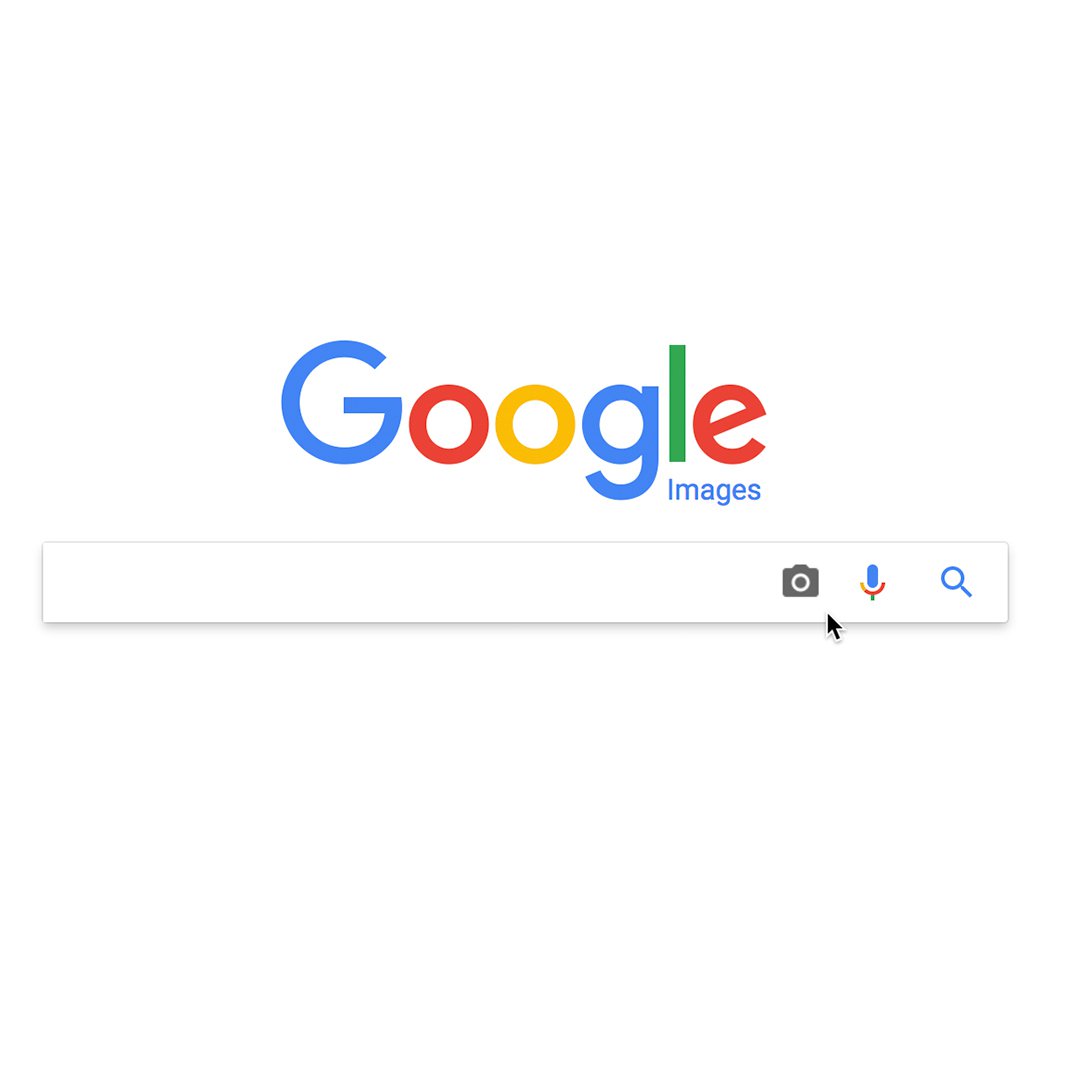
- Navigate to images.google.com in your web browser (Chrome, Firefox, Safari, Edge, etc.).
- On the right side of the search bar, you’ll see a camera icon (representing Google Lens). Click on it.
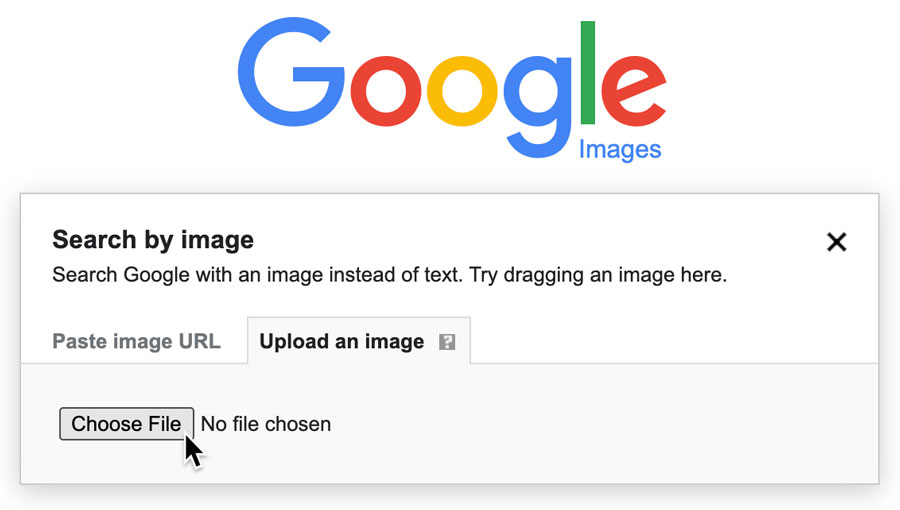
- The “Search by image” box will appear, offering two primary ways to provide your image:
- Paste image link: If the image you want to search is already online, right-click on it (on its webpage) and select “Copy image address” (or “Copy image URL,” wording may vary by browser). Then, paste this URL into the designated field in Google Images and click “Search.”
- Upload an image: If the image is saved on your computer, click “Upload a file,” then “Choose file,” and browse your computer to select the image. Alternatively, you can simply drag and drop the image file directly into the “Drag an image here” box.
- Once the image is uploaded or the URL is pasted, Google will process it and display the search results.
-
Right-Click Search in Google Chrome:
- If you are browsing the web using Google Chrome, this method offers the quickest way to initiate a reverse image search.
- When you encounter an image on a webpage that you wish to search, simply right-click on the image.
- From the context menu that appears, select “Search image with Google Lens” or “Search Google for this image.”
- A new panel will typically open on the right side of your browser, displaying the search results without requiring you to navigate away from the current page. This feature is particularly useful for Tophinhanhdep.com users who are constantly discovering new visual content and want to quickly find more details or similar images.
- Pro Tip: You can also right-click on a blank area of a webpage in Chrome, select “Search image with Google Lens,” and then draw a box around any visible image on that page to initiate a search, even if it’s not directly clickable.
The search results page will present you with several key pieces of information:
- Visually similar images: This is a goldmine for Tophinhanhdep.com users seeking image inspiration and collections. It will display other images that share visual characteristics with your query image, helping you explore thematic collections or trending styles.
- Sites that contain the image: This section helps you identify the original source, verify the authenticity of a beautiful photography piece, or see where a specific wallpaper has been published online.
- Related keywords: Google often suggests keywords that might lead to similar results through text searches, further broadening your discovery possibilities.
Expanding Your Visual Horizons: Reverse Search on Mobile Devices
The convenience of mobile devices means that much of our visual discovery happens on the go. Whether you’re scrolling through social media, capturing moments with your phone camera, or simply browsing Tophinhanhdep.com on your tablet, the ability to perform a reverse image search from your handheld device is incredibly powerful. It allows for immediate gratification when curiosity strikes, perfect for identifying that striking aesthetic background you just saw or finding more high-resolution photography.
Leveraging Google Lens for On-the-Go Image Discovery
Google Lens is Google’s AI-powered recognition technology, deeply integrated into the Google app and Chrome browser on mobile. It’s designed to understand what’s in an image and provide relevant information, making it the primary tool for mobile reverse image search.
-
Searching with a Web Image (via Google Chrome or Google App):
- In Google Chrome (Android, iPhone, iPad): When you encounter an image on a website that you wish to search, long-press your finger on the image for a second or two. A pop-up menu will appear. Select “Search Image with Google Lens” (on Android) or “Search Google for This Image” (on iPhone/iPad). The results will appear, providing information, shopping links (if applicable for products in Tophinhanhdep.com’s aesthetic collections), and visually similar images.
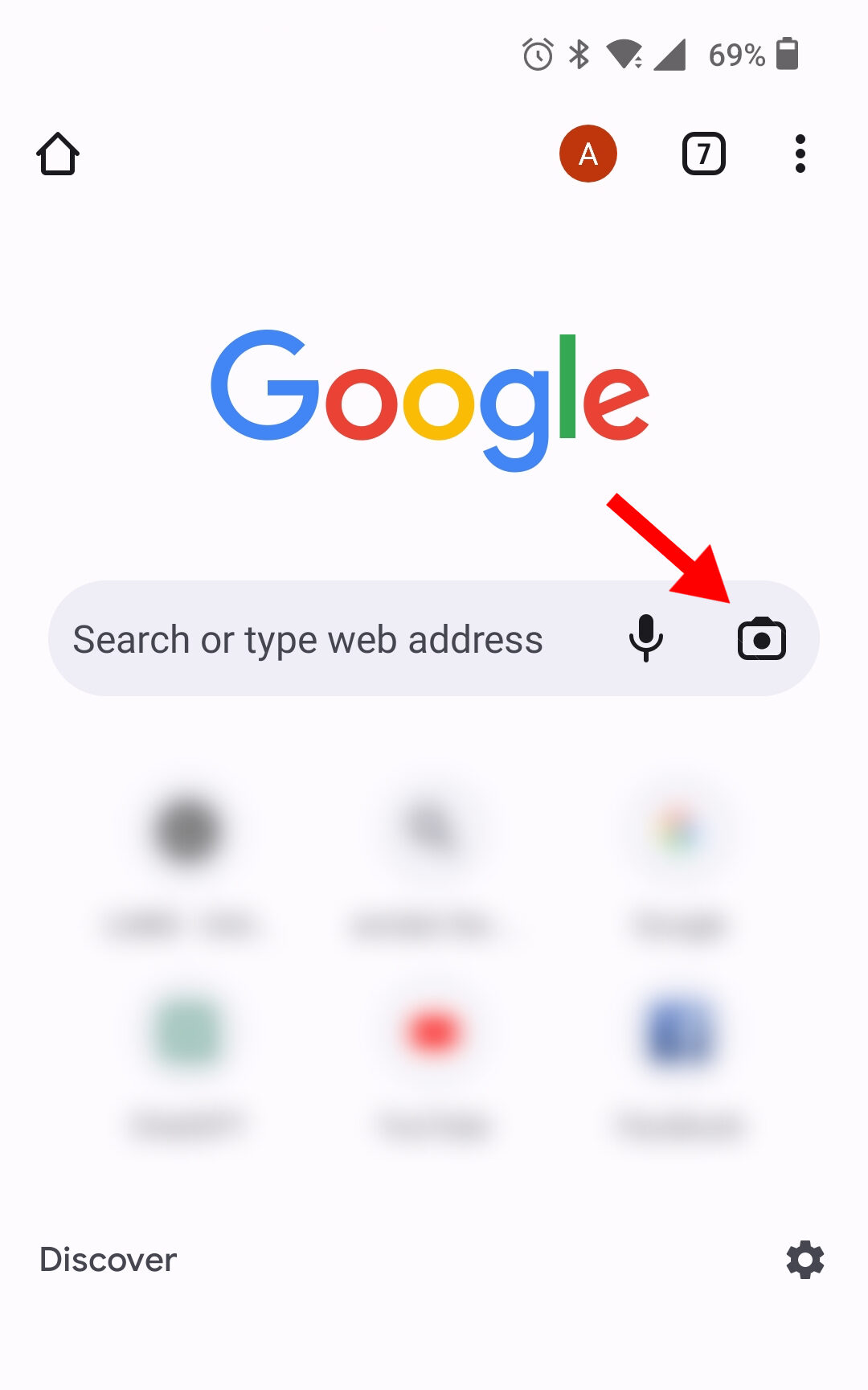
- In the Google App (Android, iPhone, iPad): Open the Google app. On iPhones and iPads, tap the camera icon in the search bar at the top of the page. On Android, tap “Discover” at the bottom, then the camera icon. From there, you can either:
- Select an image from your gallery: Tap on any image saved on your phone or tablet to initiate the search. This is fantastic for images you’ve downloaded from Tophinhanhdep.com or captured yourself and want to learn more about.
- Use your camera directly: Tap “Search with your camera” (or similar wording) and point your device’s camera at an object, a piece of digital art, a nature scene, or even a printed photograph. Google Lens will analyze what it sees and provide instant results, connecting real-world observations to the vast visual library online, potentially leading you back to Tophinhanhdep.com for related content.
-
Searching Images from Search Results:
- Even if you start with a text search on your mobile device, you can quickly pivot to a reverse image search. Open the Google app and type a keyword (e.g., “abstract wallpapers”).
- Once the search results load, tap the “Images” tab to view only image results.
- Tap on any image in the results that interests you. You’ll then usually see a Google Lens camera icon in the bottom-left corner of the selected image. Tap this icon to perform a reverse image search on that specific image, allowing you to find its origin, similar aesthetic backgrounds, or other thematic collections.
Mobile reverse image search, particularly with Google Lens, goes beyond mere identification. It offers functionalities like:
- Object identification: Tap on specific objects within an image (e.g., a piece of furniture in a photo manipulation, a type of bird in a nature photo) to get information or find shopping links. This is incredibly useful for finding similar visual elements for your graphic design projects or discovering details about beautiful photography.
- Text recognition (Image-to-Text): If an image contains text, Google Lens can extract and translate it, bridging the gap between visual and textual information, a powerful feature for referencing digital art or photography with embedded captions.
- Visual matches: The system excels at finding visually similar images, which is paramount for Tophinhanhdep.com users looking to expand their mood boards, discover new photo ideas, or find variations of their favorite abstract or sad/emotional images.
By mastering mobile reverse image search, you transform your smartphone into a powerful visual discovery tool, allowing you to explore Tophinhanhdep.com’s diverse offerings with unprecedented ease and depth, regardless of your location.
Advanced Applications for Tophinhanhdep.com Users: Beyond Simple Search
While finding the source of a cool wallpaper or discovering similar aesthetic backgrounds is valuable, Google reverse image search offers much deeper functionalities that align perfectly with the diverse interests of Tophinhanhdep.com’s audience. These advanced applications empower users to leverage image search not just for discovery, but for verification, quality enhancement, and creative ideation.
Fact-Checking and Image Verification for Digital Photography and Art
In an era of ubiquitous digital content, verifying the authenticity and origin of images is more important than ever. For users interested in high-resolution photography, stock photos, or digital art, reverse image search is an essential tool for fact-checking and preventing misinformation or misattribution.
-
Verifying Image Origin and Usage:
- Photojournalism and Research: If you encounter a compelling (or controversial) image, especially one related to “sad/emotional” themes or critical digital photography, a reverse search can reveal where and when the image first appeared online. This helps establish context and verify its authenticity. By seeing its publication history, you can discern if an image is being used accurately or if it’s an older photo repurposed for a new narrative. Tophinhanhdep.com emphasizes genuine beautiful photography, and this tool helps maintain that standard.
- Identifying Manipulated Content: For those interested in “photo manipulation” and “digital art,” it’s crucial to distinguish between genuine artistic expression and misleading alterations. A reverse search can sometimes expose manipulated images by leading you to the original, unedited version, or by showing different contexts in which the image has been used. This helps Tophinhanhdep.com users appreciate the art form while remaining critically aware.
- Combating Plagiarism: Photographers sharing their high-resolution work or digital artists showcasing their creations often face the challenge of unauthorized use. Reverse image search allows creators and their supporters to track where an image has been published, identifying potential plagiarism or instances where proper credit has not been given. This protects intellectual property and promotes ethical sharing of “stock photos” and original “digital photography.”
-
Using Time Filters for Historical Context:
- Google’s search tools often allow you to filter results by time. After performing a reverse image search, look for “Tools” or “Filter” options, which may include a “Time” or “Date” drop-down menu. Selecting a custom range or pre-defined period (e.g., “Past 24 hours,” “Past year”) can help you pinpoint the earliest known publication of an image. This historical context is invaluable for researchers, journalists, or anyone trying to understand the full journey of a significant “beautiful photography” piece or a widely-shared “aesthetic” image.
Integrating Reverse Search with Image Tools and Creative Ideas
Tophinhanhdep.com isn’t just about viewing images; it’s about empowering users with tools and inspiration to create and enhance their own visual content. Reverse image search plays a pivotal role in bridging discovery with practical application, especially when combined with our “Image Tools” and “Visual Design” sections.
-
Finding Higher-Resolution Images for Quality Enhancement:
- You find a captivating “nature wallpaper” or an “abstract background” online, but it’s too low-resolution for your needs. A reverse image search is often the best way to find a higher-quality version. The search results may directly link to pages offering “high-resolution” copies, or even to the original photographer’s site where the image is available as a “stock photo.” If a higher resolution isn’t immediately found, Tophinhanhdep.com’s “AI Upscalers” can take the discovered image and enhance its quality, ensuring your backgrounds and wallpapers are always crisp and clear. This directly leverages our “Image Tools” to improve your experience with “Images.”
-
Sparking Creative Ideas for Graphic Design and Digital Art:
- For “graphic design” and “digital art” enthusiasts, inspiration often comes from seeing what others have created. If a particular composition, color scheme, or artistic style in an image catches your eye, a reverse search can lead to similar works, artists, or even tutorials that break down the techniques. This process fuels “creative ideas” and helps build rich “mood boards.” You might discover an artist whose “photo manipulation” style perfectly complements your vision, or a “thematic collection” of abstract art that provides a starting point for your next digital painting. Tophinhanhdep.com’s curated collections and articles on “trending styles” can then provide further guidance.
-
Discovering Thematic Collections and Trending Styles:
- Reverse image search is a dynamic way to explore “image inspiration & collections.” If you have an example of a “trending style” (e.g., a specific minimalist aesthetic or a vibrant color palette), searching with that image can uncover other images that adhere to the same trend. This helps users quickly immerse themselves in new visual movements, find diverse “photo ideas,” and expand their curated “thematic collections” for personal or professional use. It’s an organic way to stay updated with the ever-evolving world of “digital photography” and “visual design.”
By integrating reverse image search into their workflow, Tophinhanhdep.com users can transform a simple visual into a powerful query, unlocking deeper insights, enhancing image quality, and fueling their creative pursuits. It’s more than just finding an image; it’s about understanding its story, maximizing its potential, and drawing endless inspiration.
Conclusion: Empowering Your Visual Journey with Tophinhanhdep.com
In today’s visually-driven digital landscape, the ability to effectively search and understand images is no longer a niche skill but a fundamental aspect of online literacy. For the community thriving on Tophinhanhdep.com—a hub for captivating images, inspiring photography, and innovative visual design—mastering Google’s reverse image search is an invaluable asset. It transforms passive viewing into active discovery, allowing you to delve deeper into the stories behind the pixels and unlock a universe of related content.
From discovering the perfect high-resolution wallpaper to adorning your digital spaces, to meticulously verifying the origin of a beautiful photograph for your next creative project, reverse image search empowers you. It provides the tools to find similar aesthetic backgrounds that resonate with your mood, explore diverse thematic collections for your mood boards, and even identify the editing styles that define compelling digital photography. This functionality is crucial for graphic designers seeking new creative ideas, digital artists exploring photo manipulation techniques, and anyone looking for a deeper connection with the visual content they encounter daily.
Tophinhanhdep.com is committed to enriching your visual journey, offering a vast array of resources, from stunning nature and abstract images to practical image tools like AI upscalers and compressors. By integrating the techniques of reverse image search into your routine, you can seamlessly navigate our extensive collections, discover trending styles, protect intellectual property, and continually feed your inspiration. Embrace this powerful tool and let it guide you through the boundless possibilities of visual discovery, transforming how you interact with and create images, making every click a step further into the art of seeing.