Mastering Google Image Search for Visual Discovery and Verification on Tophinhanhdep.com
In today’s visually-driven world, images are more than just pixels on a screen; they are powerful conveyors of information, emotion, and aesthetics. Whether you’re a professional photographer, a graphic designer, a researcher, or simply someone looking for the perfect wallpaper, the ability to effectively search for and understand images online is an indispensable skill. While traditional text-based search engines have long been the gateway to information, the advent of visual search has revolutionized how we interact with online content. At Tophinhanhdep.com, we understand the profound impact of high-quality visuals and the tools that bring them to life. This comprehensive guide will delve into the intricacies of Google Image Search, a robust service that allows users to explore, verify, and leverage the vast ocean of online imagery. We’ll explore its functionalities, practical applications, and how Tophinhanhdep.com serves as your ultimate resource for everything visual, from stunning wallpapers and backgrounds to advanced image editing techniques and creative design inspiration.
The Power of Visual Search: What is Google Image Search?

Google Image Search, a specialized service from Google, allows users to search the internet using an image as their query, rather than traditional keywords. This powerful tool goes beyond simple keyword matching, employing sophisticated algorithms to interpret visual content, identify its origins, and find related or similar images across the web. For anyone dealing with visual content, understanding and utilizing this tool is paramount.
Decoding Images: Beyond Keywords
At its core, Google Image Search functions as a reverse image search engine. Instead of typing “pictures of a red car,” you can upload a picture of a red car, and the search engine will endeavor to find that exact image, where else it has appeared online, and visually similar images. This process is far more complex than it appears, relying on advanced technologies to “see” and “understand” the content of an image.
Google analyzes various aspects of an image, including its visual characteristics, embedded metadata, and the surrounding textual context on the web page where it is hosted. This allows it to identify objects, colors, textures, and even abstract concepts within an image. For instance, if you upload a picture of a specific flower, the search results won’t just show you other pictures of flowers, but potentially the name of the flower, websites discussing it, and images featuring the same species.

Why Reverse Image Search Matters
The applications of reverse image search are incredibly diverse and impactful. For photojournalists, it’s a critical tool for verifying the authenticity of an image, determining when and where it first appeared, and tracking its spread across the internet. Researchers can use it to trace the history of an image, identify its original context, or find associated information that might not be immediately obvious from a text search. For content creators and SEO specialists, it’s vital for checking royalty-free status, detecting potential misuse of their own work, and understanding how others are using similar visuals.
Moreover, for everyday users, reverse image search opens up a world of discovery. You might stumble upon an aesthetic image you love on Tophinhanhdep.com and want to find more like it, or identify an unknown landmark in a travel photo. From finding high-resolution versions of stunning nature photography to exploring thematic collections for creative ideas, this tool is an invaluable asset. Tophinhanhdep.com, with its extensive array of images (wallpapers, backgrounds, aesthetic, nature, abstract, sad/emotional, beautiful photography) and detailed guides, empowers users to make the most of these visual search capabilities, ensuring they find precisely what they are looking for, whether it’s a specific image or inspiration for their next project.
Step-by-Step: How to Perform a Google Image Search
Performing a Google Image Search is a straightforward process, accessible across various devices. Tophinhanhdep.com provides clear, concise instructions to ensure you can harness this tool effectively, whether you’re at your desk or on the go.
Searching by Image on Desktop
The most common method for initiating a reverse image search on a desktop computer involves directly interacting with Google Images.
- Navigate to Google Images: Open your web browser and go to images.google.com.
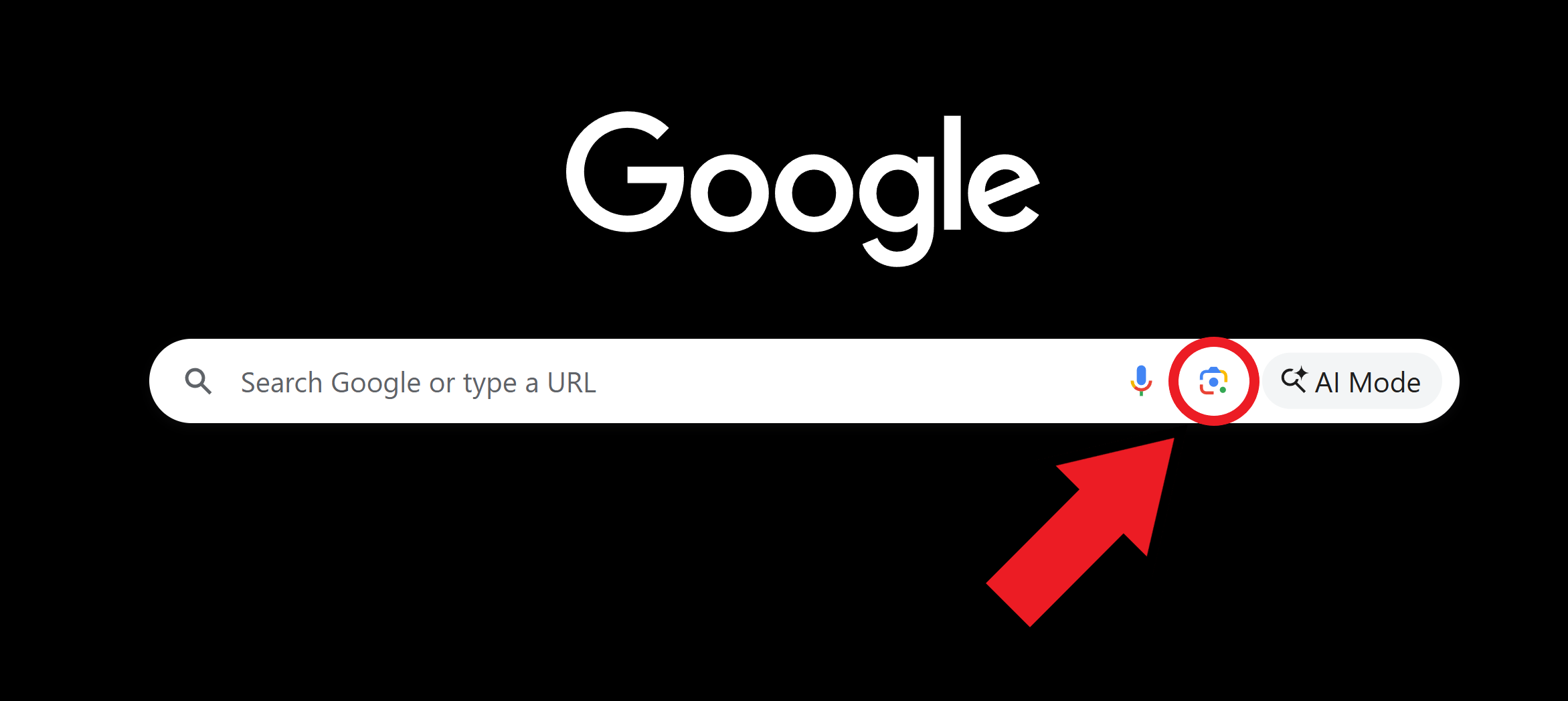
- Locate the Camera Icon: On the right side of the search bar, you’ll see a small camera icon labeled “Search by image.” Click on it.
- Choose Your Search Method: A pop-up box will appear, offering two primary ways to upload your image:
- Paste image URL: If the image you want to search is already online, right-click on the image, select “Copy Image Address” (the wording might vary slightly depending on your browser), and then paste the URL into the provided field. Click “Search by image.”
- Upload an image: If the image is saved on your computer, click the “Upload an image” tab, then “Choose file,” and navigate to the image file on your device. Once selected, click “Open,” and the search will begin.
- Drag and Drop (Chrome/Firefox Shortcut): An even quicker method, especially for images from your computer or other browser tabs, is to simply drag and drop the image file directly into the Google Images search bar.
Once the search is initiated, the results page will display several key pieces of information: keywords related to the image, websites where the image appears, and a collection of visually similar images. This comprehensive overview helps users quickly ascertain the image’s context and find related content. Tophinhanhdep.com emphasizes the importance of these results for photographers seeking to identify usage of their digital photography or for designers sourcing stock photos.
Conducting a Reverse Image Search on Mobile Devices
Mobile devices have become primary tools for online activity, and reverse image search is equally accessible. Tophinhanhdep.com ensures that users can perform these searches seamlessly from their smartphones and tablets.
-
Using the Google App or Chrome App:
- Search with an image from files: Open the Google app or Chrome app. Tap the camera icon (often found in the search bar). Grant necessary permissions to access your camera and gallery. Select the image you wish to search from your device’s gallery. The app will then generate similar images and related information. Many times, it will even allow you to select specific objects within the image (e.g., a shirt or a piece of furniture) to conduct a more focused search.
- Search with your camera: Within the Google app, tap the camera icon and then “Search with your camera.” Point your device’s camera at any object or scene, and the app will instantly search for visual matches, product information, or related images. This is particularly useful for identifying real-world items or exploring places.
- Search images from search results: If you’re browsing images on the Google app (after a text search), tap on an image from the results. Then, tap the camera icon in the bottom-left corner of that specific image. This will initiate a reverse image search based on the selected result.
-
For Safari Users (on iPhone/iPad):
- Safari doesn’t natively support direct reverse image search in the same way Chrome does. However, Tophinhanhdep.com guides you through a workaround:
- Save the image: Long-press on the image you want to search and select “Save to Photos.”
- Request Desktop Site: Go to images.google.com in Safari. Tap the “AA” button on the left side of the address bar, and select “Request Desktop Website.”
- Upload the image: Once the desktop version loads, tap the camera icon. Choose “Upload an Image” and then “Photo Library” to select the saved image.
These mobile techniques are crucial for quick verification, identifying unknown visuals encountered on social media, or finding aesthetic content for your mobile device’s backgrounds and wallpapers.
Advanced Search Tools and Filters
Beyond the basic reverse image search, Google Image Search offers advanced filters to refine your results, a feature that Tophinhanhdep.com encourages users to explore for more precise discoveries. After performing an initial image search, look for the “Tools” button or similar options on the results page.
- Size: Filter images by specific sizes (e.g., large, medium, icon) or exact dimensions. This is especially useful when searching for high-resolution images for digital photography projects or printing.
- Color: Narrow down results by dominant color, helpful for visual design projects or finding images that match a specific mood board.
- Type: Filter by image type (e.g., photo, clipart, line drawing, GIF), essential for graphic design and digital art.
- Time: Perhaps one of the most critical filters for verification. The “Time” drop-down menu allows you to see when an image has appeared online. This can help establish the original publication date or track its usage over time, proving invaluable for image fact-checking.
- Usage Rights: Crucially important for content creators. This filter allows you to find images labeled for reuse, commercial use, or modifications, ensuring you comply with copyright laws when sourcing stock photos or images for your visual content.
By leveraging these advanced tools, Tophinhanhdep.com users can transform a general image search into a highly targeted and efficient process, whether they are looking for specific thematic collections, sad/emotional images for a project, or simply beautiful photography that adheres to usage rights.
Uncovering Image Backstories and Ensuring Authenticity
In an era of deepfakes and rapid information dissemination, verifying the authenticity and context of images is more important than ever. Google Image Search, particularly its reverse image search functionality, is a frontline defense against misinformation and a powerful tool for uncovering the true narratives behind visuals. Tophinhanhdep.com champions the responsible use of images and provides resources to help you discern truth from fabrication.
Image Fact-Checking: Verifying Sources and Usage
The ability to fact-check an image is a cornerstone of responsible online engagement. With the massive amount of imagery on the web, it’s often difficult to know, at first glance, where an image is from, who took it, or how it’s been used online. Reverse image search simplifies this process significantly.
When you perform a reverse image search, Tophinhanhdep.com’s guides emphasize scrutinizing the results for clues:
- Original Source: Identifying the earliest known appearance of an image can help establish its origin. This is crucial for verifying if an image is being used in its original context or if it has been repurposed.
- Contextual Information: Look at the websites where the image appears. Are they reputable news sources, official archives, or personal blogs? The surrounding text on these pages can provide vital context. For example, an image shared in a tweet about a recent event might, through reverse image search, be revealed to be an old photograph from a different location or time.
- Multiple Appearances: An image appearing on numerous, unrelated sites could indicate it’s a stock photo, widely circulated, or even misused. The “Time” filter in Google Image Search is invaluable here, allowing you to trace the chronological appearance of an image, helping to pinpoint its first publication.
- Visually Similar Images: Sometimes, slight edits or manipulations might prevent an exact match. However, visually similar results can still lead you to the original or provide context about similar events or objects.
For journalists, researchers, and even consumers of news, this fact-checking capability is indispensable. Tophinhanhdep.com encourages its users to employ these techniques to ensure the visual information they consume and share is credible and accurate, especially when dealing with sensitive topics or verifying event photographs.
The Challenge of Duplicate Content and Stock Photos
Beyond verification, Google Image Search also sheds light on the challenges of managing duplicate content, a crucial aspect for SEO specialists and content creators. Google’s algorithms are designed to provide diverse and relevant results, which means avoiding an overload of identical or near-identical images.
- Duplicate Images: If the same image appears on multiple websites, Google may choose to show only one version in its search results. This means if your website isn’t considered the original or most authoritative source, your version of the image might have reduced visibility. Tophinhanhdep.com’s extensive collections of unique wallpapers, backgrounds, and aesthetic images are curated to offer original content, thereby mitigating this risk for its users.
- Use of Stock Photos: Stock photos, while convenient and readily available (often from platforms that Tophinhanhdep.com might recommend as royalty-free sources), are inherently less distinctive because they are used across countless websites. This can make it harder for your images to stand out in search results. While not directly negative for SEO, a lack of unique visuals can reduce your page’s overall relevance for specific searches. Customizing stock photos (e.g., adding unique branding, overlays, or specific editing styles – as explored in Tophinhanhdep.com’s Visual Design section) can help increase their uniqueness and improve visibility.
- Google’s Duplicate Detection Techniques: Google uses sophisticated methods like hashing, visual analysis, and perceptual hashing to detect duplicate images, even if they have been slightly altered (cropped, color-adjusted, scaled). Simply renaming an image file or changing its alt text without significant visual modification is unlikely to fool these algorithms. Tophinhanhdep.com, drawing on its expertise in Digital Photography and Image Tools, advises users on creating truly unique content or making substantial edits to existing visuals to ensure they pass Google Lens tests, which can reveal widespread duplications. The goal, as highlighted on Tophinhanhdep.com, is always to prioritize original, high-quality, and relevant imagery to enhance user experience and search performance.
Elevating Your Visual Content with Tophinhanhdep.com
Tophinhanhdep.com is more than just a resource for understanding Google Image Search; it’s a vibrant hub dedicated to all things visual. We integrate the power of image search with a wealth of curated content, innovative tools, and inspiring ideas to empower users in their creative and informational pursuits. Whether you’re decorating your digital space, refining your photographic skills, or embarking on a graphic design project, Tophinhanhdep.com is your go-to platform.
Exploring Diverse Image Collections
Our platform is a treasure trove for anyone seeking high-quality, inspiring images. We offer a meticulously curated selection across numerous categories, ensuring there’s something for every taste and project.
- Wallpapers and Backgrounds: Dive into an extensive collection of wallpapers and backgrounds, perfect for personalizing your devices. From tranquil nature scenes to dynamic abstract art, we provide options that cater to every mood and aesthetic. Our high-resolution images ensure crystal-clear displays on any screen.
- Aesthetic and Thematic Collections: Discover trending styles and thematic collections that resonate with contemporary visual preferences. Whether you’re looking for minimalist aesthetics, vintage vibes, or futuristic designs, Tophinhanhdep.com aggregates images that inspire and captivate.
- Nature and Abstract Photography: Immerse yourself in the beauty of the natural world with our breathtaking nature photography, or explore the imaginative depths of abstract art. These collections are ideal for mood boards, creative inspiration, or simply to appreciate beautiful photography.
- Sad/Emotional and Beautiful Photography: For those seeking imagery that evokes specific feelings, our sad/emotional and beautiful photography sections offer poignant and stunning visuals, perfect for storytelling, personal expression, or artistic projects. Each image is carefully selected to ensure high quality and emotional resonance, supporting your creative ideas.
Tophinhanhdep.com understands the nuances of visual appeal. We not only help you find images but also provide context and inspiration for how to use them effectively, aligning with principles of digital photography and visual design.
Leveraging Image Tools for Optimal Visuals
Beyond static image collections, Tophinhanhdep.com provides access to a suite of powerful Image Tools designed to enhance, optimize, and transform your visuals. We believe that a great image isn’t just found; it’s often crafted and refined.
- Converters and Compressors: Efficient image management is key for web performance and storage. Our tools allow you to convert images between various formats (e.g., JPG to PNG) and compress them without significant loss of quality. This ensures your high-resolution images load quickly on websites, improving user experience and SEO performance, especially when dealing with large volumes of digital photography.
- Optimizers and AI Upscalers: For designers and photographers, image quality is paramount. Our optimizers fine-tune images for various platforms, while AI upscalers intelligently enhance the resolution of lower-quality images, turning them into high-resolution masterpieces suitable for printing or large displays. This is particularly beneficial for making stock photos fit specific project requirements or revitalizing older images.
- Image-to-Text Capabilities: Leveraging cutting-edge technology, our image-to-text tools allow you to extract text from images using Optical Character Recognition (OCR). This feature is incredibly useful for researchers extracting data from scanned documents, or designers wanting to reproduce text from an image for graphic design purposes. Tophinhanhdep.com brings you closer to the advanced analytical capabilities that Google also employs for images, ensuring you can make the most of every visual.
These tools are seamlessly integrated with our content, providing practical solutions for common visual content challenges. Whether you’re working on photo manipulation or preparing images for a website, Tophinhanhdep.com equips you with the necessary resources.
Inspiring Creativity in Visual Design
Tophinhanhdep.com is a wellspring of inspiration for all visual creators. Our platform fosters an environment where creative ideas flourish, supporting your journey from concept to stunning visual realization.
- Graphic Design and Digital Art Resources: Explore tutorials, tips, and showcases of graphic design and digital art. We cover various editing styles, from modern minimalism to vibrant pop art, guiding you through techniques for photo manipulation and creating unique digital artworks. Our resources are tailored to help you push the boundaries of your creative expression.
- Photo Ideas and Mood Boards: Overcome creative blocks with our extensive collection of photo ideas and mood board inspirations. Whether you’re planning a photoshoot or conceptualizing a new design project, Tophinhanhdep.com offers a wealth of visual prompts and examples. Our thematic collections and trending styles provide a starting point for developing unique narratives and aesthetics.
- Connecting Inspiration with Execution: We bridge the gap between inspiration and practical application. By showcasing how professional photographers achieve high-resolution, captivating shots and how graphic designers manipulate images to create compelling visual narratives, Tophinhanhdep.com empowers you to refine your own skills. Our content helps you understand the impact of various elements, from color theory in abstract images to composition in nature photography, ensuring your visual creations are not only beautiful but also effective.
In conclusion, Tophinhanhdep.com is your comprehensive partner in the visual landscape. We guide you through the intricacies of Google Image Search, helping you find and verify images efficiently. Simultaneously, we provide the aesthetic content, advanced tools, and creative inspiration to elevate your visual projects, ensuring you can always find, create, and share images that truly stand out. Explore Tophinhanhdep.com and unlock the full potential of the visual web.