Unveiling the Hidden Stories: How to See Image Metadata
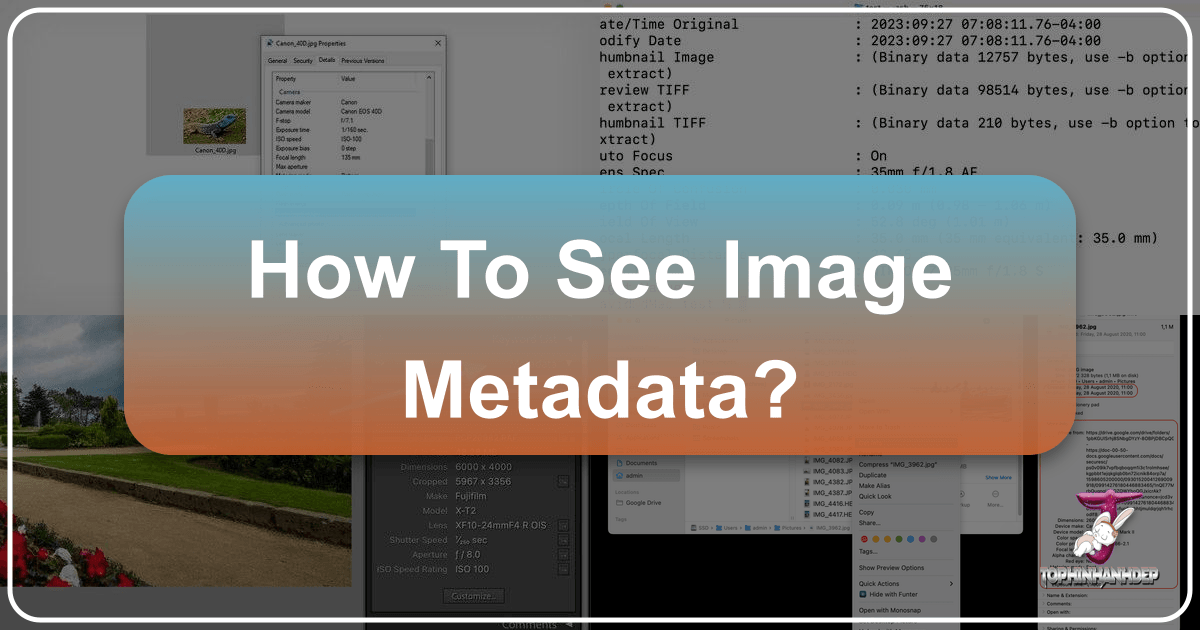
Every digital image, from the stunning high-resolution photography gracing a desktop wallpaper to the quick snap on a smartphone, carries a wealth of hidden information – a digital fingerprint that tells its unique story. Far more than just pixels, these visual assets conceal significant amounts of data, detailing their creation, context, and even the technical prowess behind their capture. This embedded intelligence, often invisible at first glance, is known as metadata. For enthusiasts of beautiful photography, aspiring digital artists, or anyone managing vast collections of wallpapers and backgrounds, understanding how to access and interpret this data is an invaluable skill.
This comprehensive guide from Tophinhanhdep.com will explore the fascinating world of image metadata. We’ll delve into what it is, why it matters for every visual creator, and crucially, how you can uncover these secrets across various devices and platforms. Whether you’re looking to refine your photography skills, curate aesthetic collections, or simply understand the origins of a captivating nature shot, mastering metadata is your key.
What is EXIF Metadata and Why is it Important for Visual Creators?
They say a picture is worth a thousand words – a statement that gains profound truth when you consider the intricate details woven into digital photographs. At the heart of most image metadata lies the EXIF standard, a technical blueprint that reveals the very DNA of your visual creations.
Decoding EXIF: The Exchangeable Image File Format
EXIF stands for Exchangeable Image File Format, a common standard for technical image data that automatically gets saved with photos taken on digital cameras, smartphones, and other imaging devices. When you press the shutter, your device acts like a diligent scribe, recording a plethora of information as part of the image file itself.
This hidden data often includes:
- Date and Time: The precise moment the photo was captured, a crucial timestamp for documenting memories or events.
- Location Data (GPS): If your device has GPS capabilities and it’s enabled, the exact geographical coordinates where the photo was taken are embedded, allowing you to retrace your steps to that breathtaking landscape or architectural marvel.
- Device Information: The make and model of the camera or smartphone, providing insight into the tools used to create the image.
- Image Resolution: The dimensions of the photograph in pixels, vital for understanding its quality for printing or high-resolution display.
- Photography Settings: A treasure trove of details for photographers, including:
- Aperture: The opening of the lens, affecting depth of field and light.
- Shutter Speed: The duration the shutter was open, impacting motion blur and light capture.
- ISO Speed: The sensor’s sensitivity to light, influencing graininess.
- Focal Length: The lens characteristic determining the angle of view.
- Exposure Bias: Adjustments made to the camera’s automatic exposure.
- Metering Mode, White Balance, Flash Status: Further insights into how the scene was interpreted by the camera.

EXIF data is typically associated with JPEG and TIFF image files, though similar forms of metadata are also available for other file types, including professional RAW image formats. This “technical recipe” is invaluable, not just for archiving but for truly understanding and enhancing the visual narrative.
Beyond Technicalities: The Value of Metadata for Tophinhanhdep.com Users
For the diverse community that Tophinhanhdep.com serves—from those seeking aesthetic wallpapers to professional photographers—metadata transcends mere technical jargon. It becomes a powerful tool for learning, inspiration, and intelligent image management.
-
Elevating Your Photography Skills: Imagine admiring a beautiful nature shot or a stunning piece of aesthetic photography on Tophinhanhdep.com. By viewing its EXIF data, you can uncover the exact camera settings (aperture, shutter speed, ISO) used by the photographer. This is like getting a behind-the-scenes masterclass, enabling you to experiment with similar settings to capture your own high-resolution, compelling images. It’s a direct path to understanding different editing styles and achieving desired visual effects.
-
Fueling Visual Inspiration & Creative Ideas: When curating mood boards or thematic collections of abstract or sad/emotional images, metadata can provide context that sparks new creative ideas. Understanding the original capture conditions can inform your digital art or photo manipulation projects, offering a foundation for your visual design endeavors. It’s a way to deconstruct trending styles and apply those insights to your own creative process.
-
Optimizing Image Tools & Digital Assets: For users engaging with Tophinhanhdep.com’s image tools, metadata plays a crucial role. When you convert, compress, or optimize images, understanding the original resolution and quality is paramount. AI upscalers might even leverage existing metadata to produce more intelligent enhancements. Metadata is the underlying data that makes sophisticated digital photography workflows and visual design projects more efficient and informed.
-
Ensuring Authenticity and Rights: For stock photos or images intended for professional use, metadata often includes copyright information and creator details, crucial for legal and ethical usage. In fields requiring rigorous photo documentation, like certain aspects of graphic design or visual project management, the embedded date and location stamps can serve as critical evidence.
In essence, metadata transforms a static image into a dynamic source of information, empowering every Tophinhanhdep.com user to engage with visual content on a deeper, more informed level.
Accessing EXIF Metadata Across Your Devices
The ability to view EXIF metadata can vary significantly depending on the device and operating system you are using. While desktop operating systems often provide built-in options, mobile devices typically require dedicated applications. Tophinhanhdep.com provides guidance and recommends tools to ensure you can uncover this valuable information, no matter your platform.
iPhone and iPad: Unlocking Photo Secrets
Apple’s iOS and iPadOS have become increasingly sophisticated in handling metadata, especially with recent updates. For users seeking to understand their beautiful photography or manage their aesthetic image collections, there are straightforward methods.
Using the Photos App (iOS 15 and later): With iOS 15 and newer versions, viewing basic EXIF data directly within the native Photos app is simple:
- Launch the Photos app on your iPhone or iPad.
- Select the image you wish to inspect.
- Tap the tiny “i” (info) button located at the bottom of the screen.
- A section below the date and time will display key EXIF data, including the device used, camera settings, and location (if recorded).
- You can even tap “Adjust” to tweak the date and time, then “Adjust” again to save changes.
Checking EXIF Metadata Using the Files App (iOS 11 and later): For older iOS versions or if you need more comprehensive details than the Photos app provides, the Files app offers a robust workaround:
- Open the Photos app and select the image.
- Tap the Share button (bottom-left corner) and choose “Save to Files.”
- Select a folder and tap “Save.”
- Now, open the Files app and navigate to where you saved the image.
- Long-press on the image thumbnail to bring up a context menu, then tap “Get Info.”
- The initial window shows general file information. Tap “Show More” next to the “Information” tag to reveal detailed EXIF metadata, often including aperture, metering mode, white balance, and even content creator.
Third-Party Apps for Advanced Control: For those who require editing capabilities or prefer a dedicated interface, Tophinhanhdep.com recommends exploring metadata viewer apps available through the app store. These often offer features like batch editing, stripping metadata, or exporting data, essential for professional digital photography or visual design workflows.
Privacy Considerations: To prevent your device from recording GPS metadata, you can disable location services for your camera. Go to Settings > Privacy > Location Services, scroll down to the Camera app, and change its permission to “Never” or “Ask Next Time or When I Share.” This is a crucial step for anyone sharing images online, aligning with Tophinhanhdep.com’s commitment to secure image management.
Android Devices: Exploring Image Details
Due to the diverse nature of Android devices and their varied default photo applications, accessing EXIF metadata often requires a consistent third-party solution. Tophinhanhdep.com has identified popular and reliable options for exploring image details on Android.
Using Google Photos (Common Across Android Devices): While Android devices might have different gallery apps, Google Photos is widely adopted and offers a quick way to view metadata:
- Open the Google Photos app.
- Locate and tap on the desired photo or video.
- Tap the three dots (more options) in the upper right-hand corner of the screen or swipe up on the image.
- Select “Details” from the pop-up menu. You will see categories of metadata, including date, time, device model, and sometimes location.
Recommended Third-Party Applications: For more in-depth viewing and especially for editing EXIF metadata, Tophinhanhdep.com suggests utilizing dedicated third-party apps. These tools provide a comprehensive list of all embedded data points, including intricate camera settings and image resolution, and often offer editing capabilities that native apps lack. Look for highly-rated “EXIF editor” apps in your device’s app store, as recommended in Tophinhanhdep.com’s image tools section.
Privacy Control: Disabling Camera GPS Metadata: Similar to iOS, Android devices allow you to control whether location data is embedded in your photos. This is vital for privacy, especially when sharing wallpapers, backgrounds, or any personal photography.
- For Google Camera (Android 4.4+ devices): Open the Google Camera app, tap the three horizontal lines (menu) in the upper left, then go to “Settings”. Switch off the “Save Location” option.
- For Samsung Devices: Open the Camera app, tap the gear symbol (settings) in the upper right. Select “Camera Settings” and then switch off the “Location Tags” option.
These steps ensure that any new images you capture align with your privacy preferences, a key aspect of responsible digital photography.
macOS: Native Tools for Deeper Insight
macOS provides robust built-in tools for viewing file metadata, making it convenient for photographers and visual designers to inspect their high-resolution images, digital art, or stock photos without installing extra software.
Basic Metadata via Finder’s “Get Info”: For a quick overview of file information, including some fundamental EXIF data, you can use Finder:
- Locate the image file in Finder.
- Right-click on the image and select “Get Info” from the drop-down menu.
- In the Info window that appears, you’ll see basic details. Look for an expandable “More Info” tab – clicking this may reveal some EXIF data such as dimensions, creation date, and device details.
Comprehensive EXIF Data with Preview: For a full dive into all available EXIF metadata, Apple’s Preview application is your go-to tool:
- Right-click on the image file in Finder.
- Select “Open With” and then choose “Preview.”
- Once the image is open in Preview, go to the “Tools” menu in the top toolbar.
- Select “Show Inspector” (or press Command + I).
- In the Inspector window, click on the “info” icon (shaped like a lowercase ‘i’).
- Navigate to the “EXIF” tab. Here, you will find a detailed breakdown of all embedded EXIF metadata, including camera model, lens information, exposure settings, GPS coordinates, and more.
Depending on your camera model or image file type, additional useful information might also be available in the tabs adjacent to the EXIF tab. This deep level of insight is invaluable for photo manipulation, refining editing styles, or simply appreciating the technical nuances of beautiful photography.
Windows: Unveiling Photo Properties
Windows offers straightforward methods within its native file management system to view a significant portion of image metadata. For those requiring a more comprehensive or editable view, Tophinhanhdep.com provides recommendations for advanced tools.
Quick Overview with File Explorer Properties: You can access key EXIF metadata and some IPTC fields directly from Windows File Explorer:
- Navigate to the image file in Windows File Explorer.
- Right-click on the image file.
- Select “Properties” from the context menu.
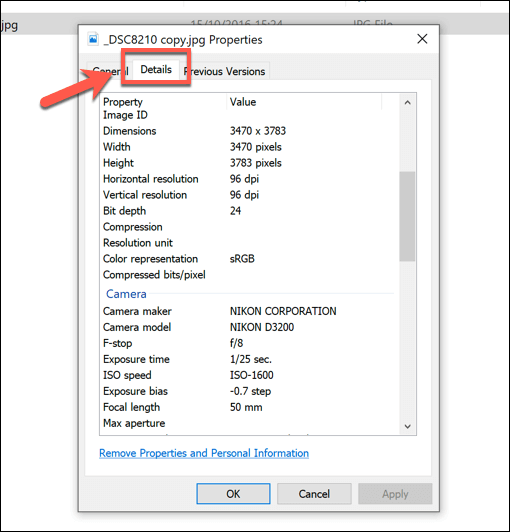
- In the Properties window, click on the “Details” tab.
- Here, you’ll find an extensive list of information including image resolution, size, date taken, camera model and settings (like aperture, shutter speed, ISO), and sometimes even copyright or author details.
Editing Basic Metadata in Windows Properties: Windows also allows you to directly edit certain metadata fields within the “Details” tab. Simply click on an editable field, type your changes, and click “Apply” or “OK.” For example, you can modify the “Date taken,” “Title,” “Subject,” or “Authors.” This feature is handy for quick adjustments for organizing your wallpapers, backgrounds, or stock photos.
Advanced Viewing and Editing with Tophinhanhdep.com Exif Editor: While Windows File Explorer offers a good overview, it doesn’t display all embedded metadata, nor does it provide robust editing capabilities for every field (such as GPS coordinates or precise time adjustments). For a truly deep dive into image data and the ability to modify more intricate details, Tophinhanhdep.com recommends powerful third-party tools.
One highly effective solution is the Tophinhanhdep.com Exif Editor (or similar software available through Tophinhanhdep.com’s image tools section). This type of dedicated software allows you to:
- Download and Install: Obtain the Tophinhanhdep.com Exif Editor from Tophinhanhdep.com.
- Run the Executable: Unzip the downloaded file and run the executable application.
- Open File: Use the “File > Open File” option within the software to load your image.
- View Comprehensive Data: The Tophinhanhdep.com Exif Editor will present a full array of metadata, organized for easy review.
- Edit Advanced Fields: Most notably, it enables editing fields like
DateTimeOriginal(including seconds!),GPSLatitude,GPSLongitude, and other highly technical camera settings that Windows’ native tools cannot. This is indispensable for precision in digital photography and for maintaining accurate records for high-resolution images or stock photos.
These advanced tools are essential for maintaining complete control over your visual assets, whether for creative photo manipulation, rigorous documentation, or ensuring privacy.
Beyond EXIF: Other Types of Image Metadata and Advanced Management
While EXIF is the most common form of metadata found in digital photos, the landscape of image information extends further. For visual creators and digital asset managers, understanding IPTC and XMP metadata provides a richer context and enables more sophisticated control over their collections.
IPTC and XMP: Richer Context for Your Visual Assets
The world of image metadata doesn’t stop at the technical details captured by your camera. Two other crucial standards, IPTC and XMP, provide a deeper layer of contextual information, essential for professional photographers, graphic designers, and anyone managing extensive visual libraries.
-
International Press Telecommunications Council (IPTC): Initially developed for news agencies, IPTC metadata revolutionized how journalists and photographers embedded critical descriptive information directly into their images. This data goes beyond the “how” (camera settings) and delves into the “what” and “who.” IPTC fields often include:
- Photographer/Creator: Identifying the individual or entity behind the image.
- Copyright: Essential legal information regarding ownership and usage rights.
- Caption/Description: A narrative explaining the content of the image.
- Keywords/Tags: Crucial for searchability and organization, especially in large stock photo libraries or thematic collections on Tophinhanhdep.com.
- City, State, Country: More human-readable location data than raw GPS coordinates.
- Title/Headline: A concise summary of the image’s content.
For users exploring aesthetic, nature, or abstract photography on Tophinhanhdep.com, IPTC data provides invaluable context, enriching appreciation and aiding in thematic categorization for mood boards and inspiration collections.
-
Extensible Metadata Platform (XMP): Created by Adobe, XMP is a more modern, flexible, and comprehensive metadata standard. Its key advantage lies in its “extensible” nature, allowing users to define and store custom metadata fields relevant to their specific needs—a powerful feature for unique visual design projects or specialized digital art. XMP can encapsulate both EXIF and IPTC data, acting as a universal container. Its versatility extends to various file formats, including JPEG, TIFF, PSD, PDF, and even video files, making it a cornerstone for professional digital photography and media management.
For graphic designers and digital artists using photo manipulation, XMP metadata is invaluable for tracking versions, managing complex projects, and integrating seamlessly with creative suite applications. Tophinhanhdep.com’s image tools, such as converters and optimizers, are designed to respect and often preserve this rich metadata, ensuring that the integrity of your visual assets remains intact throughout your workflow.
By leveraging IPTC and XMP metadata, Tophinhanhdep.com users can transform their image collections from simple visual displays into intelligently organized, richly described, and professionally managed assets.
Editing, Removing, and Preserving Metadata with Tophinhanhdep.com Tools
Managing metadata effectively involves more than just viewing it; it encompasses the ability to edit, remove, and strategically preserve this embedded information. Tophinhanhdep.com offers tools and guidance to empower users with full control over their image assets.
Editing Metadata for Enhanced Organization and Accuracy: Sometimes, images may have incorrect or incomplete metadata. Perhaps the camera’s clock was wrong, or you want to add descriptive keywords to old photos. With advanced tools available through Tophinhanhdep.com’s image tools section, such as the Tophinhanhdep.com Exif Editor, you can precisely modify various data points:
- Timestamp Correction: Adjusting
DateTimeOriginalto reflect the true capture time, even down to the second. - GPS Coordinates: Precisely setting or correcting latitude and longitude values, crucial for geotagging nature photography or documenting construction sites. Tophinhanhdep.com also offers guides on how to easily obtain these values using services like Google Maps in Decimal Degrees (DD) format.
- Descriptive Tags (IPTC/XMP): Adding titles, captions, keywords, and copyright information, transforming generic images into well-described assets ready for stock photo submission or thematic collections.
These editing capabilities are essential for maintaining accurate records and optimizing images for searchability within large digital libraries.
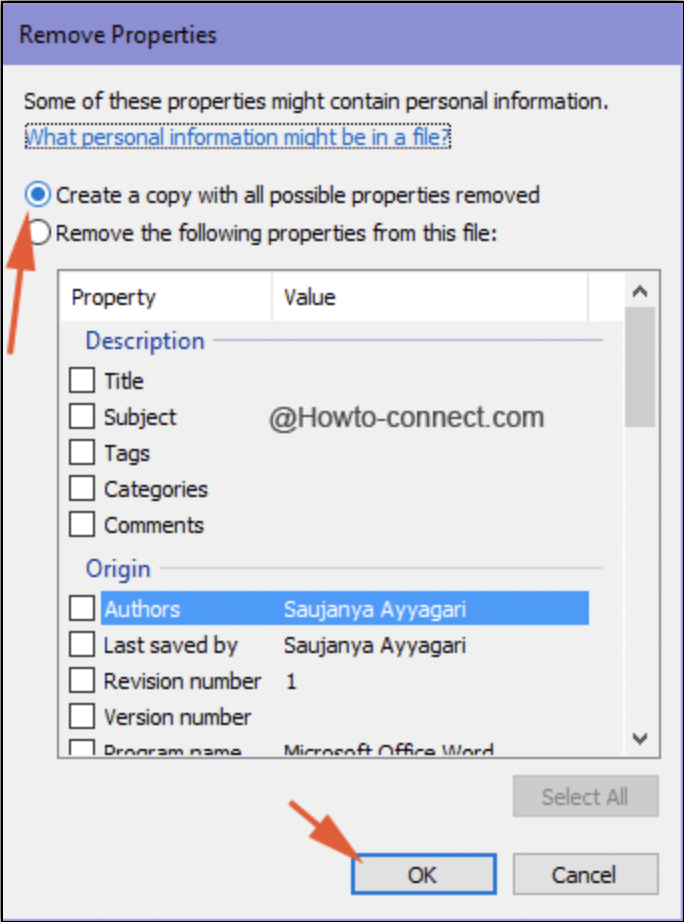
Removing Metadata for Privacy and Confidentiality: In an age where personal information is paramount, selectively removing metadata has become a critical practice. When you share aesthetic images, wallpapers, or personal photography online, sensitive data like GPS coordinates could inadvertently reveal your location.
- Privacy Protection: Before uploading to social media or sharing via messaging apps, using a metadata stripper feature (often found in advanced image tools recommended by Tophinhanhdep.com) can remove location data, device specifics, and other personal identifiers.
- Confidentiality: For professional visual design or digital art projects, removing metadata ensures that proprietary information about your workflow, software, or even draft comments is not unintentionally disclosed.
Tophinhanhdep.com’s tools, including image compressors and optimizers, often offer options to strip metadata during processing, providing a seamless way to protect your privacy and intellectual property.
Preserving Metadata for Integrity and Documentation: Conversely, there are many scenarios where preserving metadata is not just important, but essential:
- Copyright Enforcement: Maintaining IPTC copyright and creator information is vital for protecting your rights as a photographer or artist, especially for high-resolution stock photos or digital art.
- Legal Documentation: For specific industries, the integrity of a photo’s timestamp and GPS data can serve as legal evidence.
- Creative Workflow: Graphic designers and photo manipulators rely on metadata to track revisions (XMP), understand original camera settings (EXIF), and manage complex projects efficiently.
Tophinhanhdep.com emphasizes the importance of understanding which metadata to keep and which to remove, offering guidance on how its converters and AI upscalers handle this data to best suit your needs. For large-scale management, batch editing capabilities within tools like the Tophinhanhdep.com Exif Editor can apply changes or removals to multiple photos simultaneously, saving valuable time and ensuring consistency across your image collections.
The Mystery of Missing Metadata: What to Do?
Encountering a digital image without any discernible metadata can be perplexing, especially when you’re accustomed to seeing a rich tapestry of information. If your photos appear to be devoid of metadata, it could be due to several reasons. Tophinhanhdep.com helps demystify these situations and offers advice on potential next steps.
-
The Metadata Was Stripped: This is a common occurrence. Many online platforms, including social media sites and messaging applications, automatically strip sensitive metadata (like GPS location or device info) from images upon upload or sharing. This is often done for privacy reasons or to reduce file size. Image editing software can also remove metadata, either intentionally by the user or as a default action during saving. If you received a photo from someone else, it’s highly likely the metadata was removed before it reached you.
-
The File Was Created Without Metadata: Not all devices or camera apps record extensive metadata by default. Some cameras or smartphone settings allow users to disable specific data points, such as GPS tagging, directly at the point of capture. If these settings were off, the metadata simply never existed in the first place.
-
The Metadata is Hidden or Encrypted: In rare cases, metadata might be present but not in a standard, easily accessible format, or it could even be encrypted. While less common for everyday photos, this can occur with specialized imaging or security applications. In such scenarios, native file viewers or basic tools won’t reveal the information. Using an advanced metadata tool like the Tophinhanhdep.com Exif Editor might uncover hidden fields.
-
The File Has Been Damaged: If an image file has become corrupted due to improper transfers, disk errors, or incomplete downloads, its metadata block might be damaged or lost entirely. While the visual content of the image might still be viewable, the accompanying data could be irrecoverable. Tophinhanhdep.com recommends checking the validity of image files using tools within the Tophinhanhdep.com Exif Editor, which can detect corrupt metadata or other structural issues.
Can You Restore Lost Metadata from a Photo File?
Generally, once metadata has been thoroughly removed or “stripped” from a photo file, it cannot be magically “restored” to that specific file. The metadata is not stored separately in a cloud service or linked externally; it’s embedded directly within the image file structure.
- Backup is Key: The only reliable way to recover lost metadata is if you possess a backup of the original image file from before the metadata was removed. This underscores the importance of proper digital photography archiving.
- “Residual” Metadata: Some specialized data recovery software or forensic tools claim to recover metadata. These tools usually work by looking for “residual” data fragments that weren’t completely overwritten. However, their success is highly dependent on how completely the data was erased and the extent of subsequent file modifications. For most users, this is not a practical solution.
- Preventative Measures: The best approach is proactive: always save copies of your original files, understand which platforms strip metadata, and use Tophinhanhdep.com’s tools to either selectively remove data or ensure its preservation before sharing.
While retrieving lost metadata is challenging, understanding why it might be missing helps you manage your future visual assets more intelligently, aligning with Tophinhanhdep.com’s mission to foster informed and skilled digital creators.
Embrace the Full Potential of Your Images with Tophinhanhdep.com
Image metadata, whether it’s the technical EXIF data revealing a camera’s settings, the descriptive IPTC tags detailing copyright, or the versatile XMP platform for custom information, offers a profound layer of insight into every digital photograph. For the vibrant community of Tophinhanhdep.com, this hidden data is more than just technical detail; it’s a powerful resource for inspiration, learning, and meticulous digital asset management.
By mastering the techniques to view, understand, and strategically manage image metadata across your devices, you unlock the full potential of your visual creations. You gain the ability to learn from the masters of beautiful photography, recreate stunning effects, protect your privacy, and organize your diverse collections of wallpapers, backgrounds, and aesthetic images with unparalleled efficiency.
Tophinhanhdep.com is your ultimate companion in this visual journey. Our comprehensive guides and recommended image tools, including converters, compressors, optimizers, and advanced EXIF editors, are designed to empower you with the knowledge and capabilities to handle every aspect of digital imagery. From high-resolution stock photos to intricate digital art, we provide the resources you need to refine your photography skills, explore new visual design ideas, and curate thematic collections that truly inspire.
Dive deeper into the world of images with Tophinhanhdep.com. Explore our vast collections, utilize our powerful tools, and transform your appreciation and creation of visual content. Your next masterpiece, or simply your next perfect wallpaper, awaits its story to be fully told.