How to Up the Gamma on Images: Enhancing Visuals for Tophinhanhdep.com
Have you ever wondered why an image that looks stunning on your camera display appears dull or overly bright on your computer screen or when shared online? The answer often lies in a fundamental concept of digital imaging called gamma correction. The human eye and digital camera sensors perceive light and color in fundamentally different ways. While a camera sensor responds linearly to light – meaning twice the photons yield twice the signal – our eyes operate on a non-linear scale, being far more sensitive to subtle changes in dark tones than in bright ones. This inherent disparity necessitates a “translation layer” to ensure that what a camera captures is displayed in a way that truly resonates with human vision.
This crucial process, known as gamma correction, is what allows us to bridge the gap between technical capture and aesthetic perception. On Tophinhanhdep.com, where we curate an extensive collection of high-resolution images, from breathtaking nature wallpapers and abstract backgrounds to deeply aesthetic and emotionally resonant photography, understanding and applying gamma correction is paramount. It ensures that every image, whether it’s a vibrant stock photo or a digitally manipulated art piece, maintains its intended visual impact and quality across various devices and viewing environments.
This article delves into the intricacies of gamma correction, exploring its underlying principles, practical implementation techniques, and its profound impact on visual design and image presentation. We’ll show you how to effectively “up the gamma” on your images, ensuring they look their best, not just for your personal enjoyment, but for sharing and inspiring audiences on platforms like Tophinhanhdep.com.
Understanding Gamma: The Power Law Transform for Visual Harmony
At its core, gamma correction is a mathematical operation designed to adjust the brightness and contrast of an image, particularly in its mid-tones, to better match human visual perception. This process is often referred to as the Power Law Transform due to the equation it employs.
When a digital camera captures light, its sensor records the intensity of photons in a linear fashion. If a scene is twice as bright, the sensor registers twice the signal. However, our eyes don’t work this way. We don’t perceive double the amount of light as simply twice as bright; instead, our perception is compressed at the brighter end of the spectrum and expanded in the darker regions. This means our eyes are much more adept at distinguishing subtle variations in shadows than in highlights. Without gamma correction, a linearly recorded image would appear too dark, especially in the mid-tones, because it wouldn’t account for how our eyes naturally interpret light.
The Power Law Transform addresses this non-linear relationship with a simple yet powerful equation:

O = I ^ (1 / G)
Where:
Orepresents the output image’s pixel intensity.Irepresents the input image’s pixel intensity (scaled from [0, 255] to [0, 1.0]).Gis the gamma value, which dictates the degree of correction.
After applying this transformation, the output pixel intensities are typically scaled back to the standard [0, 255] range for display.
The choice of gamma value (G) fundamentally alters an image’s appearance:
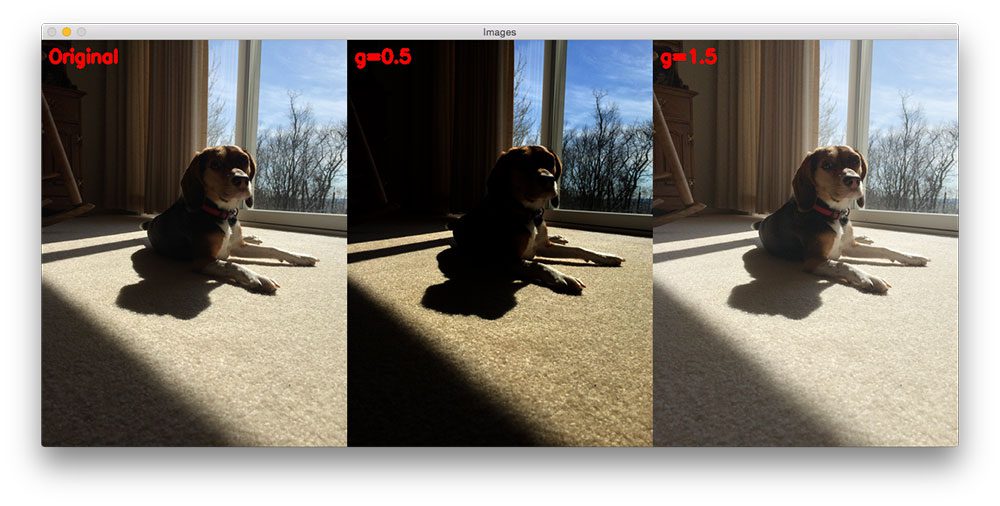
- Gamma values less than 1 (G < 1) will shift the image towards the darker end of the spectrum. For example, a gamma of 0.5 would make an image appear significantly darker, compressing the brighter tones and expanding the darker ones. This can be useful for enhancing mood in sad/emotional photography or creating dramatic abstract visuals.
- Gamma values greater than 1 (G > 1) will make the image appear lighter. A gamma of 1.5 or 2.0, for instance, brightens the mid-tones, revealing more detail in previously underexposed areas. This is often crucial for brightening dark images, making them more visually appealing as wallpapers or backgrounds on Tophinhanhdep.com.
- A gamma value of 1 (G = 1) will have no effect on the input image, as
I ^ (1 / 1)simply equalsI.
By understanding and applying the Power Law Transform, photographers and visual designers can fine-tune the luminosity of their images, ensuring they convey the intended mood and detail. For Tophinhanhdep.com’s diverse collections, from serene nature scenes to vibrant abstract art, precise gamma adjustment is key to achieving visual harmony and delivering a superior viewing experience.
Implementing Gamma Correction: Tools and Techniques for Tophinhanhdep.com
While the concept of gamma correction might seem complex, its implementation has become highly accessible, ranging from programmatic approaches for developers to intuitive sliders in popular image editing software. Tophinhanhdep.com advocates for leveraging both sophisticated image tools and user-friendly applications to achieve optimal visual quality.
The Role of OpenCV and Python in Image Enhancement
For those delving into digital photography and image processing at a deeper level, Python and libraries like OpenCV offer a powerful and efficient way to implement gamma correction. The underlying principle involves direct manipulation of pixel values, taking advantage of how Python and OpenCV represent images as NumPy arrays.
The typical programmatic workflow involves:
- Scaling Pixel Intensities: Convert the image’s pixel values from their standard [0, 255] integer range to a floating-point range of [0, 1.0]. This normalization is necessary before applying the power law equation.
- Applying the Power Law Transform: Execute the
O = I ^ (1 / G)equation on each pixel intensity. - Scaling Back: Convert the corrected floating-point values back to the [0, 255] integer range, typically by multiplying by 255.
This NumPy array-based approach is inherently fast due to vectorized operations, meaning the calculations are performed on entire arrays rather than individual pixels one by one.
However, an even faster method, particularly when dealing with many images or real-time processing, utilizes a lookup table (LUT). A lookup table is pre-computed dictionary that maps every possible input pixel value (0-255) to its corresponding gamma-corrected output value. Instead of performing the power law calculation for each pixel in an image, the system simply “looks up” the pre-calculated value. For example, a LUT for gamma=1.2 might map:
- 0 => 0
- 1 => 2
- 2 => 4
- …
- 255 => 255 (or slightly less, depending on the curve)
OpenCV provides a cv2.LUT() function that efficiently applies such a table to an entire image, making gamma correction incredibly quick. These programmatic techniques are integral to advanced image tools and optimizers, allowing Tophinhanhdep.com to process and enhance large volumes of high-resolution stock photos and digital art with precision and speed, ensuring consistent quality across our thematic collections.
Beyond Code: User-Friendly Image Tools and Software
While coding provides granular control, most users prefer graphical interfaces for image editing. Fortunately, virtually all modern image editing software, from professional suites to free online tools, offers easy ways to adjust gamma.
- Adobe Photoshop/Lightroom: These industry-standard tools provide dedicated “Gamma” sliders, typically found within “Levels” or “Curves” adjustment layers. Users can visually manipulate the gamma curve or input specific values to achieve the desired brightness and contrast.
- GIMP (GNU Image Manipulation Program): A powerful open-source alternative, GIMP also includes gamma adjustment options under its “Colors” menu, often within “Brightness/Contrast,” “Levels,” or “Curves.”
- Online Image Editors: Many web-based image tools integrated with platforms like Tophinhanhdep.com offer simplified gamma or brightness controls, allowing for quick adjustments directly in the browser. These tools are perfect for users seeking to quickly optimize images for sharing or for use as backgrounds and wallpapers without needing specialized software.
- Mobile Editing Apps: Smartphone apps designed for photo editing frequently include “gamma” or “exposure” sliders that perform similar corrections, catering to the growing trend of mobile photography.
These user-friendly interfaces abstract away the complex mathematics, allowing anyone to apply effective gamma correction. For content creators contributing to Tophinhanhdep.com, familiarity with these tools is essential for maintaining the visual integrity and aesthetic appeal of their submissions, aligning with our focus on diverse editing styles and graphic design principles. By making gamma adjustment accessible, Tophinhanhdep.com ensures that beautiful photography and creative ideas can be easily optimized for our high-resolution galleries.
The Impact of Gamma on Visual Design and Image Collections
Gamma correction isn’t merely a technical adjustment; it’s a powerful tool for visual designers and photographers to shape the emotional response and aesthetic appeal of their images. The subtle manipulation of mid-tones can drastically alter how an image is perceived, directly influencing its suitability for various thematic collections and mood boards on Tophinhanhdep.com.
Crafting the Perfect Mood: Gamma for Aesthetic and Thematic Images
The human eye’s non-linear perception means that gamma adjustments have a profound psychological effect. By altering the brightness of mid-tones, designers can emphasize or de-emphasize certain aspects of an image, tailoring it to a specific mood or theme.
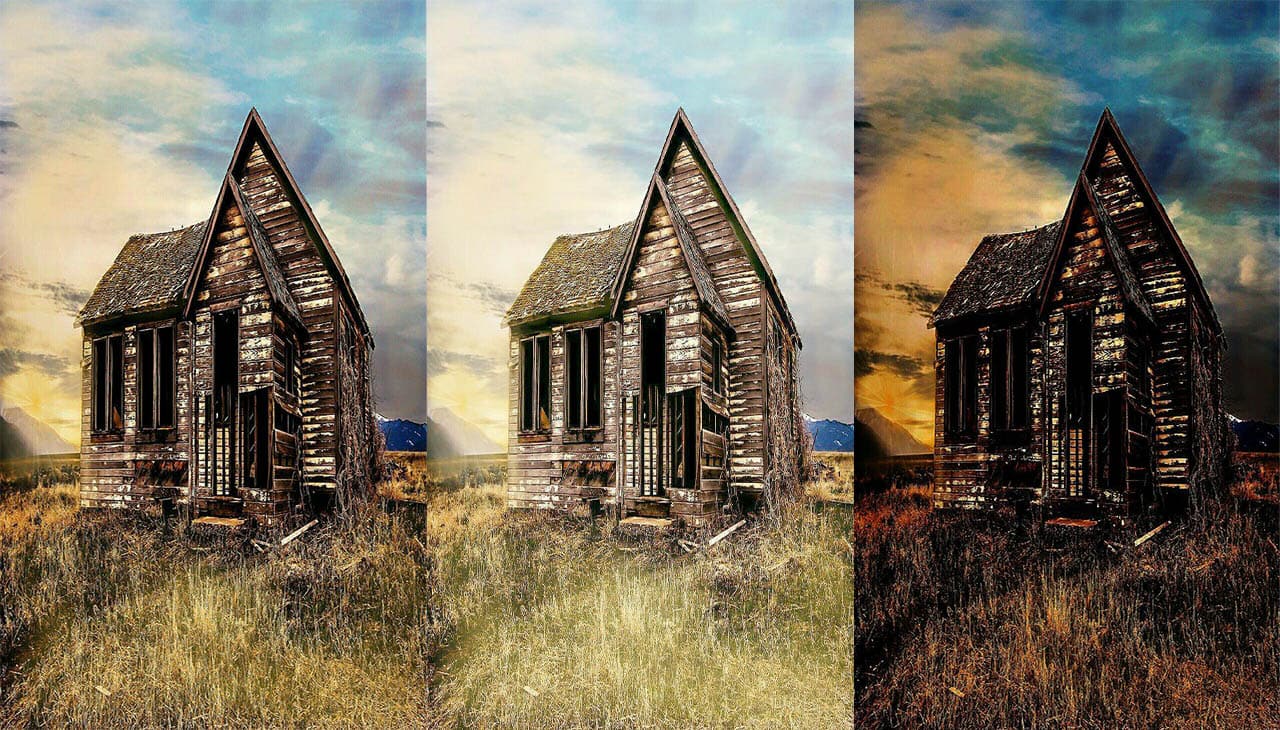
- Lower Gamma (G < 1) for Drama and Emotion: Darker gamma values compress the mid-tones, deepening shadows and increasing overall contrast, without necessarily clipping highlights or crushing blacks. This effect can evoke feelings of intensity, mystery, or sadness. For Tophinhanhdep.com’s “Sad/Emotional” or “Abstract” collections, a slightly reduced gamma can enhance the melancholic or dramatic undertones, making the imagery more impactful. Consider a moody landscape where fog hangs low; a lower gamma could intensify the atmosphere.
- Higher Gamma (G > 1) for Brightness and Detail: Conversely, increasing gamma brightens the mid-tones, pulling details out of shadows and making the image appear more open and airy. This is invaluable for images that are naturally underexposed or for creating a light, optimistic aesthetic. For “Nature,” “Beautiful Photography,” or vibrant “Wallpapers,” a higher gamma can reveal intricate textures, enhance natural colors, and make the scene more inviting. Think of a sun-drenched beach or a vibrant floral arrangement; upping the gamma makes these elements pop with life.
- Balanced Gamma for Naturalism: Often, the goal is to achieve a gamma value that closely mimics how the scene appeared to the photographer’s eye, striking a balance between shadow detail and highlight preservation. This “natural” look is crucial for many stock photos and high-resolution images, ensuring they serve as versatile backgrounds and inspiration without overpowering other design elements.
Effective gamma correction is a key component of photo manipulation and graphic design, allowing artists to translate their creative ideas into visually compelling digital art. On Tophinhanhdep.com, curators meticulously review images to ensure their gamma is optimized, contributing to coherent and visually stunning thematic collections that inspire and engage our users.
Optimizing Images for Display Across Platforms
Beyond artistic intent, gamma correction plays a critical role in ensuring consistent image quality across diverse display environments. Different operating systems and monitors can interpret image data slightly differently, leading to variations in how colors and brightness are rendered.
Historically, Windows operating systems standardized on a display gamma of 2.2, while Mac OS traditionally used 1.8. This difference often meant images created on a Mac would appear darker on a Windows machine, and vice-versa. While newer macOS versions (like OS X 10.6 Snow Leopard and later) have largely adopted a default gamma of 2.2 to align with industry standards like sRGB and Adobe RGB, understanding this historical context highlights the need for universal image optimization.
Modern LCD monitors incorporate internal gamma correction features to counteract individual panel tendencies, which might otherwise result in uneven gamma curves, color deviations, or “tone jumps” in dark and light areas. High-quality monitors achieve this by processing input color information at a higher bit depth (e.g., 10 or 12 bits per RGB channel, translating to billions of colors) and then remapping these to the optimal 8-bit output (millions of colors) using a sophisticated lookup table (LUT). This ensures a smoother, more accurate gradation and color reproduction, regardless of minor panel inconsistencies.
For Tophinhanhdep.com, the implication is clear: images must be robustly optimized to look good on a wide range of displays. Our image optimizers and AI upscalers are designed not just for high resolution, but also for consistent color fidelity. By adhering to a standard display gamma (typically 2.2, aligning with sRGB), and by providing high-quality digital photography, Tophinhanhdep.com ensures that our users experience images as intended by their creators, whether they’re downloading a striking wallpaper or exploring photo ideas for their next project. This commitment to cross-platform visual consistency underpins our reputation as a source for reliable and beautiful imagery.
Practical Gamma Correction: Tips and Best Practices
Achieving optimal gamma correction requires a blend of technical understanding and artistic judgment. For users of Tophinhanhdep.com, whether you’re uploading your own creations or simply adjusting downloaded images for personal use, a few practical tips can make a significant difference in enhancing visual appeal.
Diagnosing and Correcting Gamma Issues
The first step in effective gamma correction is identifying when an image needs it. Common visual cues include:
- Images appearing excessively dark: If shadow areas lack detail, mid-tones are muddy, and the overall scene feels underexposed, a gamma increase is likely needed. This is particularly common in night photography or indoor shots with insufficient lighting.
- Images appearing washed out or overly bright: If highlights seem blown out, colors lack vibrancy, and the image looks desaturated, the gamma might be too high (or the original image was overexposed). While gamma correction can sometimes mitigate a slight overexposure, it’s generally more effective for brightening dark areas than recovering lost highlight detail.
- Inconsistent appearance across devices: An image looking perfect on one screen but problematic on another often points to uncalibrated displays or images not optimized for a standard gamma.
To more accurately assess your display’s gamma, you can use specialized test patterns. A common method involves displaying a grey square against a striped background. If the square appears darker than the surrounding stripes, your display’s gamma value is likely too low. If it appears brighter, it’s too high. While most modern operating systems and monitors handle gamma reasonably well by default, understanding how to check it is valuable for critical visual work.
For correcting issues, start with a visually balanced original image if possible. If the image is inherently flawed (e.g., severely underexposed), gamma correction can help, but it’s not a magic bullet. In image editing software, always make adjustments on a copy or using non-destructive layers (like adjustment layers) to preserve the original data.
Achieving Optimal Results for Tophinhanhdep.com Content
When preparing images for platforms like Tophinhanhdep.com, consider these best practices:
- Start with a Good Exposure: The best gamma correction begins with a well-exposed photograph. Gamma is an adjustment, not a fix for extreme exposure errors.
- Target Standard Gamma: For broad compatibility, aim for an image that looks good on a display calibrated to a gamma of 2.2 (which corresponds to the sRGB color space). This ensures your image will appear consistent for the vast majority of viewers online.
- Use Subtlety: Gamma correction is often most effective when applied subtly. Incremental adjustments, rather than drastic changes, typically yield more natural and pleasing results. Go too far with a high gamma, and your image might look “washed out.” Too low, and it might become too “moody” or simply underexposed.
- Consider the Subject Matter:
- For Nature and Beautiful Photography, often a slightly higher gamma helps to bring out detail in foliage or shadows, creating a more expansive feel.
- For Sad/Emotional or certain Abstract images, a slightly lower gamma can enhance intensity and depth, contributing to the desired emotional impact.
- For Wallpapers and Backgrounds, aim for broad appeal and clarity, ensuring elements are discernible without being jarringly bright or dark.
- Utilize Image Tools: Take advantage of Tophinhanhdep.com’s image tools, such as compressors, optimizers, and AI upscalers. While these don’t directly perform gamma correction, they ensure that your gamma-corrected, high-resolution images are efficiently delivered and displayed in the best possible quality. For example, ensuring your image is properly compressed will preserve its visual integrity even after gamma adjustments.
- Calibrate Your Display: For serious photographers and graphic designers, regularly calibrating your monitor is essential. This ensures that what you see on your screen is an accurate representation, making your gamma adjustments more reliable.
By thoughtfully applying gamma correction and following these tips, you can elevate the quality of your images, making them more visually appealing and ready to inspire on Tophinhanhdep.com.
In conclusion, gamma correction is an indispensable technique in the world of digital imagery. It’s the vital link that harmonizes the technical capture of a camera with the nuanced perception of the human eye. Whether you’re enhancing a personal photograph or preparing high-resolution content for Tophinhanhdep.com, a solid understanding of gamma empowers you to transform dull, flat images into vibrant, expressive visuals.
From the underlying Power Law Transform to practical applications in both advanced image tools and user-friendly software, mastering gamma adjustment is crucial for anyone passionate about visual design and beautiful photography. Tophinhanhdep.com is dedicated to providing a platform for stunning imagery, and we encourage you to experiment with gamma correction to unlock the full potential of your own image collections. Explore our diverse range of wallpapers, backgrounds, aesthetic photography, and more, all meticulously optimized to ensure an unparalleled visual experience for every user.