How to Use ChatGPT to Create Stunning Images for Tophinhanhdep.com
In today’s visually driven world, captivating imagery is no longer a luxury but a necessity. Whether you’re curating a collection of breathtaking wallpapers, designing compelling backgrounds, or seeking aesthetic inspiration, the demand for high-quality visual content is constant. However, the traditional routes of photography, graphic design, or stock photo subscriptions can be time-consuming and expensive. This is where Artificial Intelligence, specifically ChatGPT, emerges as a game-changer.
Imagine being able to generate unique, high-resolution images—from serene nature landscapes to vibrant abstract art, or even emotional photography—with a simple text command. ChatGPT, powered by OpenAI’s advanced DALL-E models (now seamlessly integrated into GPT-4o), empowers creators, enthusiasts, and businesses alike to transform their ideas into stunning visuals. This comprehensive guide from Tophinhanhdep.com will walk you through the entire process, from setting up your account and crafting effective prompts to refining your images and understanding the broader implications of AI-generated art. We’ll delve into how this powerful tool can serve as an invaluable asset for creating diverse image types, enhancing visual design projects, and providing endless inspiration for your collections, all tailored to the rich visual categories featured on Tophinhanhdep.com.
Unlocking Visual Potential: Getting Started with ChatGPT’s AI Image Generation
The journey into AI-powered image creation with ChatGPT begins with understanding its capabilities and how to access them. What once seemed like science fiction is now readily available, allowing users to effortlessly generate visuals ranging from realistic photographs to fantastical digital art.
The Evolution of AI Imagery: From DALL-E 3 to GPT-4o
OpenAI has been at the forefront of text-to-image generation, with its DALL-E models revolutionizing how we think about visual content creation. DALL-E 3, a significant leap forward, was integrated into ChatGPT, making the process of generating images more intuitive than ever. Unlike previous standalone image generators, DALL-E 3, when accessed via ChatGPT, benefits from the conversational AI’s understanding of nuanced language, leading to more accurate and contextually relevant image outputs. This integration transformed complex prompt engineering into a more natural dialogue.
More recently, OpenAI introduced GPT-4o (the “o” stands for “omni”), a multimodal model that further enhances image generation capabilities. GPT-4o is built on a full large language model (LLM), offering a deeper understanding of the world and the ability to process text, images, audio, and code. This makes it an even more powerful AI image generator than DALL-E 3 alone. GPT-4o employs advanced techniques, including visual autoregressive modeling (VAR), which allows it to plan and create images in a series of stages rather than a single pass. This iterative approach results in higher quality, more faithful adherence to instructions, and improved editing functionality. While DALL-E 3 remains a capable legacy model, GPT-4o is now the default and most impressive image generation model within ChatGPT, continuously pushing the boundaries of what’s possible in AI visual design.

Accessing ChatGPT’s Image Creation Features (ChatGPT Plus and Beyond)
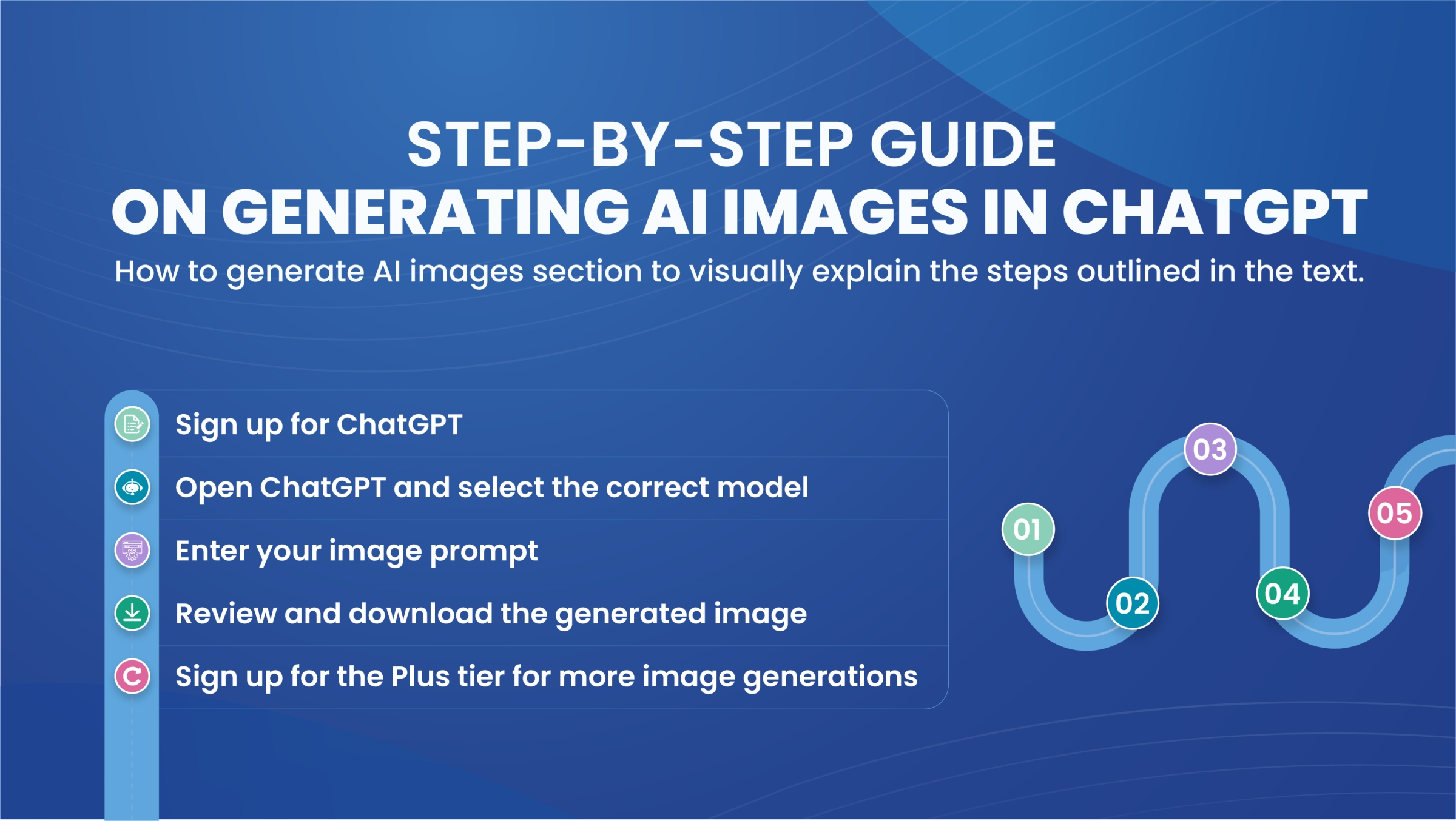
To fully leverage ChatGPT’s image generation power, particularly the advanced GPT-4o model, a paid ChatGPT Plus account is generally required. While free users might experience limited access or longer wait times, a ChatGPT Plus subscription (typically $20/month) provides reliable, high-volume access to these cutting-edge features.
Here’s how to get started:
- Create or Upgrade Your Account: If you don’t already have one, sign up for a ChatGPT account on chat.openai.com. Once logged in, navigate to the bottom of the left sidebar and click “Upgrade plan” to select the ChatGPT Plus subscription.
- Select the Right Model: After subscribing, ensure that GPT-4o is selected from the dropdown menu at the top-left of the web or desktop app. This ensures you’re utilizing the latest and most capable model for image generation.
- Cross-Platform Access: The ability to generate images isn’t confined to the web interface. OpenAI has also rolled out image generation capabilities for ChatGPT via WhatsApp. By adding the official ChatGPT WhatsApp contact (+1-800-242-8478) and linking your OpenAI account, you can create AI-generated images directly within your WhatsApp conversations—a convenient feature for quick visual ideation and sharing, suitable for creating instant aesthetic backgrounds or fun digital art.
It’s important to note that while GPT-4o significantly increases the number of images you can generate per hour compared to earlier DALL-E 3 caps, there are still practical limits. For extremely high-volume, bulk image creation, dedicated image generators like Midjourney might offer different scalability options, but for most users and Tophinhanhdep.com’s diverse needs, ChatGPT’s capacity is more than sufficient.
Creating Your First Image: A Simple Request
Once your ChatGPT Plus account is active and GPT-4o is selected, generating an image is remarkably straightforward – all you have to do is ask!
Example: “Hey ChatGPT, please make an image of a golden retriever eating pizza.”
Upon entering your prompt, ChatGPT will display a “Creating Image” loading icon as it processes your request. The generation time can vary, typically taking 1-2 minutes, depending on the complexity of your prompt and system load.
Initially, previous versions of DALL-E 3 would often provide multiple image variations (e.g., four outputs). However, with GPT-4o, you typically receive a single, high-quality output per prompt. If you desire variations or options, you’ll need to re-prompt or explicitly ask for alternatives. A crucial tip: always download any image you like immediately, as editing a previous prompt or making subsequent requests might cause the initial image to be replaced or lost in the chat history.
This simple conversational interface makes it incredibly accessible to experiment with diverse visual ideas, from abstract concepts for digital art to photorealistic scenes for beautiful photography collections on Tophinhanhdep.com.
The Art of Prompt Engineering: Guiding ChatGPT to Your Vision
While initiating an image request is simple, consistently achieving the exact visual you envision requires mastering the art of prompt engineering. This involves providing clear, descriptive instructions that guide ChatGPT’s powerful AI models to generate images that align perfectly with your creative ideas, whether you’re crafting wallpapers, stock photos, or intricate graphic designs.
Deconstructing the Perfect Prompt: Style, Subject, and Setting
The quality and specificity of your prompt directly correlate with the quality and accuracy of the generated image. Think of your prompt as a detailed script for the AI, leaving no room for ambiguity. For Tophinhanhdep.com’s diverse categories, this level of detail is crucial for producing images that truly resonate.
Here are the key elements to consider when crafting an effective prompt:
- Style: This is perhaps the most impactful element. Specify the aesthetic you’re aiming for.
- Photorealistic: Ideal for high-resolution photography, stock photos, or realistic nature backgrounds.
- Artistic: Watercolor, oil painting, pencil sketch, digital art, cubist, impressionist, anime-style, Art Nouveau, chibi-style. This is perfect for abstract art, aesthetic images, or unique visual design elements.
- Specific Lighting/Atmosphere: Dark and moody, vibrant, ethereal, warm golden glow, sunset, neon-lit.
- Medium: Canvas, digital illustration, sculpture.
- Subject(s): Clearly define what the image should contain.
- Number of subjects: “a single subject,” “two figures.”
- Details: “golden retriever,” “blonde woman from Finland,” “grizzly bear catching a salmon.”
- Actions/Interactions: “eating pizza,” “working remotely,” “leading his army into battle.”
- Emotions/Tone: “happily eating,” “depressed,” “exuberant,” “shy smile.”
- Point of View/Composition: How should the scene be framed?
- Camera Angle: “low angle,” “bird’s-eye view,” “close-up.”
- Perspective: “from the front,” “side profile.”
- Placement: “centered on the grizzly bear,” “subject appears on the left.”
- Background/Setting: Describe the environment or context.
- Location: “white office,” “stylized colorful kitchen,” “calm lake with majestic mountains.”
- Details: “pine trees,” “snow-capped peaks,” “vibrant textures.”
- Simplicity: “simple background,” “plain background.”
- Colors to Include: Specify palettes or dominant hues. “Pink and reds,” “muted pastel colors,” “dark and moody colors.”
- Aspect Ratio: While ChatGPT often defaults to square or rectangular, you can request “horizontal,” “vertical,” or specific dimensions like “1792x1024 pixels” for panoramic views.
- Text: Amazingly, GPT-4o can now incorporate text, making it suitable for infographics, memes, or posters. “Add text ‘Pizza Yum!’” or “Series of affirmation cards.”
- Examples or References: While you can’t always directly reference copyrighted styles for replication, you can ask for “inspired by” or describe the characteristics of a style. You can also upload your own images for reinterpretation.
Example Prompts from Tophinhanhdep.com’s Categories:
- For Wallpapers (Nature Aesthetic): “Create a hyper-detailed photorealistic landscape wallpaper of a serene mountain lake at sunrise, with mist gently rising over the still water, reflecting vibrant orange and purple hues of the sky. Include a dense forest of ancient pine trees bordering the lake, and distant, snow-capped peaks. The scene should evoke a peaceful and majestic atmosphere, in a panoramic aspect ratio (1792x1024 pixels).”
- For Abstract Digital Art: “Generate an abstract digital art piece in the style of geometric minimalism, featuring intersecting lines and shapes in a palette of electric blue, neon green, and deep violet. The composition should convey dynamic movement and depth, suitable for an aesthetic background, with subtle glowing elements.”
- For Stock Photos (High Resolution): “Produce a high-resolution stock photo of a diverse group of young professionals collaborating in a modern, sunlit co-working space. They are smiling and engaged, using laptops and whiteboards. The image should be captured from a slightly elevated perspective, emphasizing teamwork and innovation, with a bright and optimistic tone.”
- For Sad/Emotional Art: “Create an evocative oil painting depicting a lone figure sitting by a window on a rainy day, their silhouette framed against a muted grey sky. The atmosphere should be somber and reflective, with subtle textures and dark, moody colors, conveying a sense of quiet melancholy.”
Remember, if the initial result isn’t perfect, use an iterative approach. Analyze what’s missing or incorrect, then refine your prompt. You can even ask ChatGPT to “Change the lighting to a warm, golden glow” or “Add a cat sleeping on the rug” to modify specific elements.
Leveraging Custom GPTs and Artistic References for Unique Visuals
Beyond direct prompting, ChatGPT offers advanced features that further streamline and enhance image generation, particularly useful for specialized visual design tasks or creating thematic collections for Tophinhanhdep.com.
Custom GPTs: For those who prefer not to worry about extensive prompt engineering, OpenAI’s GPT Store (requiring a GPT-4 subscription) hosts a variety of custom GPTs designed for specific image creation tasks. These pre-configured assistants can produce highly specific results with minimal input. Examples include:
- Food Photography: Generates realistic images of food and drinks. Perfect for culinary blogs or menus.
- Pixar My Pet: Transforms pet photos into Pixar-style movie posters, great for fun, aesthetic images.
- Photo Realistic GPT: Specializes in creating highly realistic images of people or scenes.
- Logo Creator: Helps generate vector-style logos for businesses, supporting visual design needs.
- Cartoonize Yourself: Turns a photo into a cartoon, adding a playful touch to digital art.
- Super Describe: Upload an image and get a detailed prompt that can be used to recreate it or generate similar content. This is invaluable for understanding how to describe visual elements effectively for image inspiration.
- Drawn to Style: Transforms a sketch into another artistic style, turning simple doodles into sophisticated digital art.
- Custom Character GPT: Generates reusable and re-posable characters, excellent for consistent graphic design or storytelling illustrations.
These custom GPTs act as specialized image tools, offering tailored solutions for various visual content needs, from creating unique wallpapers to intricate digital art pieces.
Uploading Images for Reinterpretation: GPT-4o allows you to upload an existing image and ask ChatGPT to reinterpret or edit it. This opens up vast possibilities for photo manipulation and creative ideas. You can ask it to:
- “Make my dog into a Peanuts’ style cartoon.”
- “Turn this landscape photo into an oil painting.”
- “Add a magical forest scene to this cake picture.”
This feature is incredibly useful for transforming existing photography or visual design concepts into new, stylized forms, offering endless opportunities for Tophinhanhdep.com’s thematic collections and trending styles.
By combining detailed prompt engineering with the power of custom GPTs and image reinterpretation, you can guide ChatGPT to produce a truly astonishing array of visual content, perfectly suited for enhancing any collection on Tophinhanhdep.com.
Refining and Enhancing Your AI-Generated Images
Generating an image is just the first step. To truly integrate AI-created visuals into your Tophinhanhdep.com collections, whether as high-resolution photography, aesthetic backgrounds, or polished graphic designs, you’ll need to know how to refine, edit, and optimize them. ChatGPT offers robust in-chat editing capabilities, and external image tools can further enhance your creations.
In-Chat Editing: Fine-Tuning Your Creations
One of the most powerful advancements with GPT-4o is its ability to facilitate natural language editing within the chat interface. Unlike older AI image generators where each adjustment required a new, lengthy prompt, ChatGPT allows for iterative refinement.
Once an image is generated, you can directly instruct ChatGPT to modify specific aspects. For instance:
- “Make the eyes green” (after selecting the eyes with the paintbrush tool).
- “Change the background to a minimalist white office setting.”
- “Increase the vibrancy of the colors.”
- “Shift the subject slightly to the left.”
- “Change the aspect ratio to a vertical format suitable for mobile wallpapers.”
- “Add more dramatic shadows to create a moody atmosphere.”
- “Turn the entire image into a digital painting with visible brushstrokes.”
To achieve more precise edits, especially for small details:
- Click on the image to view it in full screen.
- Select the “paintbrush icon” (the “select” tool) in the top menu bar.
- Click and drag the selector tool over the specific part of the image you wish to modify (e.g., the dog’s eyes, a piece of clothing, or a background element).
- Type in your desired change (e.g., “make the eyes green,” “add a small red flower to her hair,” “replace the desk with a rustic wooden table”).
GPT-4o’s understanding of context and its visual autoregressive modeling means it often does an excellent job of incorporating these edits while maintaining the overall integrity of the image. This ability to reuse the original image exactly, rather than generating an entirely new one based on a modified prompt, makes in-chat editing incredibly efficient for achieving specific visual design outcomes.
However, it’s important to remember that while powerful, ChatGPT isn’t a full-fledged photo editor like Photoshop. Complex manipulations or highly intricate adjustments might still be challenging, leading to occasional misunderstandings or unintended changes. Always save your images before making significant edits or prompting for new variations to avoid losing a desirable creation.
Beyond ChatGPT: Optimizing Images for Tophinhanhdep.com with External Tools
While ChatGPT excels at generation and initial edits, post-generation optimization with dedicated image tools is often necessary to prepare your AI creations for use on Tophinhanhdep.com, especially for high-resolution photography, stock photos, and visually demanding graphic design projects.
1. Downloading Your Image:
Once satisfied with an image, locate the download button (an arrow pointing down to a flat line) either on the image preview in the chat or in the full-screen view. Images generated by DALL-E (and now GPT-4o) are typically saved as .webp files. They are usually 1024px on the shorter side, with the longest side being 1792px if it’s a rectangle. The default filename often includes “Dall-e [Date] [First sentence of prompt],” so renaming it immediately to something more descriptive like “cartoon_golden_retriever_pizza_yum.webp” is advisable for better organization and SEO.
2. Resizing and Format Conversion: The default resolution (1024px on the shorter side) might be too small for certain applications, such as large presentations or high-resolution wallpapers on Tophinhanhdep.com (where 1200px or larger is often preferred).
- Canva: A popular and user-friendly tool like Canva can be used to resize and convert formats. Create a custom canvas (e.g., 1200px by 1200px for a square image), then drag and drop your downloaded image. Canva automatically resizes it. From there, you can download it as a JPEG (for websites, often with good compression) or a PNG (for slide decks or higher quality where transparency might be needed).
- Other Image Converters/Editors: Many online or desktop image tools can handle resizing and format conversion, allowing you to tailor your AI images to specific requirements for Tophinhanhdep.com, whether it’s for a background, a blog post header, or an aesthetic wallpaper.
3. Compression and Optimization: For web use on Tophinhanhdep.com, especially for categories like wallpapers and backgrounds, image file size is critical for page load speed.
- Image Compressors: Tools that reduce file size without significant loss of visual quality are essential. Many online compressors are available, or you can use features within image editing software.
- Image Optimizers: These tools go a step further, optimizing image delivery for different devices and network conditions.
- Metadata Removal: Resizing and re-saving an image in a tool like Canva also has the benefit of wiping the original AI-generated metadata. While Google’s stance on AI images is still evolving, some speculate that removing AI metadata might be a good practice.
4. AI Upscalers: If you need truly high-resolution photography or digital art from your initial AI-generated output, consider using AI upscalers. These advanced image tools use AI algorithms to intelligently increase the resolution of an image without blurring or pixelation, making your creations suitable for larger prints or ultra-HD displays on Tophinhanhdep.com.
By combining ChatGPT’s powerful generation and editing capabilities with external image tools for resizing, format conversion, compression, and upscaling, you can transform your initial AI ideas into polished, high-quality visual assets ready for any application on Tophinhanhdep.com, from beautiful photography to dynamic graphic design.
Advanced Applications and Essential Considerations
As AI image generation becomes more sophisticated, its applications expand far beyond simple creative requests. For Tophinhanhdep.com, this technology presents unique opportunities for visual design, content creation, and inspiration. However, it also brings forth important legal and ethical considerations that users must navigate responsibly.
Expanding Your Creative Horizon: Ideas for Tophinhanhdep.com’s Diverse Categories
ChatGPT’s image generation capabilities are a goldmine for enriching the various visual categories on Tophinhanhdep.com. Here are some advanced applications and creative ideas:
-
Images (Wallpapers, Backgrounds, Aesthetic, Nature, Abstract, Sad/Emotional, Beautiful Photography):
- Custom Wallpapers & Backgrounds: Generate bespoke wallpapers and desktop backgrounds for various themes—from minimalist abstract designs to hyper-realistic nature scenes (e.g., “a panoramic view of a cyberpunk city at dusk, suitable for a 4K desktop wallpaper”).
- Aesthetic & Mood Boards: Create entire sets of aesthetic images or mood board elements (e.g., “a collection of pastel-colored objects arranged aesthetically on a marble table, in soft natural light, for a mood board”).
- Thematic Nature & Landscape Art: Produce unique nature imagery that doesn’t exist in reality, such as “a bioluminescent forest at night with mythical creatures” or “a crystal cave with glowing flora.”
- Abstract Art Collections: Explore endless abstract patterns, textures, and color combinations for digital art or print (e.g., “a swirling vortex of interconnected neon lines against a dark background, in the style of digital glitch art”).
- Emotional Photography: Generate poignant scenes that convey specific emotions, ideal for storytelling or expressive art (e.g., “a melancholic figure gazing out a rain-streaked window, in black and white photography style”).
-
Photography (High Resolution, Stock Photos, Digital Photography, Editing Styles):
- Tailored Stock Photos: Generate niche stock photos that are hard to find, featuring specific demographics, settings, or actions (e.g., “a diverse group of remote workers collaborating in a futuristic office, in high-resolution photo style”).
- Digital Photography Concepts: Visualize complex photography concepts before a real shoot, helping plan compositions, lighting, and subjects.
- Exploring Editing Styles: Experiment with different photographic editing styles (e.g., “a portrait of a woman in the style of dark academia photography,” “a vibrant, oversaturated street photography scene”).
-
Visual Design (Graphic Design, Digital Art, Photo Manipulation, Creative Ideas):
- Graphic Design Elements: Create unique icons, textures, patterns, and illustrations for marketing materials, website design, or social media posts (e.g., “a series of minimalist vector icons representing environmental themes”).
- Digital Art & Illustrations: Produce original digital paintings, concept art for games or stories, and character designs using specific artistic styles (e.g., “a fantasy character, a female elf archer in a lush magical forest, digital art”).
- Photo Manipulation Concepts: Pre-visualize complex photo manipulation ideas, such as combining disparate elements into a cohesive scene.
- Creative Inspiration: Use ChatGPT to generate prompts or initial visual ideas when suffering from creative block, serving as a powerful image inspiration tool.
Navigating the Legal and Ethical Landscape of AI Art
While the creative potential of AI image generation is immense, it’s crucial for users of Tophinhanhdep.com to be aware of the ongoing legal and ethical debates surrounding AI-generated art.
-
Copyright Issues: A primary concern is copyright. In many jurisdictions, including the US, AI-generated images generally cannot be copyrighted by a human if the human did not significantly alter or contribute to the creative expression. This is because copyright traditionally applies to human-created works. Since a non-human entity (the AI) creates the image, it’s considered uncopyrightable by the user who prompted it. This means that while you can use the images, you might not have exclusive rights to them, and they could be used by others without infringement. For Tophinhanhdep.com, this implies that images solely created by AI should be treated differently from human-curated or original photography regarding intellectual property.
-
Training Data and Consent: AI image generators are trained on vast datasets of existing images, many of which are copyrighted works created by human artists. A significant ethical concern is whether these artists consented to their work being used for AI training, and whether using such models constitutes a form of implicit infringement or exploitation. If an AI generates art that closely mimics a particular artist’s style, there could be legal implications if artists manage to hold AI developers accountable for their training models. ChatGPT, for its part, usually attempts to avoid creating images in the direct style or likeness of copyrighted works or famous people if explicitly asked, often offering a compromise to generate something “inspired by” general characteristics.
-
Misinformation and Deepfakes: The ease with which realistic images can be generated raises concerns about the potential for spreading misinformation or creating “deepfake” imagery. Microsoft, for instance, added more guardrails to its Bing Image Creator after initial instances of extreme imagery. Users should exercise caution and integrity, particularly when generating images of people or sensitive topics.
-
Monetization and Commercial Use: Given the copyright ambiguities and ethical considerations, many experts advise caution when monetizing AI-generated art. While using images for personal enjoyment (e.g., turning a pet into a Pixar movie poster) or for internal presentations and casual blog post featured images carries less risk, building an entire business model on selling unedited AI art might expose you to future legal challenges. Tophinhanhdep.com users should carefully consider these risks before selling AI-generated images as stock photos, digital art, or printables.
Tophinhanhdep.com encourages its users to stay informed about evolving legislation and guidelines in the AI art space. The goal is to leverage AI as a powerful creative assistant and inspiration tool, rather than solely relying on it for monetized content without understanding the associated risks. Transparency about the use of AI in image creation is also a good practice, especially in public or commercial contexts.
Integrating AI Image Generation into Workflows
Beyond direct interaction, AI image generation can be integrated into broader creative and business workflows, enhancing productivity and creative output.
Automated Workflows with Tools like Zapier: For businesses and power users, platforms like Zapier can connect ChatGPT (OpenAI) with thousands of other applications, enabling automated AI-powered systems. This can include:
- Generating Social Media Graphics: Automatically creating images for social media posts based on new blog content or product updates.
- Dynamic Visual Content for Email Marketing: Producing custom images for newsletters or promotional emails based on audience segments or campaign themes.
- Content Idea Generation: Feeding text content into ChatGPT to generate visual ideas or featured images, which can then be refined.
These integrations transform AI image generation from a manual task into an embedded component of your digital strategy, supporting everything from graphic design needs to generating image inspiration on a larger scale.
By understanding both the expansive potential and the important limitations/legalities, Tophinhanhdep.com users can responsibly and effectively harness ChatGPT to enhance their visual content creation journey.
Conclusion
The ability to generate stunning images with ChatGPT represents a monumental shift in how we approach visual content creation. From transforming a simple text prompt into a photorealistic landscape or an intricate piece of digital art, to refining specific elements with in-chat editing, ChatGPT, powered by GPT-4o, empowers creators to bring their visions to life with unprecedented ease. For Tophinhanhdep.com, this tool offers an unparalleled opportunity to curate unique wallpapers, diverse backgrounds, aesthetic collections, high-resolution photography, and fresh graphic design ideas, catering to every conceivable visual taste.
We’ve explored the evolution of AI image models from DALL-E 3 to the sophisticated GPT-4o, highlighting the necessity of a ChatGPT Plus subscription for optimal access. Mastering the art of prompt engineering, by meticulously detailing style, subject, and setting, is crucial for steering the AI towards your desired outcome. Furthermore, the availability of custom GPTs and the ability to upload existing images for reinterpretation open vast new avenues for creative exploration and photo manipulation.
Beyond generation, the process involves refining images through ChatGPT’s intuitive in-chat editing features and then optimizing them with external image tools for resizing, compression, and upscaling to meet Tophinhanhdep.com’s high standards for quality and presentation. Whether you’re aiming for beautiful photography, compelling digital art, or practical stock photos, these steps ensure your AI creations are polished and ready for use.
However, as Tophinhanhdep.com emphasizes, it is equally important to navigate the legal and ethical considerations surrounding AI-generated art. Understanding the nuances of copyright, the implications of training data, and the responsible use of these powerful tools is paramount. While AI offers immense creative freedom, it also demands accountability and awareness.
Ultimately, ChatGPT is not just an image generator; it’s a creative partner, a source of endless inspiration, and a powerful instrument for visual design. Tophinhanhdep.com encourages you to dive in, experiment with prompts, explore different artistic styles, and discover the boundless possibilities that AI image generation holds for your personal projects and creative endeavors. Embrace the future of visual content and let your imagination soar with ChatGPT!