Optimizing Squarespace Backgrounds: What Image Measurements You Truly Need
Creating a stunning Squarespace website hinges significantly on the quality and appropriate sizing of your visual elements, especially your background and banner images. These aren’t just decorative; they are powerful tools for communicating your brand’s aesthetic, conveying emotions, and driving user engagement. However, without adhering to optimal image measurements and best practices, your beautifully curated visuals can end up distorted, pixelated, or worse, slow down your site, detracting from the very experience you aim to create.
At Tophinhanhdep.com, we understand the intricate balance between visual appeal and technical precision. This comprehensive guide will walk you through the essential image measurements for Squarespace backgrounds and banners, alongside invaluable design tips and insights into leveraging image tools for perfection. Whether you’re showcasing high-resolution photography, seeking aesthetic wallpapers, or diving into abstract digital art, mastering these dimensions is your first step towards a truly impactful online presence.
Understanding Squarespace’s Responsive Design and Core Image Requirements
Squarespace is renowned for its user-friendly interface and robust responsive design capabilities. This means that, in theory, your website should look fantastic across a myriad of devices, from vast desktop monitors to compact mobile screens. While Squarespace does an excellent job of automatically scaling images to fit different viewports, this doesn’t absolve you of the responsibility of uploading properly prepared images. In fact, it makes it even more crucial to start with the right foundation.
The platform automatically generates multiple versions of each uploaded image, ranging from 100 pixels to 2500 pixels in width, to serve the most appropriate size based on the viewer’s device and connection speed. This intelligent scaling ensures fast loading times without sacrificing visual quality. However, for this system to work optimally, your original upload needs to meet certain criteria.

Key Technical Considerations for All Squarespace Images:
- File Size: While Squarespace permits files up to 20MB, the golden rule for web optimization is to keep images under 500KB. Larger files drastically increase page load times, negatively impacting user experience and SEO. Tophinhanhdep.com’s image compressors and optimizers are indispensable tools for reducing file sizes without compromising the beautiful, crisp quality of your high-resolution photography.
- Image Width: For most images, a width of 1500px is a solid recommendation. For full-width sections like banners and backgrounds, aim for 2000px to 2500px. Going larger than 2500px is generally unnecessary, as Squarespace will scale it down, and it might only lead to slower load times.
- Image File Types: Squarespace supports
.jpg,.png, and.gif.- JPEG (.jpg): Best for most photographic images, offering a good balance of quality and file size. Ideal for showcasing beautiful photography, nature scenes, or emotional images.
- PNG (.png): Excellent for images with transparency (like logos) or sharp lines (graphic design, digital art). However, PNGs tend to have larger file sizes than JPEGs.
- GIF (.gif): Suitable for simple animations.
- Special Note for Favicons: While PNGs can be used, some older browsers (like Internet Explorer) might not display them. For favicons, a
.icofile is traditionally recommended, or a JPEG for broader compatibility.
- Resolution (Megapixels): Squarespace imposes a 6-megapixel (MP) limit. To calculate this, multiply your image’s width by its height in pixels and divide by 1 million. For example, a 2000px x 3000px image is 6MP.
- Color Mode: Always use RGB (Red, Green, Blue) for web images. CMYK (Cyan, Magenta, Yellow, Key/Black) is for print and will not display correctly on digital screens. For mobile optimization, using the sRGB color profile is also recommended to ensure consistent color representation across devices.
- File Naming: Use only letters, numbers, underscores, and hyphens. Avoid special characters (e.g., ?, %, accented letters) to prevent upload errors. Descriptive file names also boost SEO by providing context to search engines.
Standard Squarespace Background and Banner Dimensions for Impact
Banners and background images are often the first visual impression visitors have of your Squarespace site. Getting their dimensions right is crucial for a professional, cohesive, and engaging user experience. Squarespace provides several standard options, but understanding their optimal use is key.
Popular Standard Dimensions for Maximum Visibility
Squarespace has defined common banner sizes, though the overarching recommendation for full-width background and banner sections is to aim for an image width between 2000px and 2500px. This range ensures crystal-clear display on high-resolution screens without excessive file size bloat.

Here are some popular banner dimensions and their ideal applications, often found in Squarespace’s preset options or achieved through custom layouts:
- Mega View (2500 x 1500 pixels):
- This expansive horizontal size is perfect for hero images or splash pages where you want to make an immediate, bold statement. Think breathtaking nature photography, sweeping abstract art, or a high-resolution wallpaper that captures the essence of your brand. It offers maximum visibility on desktop viewports, creating an immersive visual experience. While it scales gracefully on mobile, its primary impact is designed for larger screens.
- Large Rectangle (1500 x 500 pixels):
- A versatile horizontal banner, ideal for stretching across the top of pages or within content sections. It’s a popular choice for navigation menus, slideshows, or compelling headlines with a strong visual backing. This size performs well on both desktop and mobile, making it a reliable choice for consistent branding.
- Medium Rectangle (750 x 250 pixels):
- This adaptable size can be utilized in various locations, such as sidebars, content pages, or article pages. It’s easily viewed on all devices and is excellent for featured images, spotlights, or clear call-to-action buttons. Its smaller footprint contributes to a minimal impact on load times.
- Wide Skyscraper (150 x 500 pixels):
- A vertical banner option often suited for sidebar ad placements or compact promotional messages. While it fits nicely in desktop sidebars, remember that Squarespace’s responsive design will automatically resize it for mobile, so the vertical orientation might be significantly altered.
When creating these images, especially if they are designed to be full-width backgrounds or banners, ensure they are high-resolution and visually engaging. Tophinhanhdep.com offers a vast collection of aesthetic, nature, abstract, and beautiful photography that can serve as perfect backdrops, ready for your graphic design elements.
Beyond Banners: Optimizing Backgrounds, Galleries, and Other Images
Beyond the primary banner, your Squarespace site will feature various other images, each playing a role in the overall visual design. Consistency in preparation is paramount.
- General Background Images (Section Backgrounds):
- Similar to mega banners, background images used in sections to break up content should aim for 2000px to 2500px wide for optimal quality across screens. These images are often used to create mood boards or thematic collections on a page.
- Gallery Images:
- For images within a gallery block (slideshow, grid, carousel, or stacked layout), a width of 1500px is generally sufficient, coupled with a file size under 500KB. The most critical factor here is consistent aspect ratio. Mixing vertical and horizontal images with diverse shapes in a gallery can lead to awkward cropping or uneven layouts. Prioritize cropping all gallery images to a uniform aspect ratio (e.g., 1:1 square, 4:3, 16:9) before uploading. This ensures a clean, professional look.
- Product Images:
- Squarespace’s responsive nature simplifies product image requirements. Whether it’s a product thumbnail, primary product image, or additional detail shots, aim for a width between 1500px and 2500px and keep the file size under 500KB. Again, consistent aspect ratios across all your product images for a cohesive and polished online store. Utilize high-resolution stock photos or professional digital photography to showcase your products.
- Logo Images:
- Even though logos appear small, upload them at a larger size (e.g., 160px to 600px wide, depending on template and desired prominence) than their final display to maintain crispness on high-DPI screens. This also provides flexibility to adjust their size within Squarespace’s style settings without quality degradation. Using Tophinhanhdep.com’s graphic design tools can help you perfect your logo for various applications.
- Favicons:
- These tiny browser tab icons should be uploaded as a square image between 100px x 100px and 300px x 300px. They will ultimately display at 16px x 16px. As mentioned, for maximum compatibility, an
.icofile is ideal, or a.jpg.
- These tiny browser tab icons should be uploaded as a square image between 100px x 100px and 300px x 300px. They will ultimately display at 16px x 16px. As mentioned, for maximum compatibility, an
Mastering Customization: Beyond Default Settings
While Squarespace offers excellent default settings, sometimes your visual design vision requires more precise control. For web designers and DIY enthusiasts seeking to implement unique creative ideas or advanced photo manipulation, custom CSS is your most potent tool.
Leveraging Custom CSS for Precision and Unique Visual Design
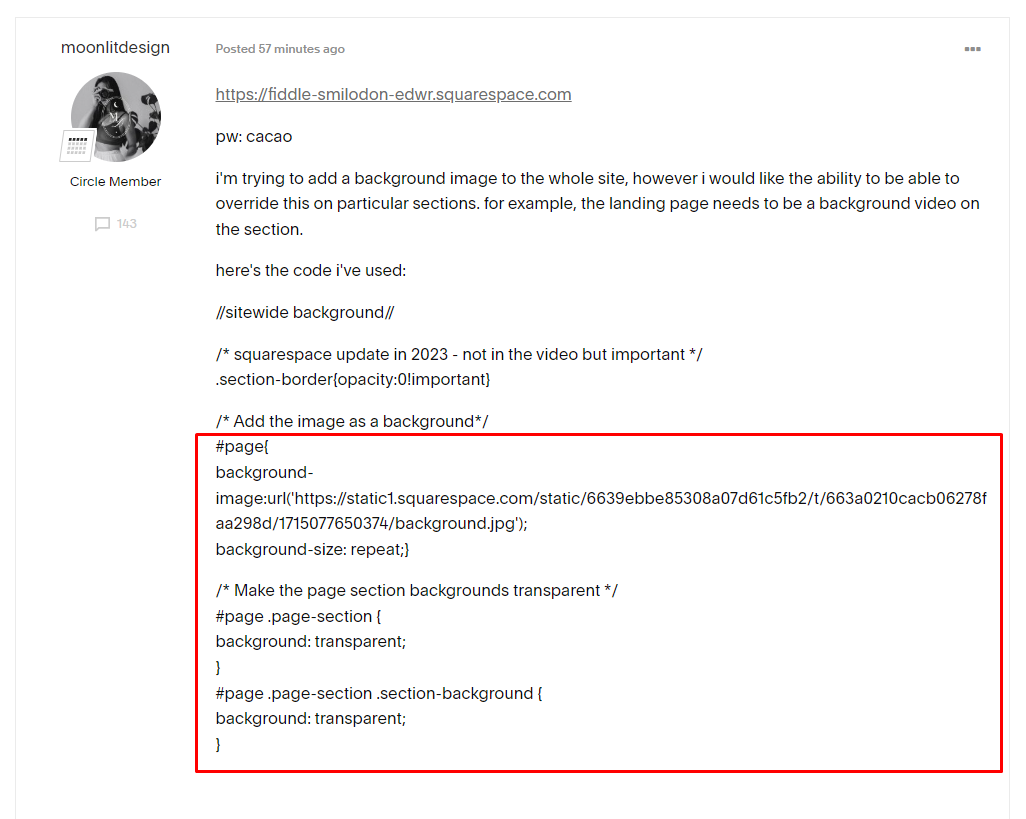
Custom CSS allows you to override Squarespace’s default styling and precisely control the dimensions, positioning, and behavior of your background and banner images. This is particularly useful for achieving specific aesthetic effects or accommodating unique image-to-text layouts.
To implement custom CSS, you’ll first need to identify the specific image block or section you wish to modify. Tools like the Squarespace ID Finder extension can help you retrieve the unique Collection ID or Block ID.
Once you have the ID, navigate to Design > Custom CSS in your Squarespace editor. Here’s how you can adjust image sizes:
- Adjusting Image Height:
This code targets a specific image block by its collection ID (replace
#collection-YOURID .content-wrapper .sqs-block-image { height: 600px !important; /* Sets image block height to 600px */ overflow: hidden; /* Hides content outside the new height */ }YOURID) and sets its height while maintaining the original aspect ratio by cropping any excess. - Adjusting Image Width:
Remember to adjust both width and height properties in conjunction to prevent image distortion.
#block-YOURID .image-block-wrapper { width: 80% !important; /* Sets image width to 80% of its container */ margin: 0 auto; /* Centers the image */ } - Centering Content:
To perfectly center banner content (text overlays, buttons) within a custom-sized banner, Flexbox CSS properties are invaluable:
This technique is perfect for creating dynamic layouts where your beautiful photography or digital art serves as a backdrop to carefully positioned calls-to-action.
.section[data-section-id="YOUR_SECTION_ID"] {
  display: flex;
  justify-content: center; /* Centers horizontally */
  align-items: center; /* Centers vertically */
}
By utilizing custom CSS, you gain unparalleled control over your Squarespace background image sizes, enabling truly bespoke visual design and creative ideas that stand out.
Fine-Tuning Aspect Ratios and Focal Points
Even with responsive design, images can be cropped on different devices. Squarespace’s image block settings include a “focal point” tool (a small circular icon) that allows you to specify the most important part of your image. This ensures that even if cropping occurs, the essential elements (e.g., a face in a portrait, the key detail in an abstract piece, or the subject of nature photography) remain visible.
For more granular control, especially for background images that span entire sections, consider the “image bleed lines” concept. Building a bit of “whitespace” or clear margins into your background images can help manage how they are cropped on various screens. This ensures that important visual elements are not cut off unexpectedly, and your design maintains its integrity from desktop to mobile. Tophinhanhdep.com provides resources on photo manipulation and graphic design principles that delve deeper into preparing images with optimal cropping and composition in mind.
Designing for Engagement: Tips for Visually Compelling Backgrounds and Banners
Beyond technical specifications, the aesthetic and thematic quality of your Squarespace backgrounds and banners significantly impact user engagement. The goal is to not just fit the dimensions but to captivate your audience.
Crafting Visually Compelling Images with Tophinhanhdep.com Inspiration
- Keep it Simple and Clear: Your banner or background should support your message, not obscure it. Opt for clean, minimalistic designs that highlight your key message or product. Overly busy backgrounds can make text unreadable. Consider the emotional impact – a serene nature wallpaper, a bold abstract background, or a poignant sad/emotional photograph for specific sections.
- Use High-Quality Images: This cannot be stressed enough. Pixelated or low-resolution images are an instant turn-off. Always use high-resolution photography, ideally 2500 pixels wide for banners, ensuring they are optimized for web display (under 500KB file size). Tophinhanhdep.com is your go-to resource for high-resolution stock photos, beautiful photography, and a diverse range of wallpapers and backgrounds, from aesthetic and nature-inspired to abstract art, ensuring your visuals are always top-tier. If you have images that need improvement, Tophinhanhdep.com’s AI upscalers can help enhance their quality.
- Ensure Consistent Branding: Your image choices, color schemes, fonts, and overall style across all banners and backgrounds should align with your brand identity. This creates a cohesive and professional look. Explore Tophinhanhdep.com’s thematic collections and mood boards for inspiration that matches your brand’s unique vibe.
- Include a Clear Call-to-Action (CTA): For banners, a compelling CTA is vital. Whether it’s “Learn More,” “Shop Now,” or “Sign Up,” ensure it’s easily visible and encourages interaction. The background image should complement, not compete with, the CTA.
- Incorporate Visual Hierarchy: Use design elements like size, color, contrast, and positioning to guide the viewer’s eye. Emphasize the most important information first. A transparent background overlay can help text stand out against a busy image.
- Introduce Relevant Content: Tailor your backgrounds and banners to the specific page or section. A blog banner might feature an enticing image related to the post topic, while a product page background could subtly hint at the product’s benefits. Tophinhanhdep.com offers diverse photo ideas and trending styles to keep your content fresh and relevant.
Ensuring Responsiveness and Optimal Performance
- Lean Towards Responsive Design: Always remember your audience views your site on various devices. Test your banners and backgrounds across different screen sizes (desktop, tablet, mobile) to ensure they display correctly and maintain their intended impact. Squarespace’s built-in preview modes are helpful, but actual device testing is best.
- Test and Iterate: Don’t settle for the first design. A/B test different banner designs, background images (e.g., trying a vibrant abstract versus a calming nature scene), and CTAs to see what resonates most with your audience. Monitor performance metrics and refine your visuals over time. Tophinhanhdep.com’s resources on digital photography and editing styles can provide fresh perspectives for iterative improvements.
Your Squarespace banners and backgrounds are more than just visual fillers; they are dynamic elements that engage visitors, tell your story, and influence conversions. By combining precise image measurements with thoughtful visual design, you can create a website that not only looks exceptional but also performs flawlessly.
Tophinhanhdep.com: Your Partner in Squarespace Visual Excellence
At Tophinhanhdep.com, we are dedicated to empowering Squarespace users and web designers with the tools and inspiration needed to achieve visual perfection. Our platform is a comprehensive resource that directly supports every aspect of optimizing your Squarespace backgrounds and banners:
- Images: Dive into our extensive collections of high-resolution wallpapers and backgrounds. Discover a myriad of aesthetic options, from serene nature landscapes and captivating abstract art to emotionally resonant photography, perfect for any Squarespace section.
- Photography: Access a wealth of high-resolution stock photos and learn about various digital photography and editing styles to elevate your visuals. Our resources guide you in selecting and preparing images that truly stand out.
- Image Tools: Our suite of online tools is specifically designed to address Squarespace’s technical requirements. Utilize our converters for optimal file types, compressors and optimizers to keep files under the critical 500KB limit, and AI upscalers to enhance the quality of any image you wish to use. The Image-to-Text tool can also be useful for generating alt-text descriptions, improving accessibility and SEO.
- Visual Design: Explore our guides on graphic design, digital art, and photo manipulation to spark creative ideas for your banners and backgrounds. We provide insights into visual hierarchy, color theory, and layout to ensure your designs are both beautiful and effective.
- Image Inspiration & Collections: Never run out of ideas with our curated photo ideas, mood boards, and thematic collections. Stay ahead of trending styles and find the perfect visuals to convey your brand’s message, whether it’s a vibrant collection for a product launch or a calming background for a wellness blog.
Tophinhanhdep.com is more than just an image repository; it’s a creative hub designed to make your Squarespace journey visually successful, ensuring your images are not only perfectly sized but also breathtakingly beautiful.
Conclusion
Mastering the image measurements for your Squarespace backgrounds and banners is a fundamental skill for anyone looking to create a professional, fast, and visually engaging website. While Squarespace’s responsive design simplifies much of the technical work, the responsibility of uploading high-quality, appropriately sized, and optimized images remains with you.
By adhering to recommended widths (2000-2500px for full-width elements), keeping file sizes under 500KB, maintaining consistent aspect ratios, and leveraging custom CSS for advanced control, you can ensure your visuals load quickly and look stunning on any device. Furthermore, focusing on clear messaging, strong branding, and captivating imagery transforms your website from merely functional to truly impactful.
Tophinhanhdep.com stands as your indispensable partner in this creative and technical endeavor. From providing an endless source of inspiring images across all categories – aesthetic, nature, abstract, beautiful photography, and sad/emotional expressions – to offering essential image tools like compressors, optimizers, and AI upscalers, we equip you with everything needed to make your Squarespace site shine. Embrace these guidelines, explore the vast resources at Tophinhanhdep.com, and watch your Squarespace website achieve its full visual potential.