What is an NEF File? Unlocking Nikon's Raw Photography Potential on Tophinhanhdep.com
In the vibrant world of digital photography, where every pixel contributes to the story an image tells, understanding file formats is paramount. For Nikon camera users, one particular file type stands out: the NEF file. An acronym for Nikon Electronic Format, NEF is Nikon’s proprietary raw image format, a digital negative that captures and preserves the entirety of an image’s data as recorded by the camera’s sensor. On Tophinhanhdep.com, a platform dedicated to the beauty of images, the art of photography, and the power of visual design, delving into the intricacies of NEF files is essential for anyone seeking to maximize their photographic output, from stunning wallpapers to high-resolution stock photos and breathtaking aesthetic creations.
NEF files are much more than just image containers; they are comprehensive records that retain every nuance of the light and color captured at the moment of exposure, long before any in-camera processing is applied. This uncompressed, untouched data, including crucial metadata like the camera and lens model, white balance settings, and exposure details, provides photographers with unparalleled flexibility and control during post-processing. Unlike heavily compressed formats like JPEG, which discard significant amounts of image information to reduce file size, NEF files offer a rich canvas for editing. This aligns perfectly with Tophinhanhdep.com’s mission to provide resources and inspiration for high-resolution photography and diverse editing styles, encouraging users to push the boundaries of their creative vision. Whether you’re aiming for a moody abstract piece or a vibrant nature shot, starting with a NEF file gives you the foundation for superior image quality and artistic freedom.

The Essence of NEF: Why Nikon Photographers Choose Raw
For serious photographers and digital artists alike, the choice of file format can dramatically impact the final output of an image. When it comes to Nikon cameras, the NEF file format is often the preferred option, and for good reason. It embodies the principle of “digital negative,” offering a level of detail and flexibility that compressed formats simply cannot match. Understanding what makes NEF unique is the first step towards harnessing its full potential, transforming ordinary captures into extraordinary visual experiences that align with the high standards seen across Tophinhanhdep.com’s curated collections.
NEF Files Explained: A Digital Negative
An NEF file serves as the raw, unprocessed data directly from your Nikon camera’s image sensor. Imagine it as a pristine digital negative, holding all the information – every single detail, every pixel – that the camera captured, untouched by any in-camera adjustments or compression algorithms. This rich data includes the full tonal range, color information, and intricate details that might otherwise be lost in a processed JPEG. The term “raw” aptly describes this state: it’s the raw ingredient, ready for a photographer to sculpt into their vision.
This uncompressed nature means that NEF files typically have a larger file size than JPEGs. However, this trade-off is well worth it for the enhanced quality and editing headroom they provide. The ability to manipulate an image’s exposure, white balance, contrast, and color saturation without introducing artifacts or degrading quality is a significant advantage. For creators looking to produce high-resolution images for professional portfolios, digital art, or even for eye-catching wallpapers and backgrounds featured on Tophinhanhdep.com, starting with a NEF file ensures that the maximum amount of original data is available for manipulation, leading to a much more refined and detailed final product. It’s the cornerstone of achieving that “high resolution” and “beautiful photography” standard that defines much of the content on Tophinhanhdep.com.
Key Features of NEF Files: Preserving Every Detail
The distinction of NEF files lies in several key features that empower photographers. Primarily, they retain everything captured by the camera sensor, including vital metadata. This metadata encompasses details about the camera model, lens used, ISO, aperture, shutter speed, and even the date and time of capture. This comprehensive record is invaluable for organizing, reviewing, and perfecting your photography workflow.
Crucially, NEF files preserve the image data before any in-camera processing. This means that elements like white balance, hue, sharpness, and tone are not permanently “baked into” the image pixels. Instead, they are stored as a set of instructions within the file. This non-destructive editing capability is a game-changer. Any adjustments you make in editing software are merely applied to this instruction set, leaving the original raw data — your “digital negative” — completely unaltered. You can experiment endlessly, revert to the original, or apply different interpretations without ever damaging the source image. This flexibility is essential for achieving diverse “editing styles” and realizing “creative ideas” often showcased on Tophinhanhdep.com.
Furthermore, NEF files boast an impressive tonal range, accommodating 12-bit or even 14-bit data, significantly surpassing the 8-bit data found in standard JPEG or TIFF files. This wider tonal range allows for a much smoother gradient of colors and a greater capacity to recover detail in both underexposed shadows and overexposed highlights, aspects that are critical for achieving the “aesthetic,” “nature,” or “abstract” photography styles highlighted on Tophinhanhdep.com. The depth of information makes NEF files ideal for crafting stunning digital art and high-quality stock photos, ensuring that every image, whether a serene landscape or a poignant portrait, can be rendered with exceptional clarity and visual impact.
Navigating NEF Files: Opening, Viewing, and Editing for Creative Expression
Having captured your images in the superior NEF format, the next crucial step is to effectively open, view, and edit these files to bring your creative vision to life. While the richness of NEF data offers unparalleled possibilities, it also requires specific approaches to handle them. For users of Tophinhanhdep.com, a platform that celebrates all forms of visual content, from vibrant wallpapers to intricate digital art, mastering the workflow for NEF files is key to unlocking the full potential of their high-resolution photography.
How to Open an NEF File: Software and Apps
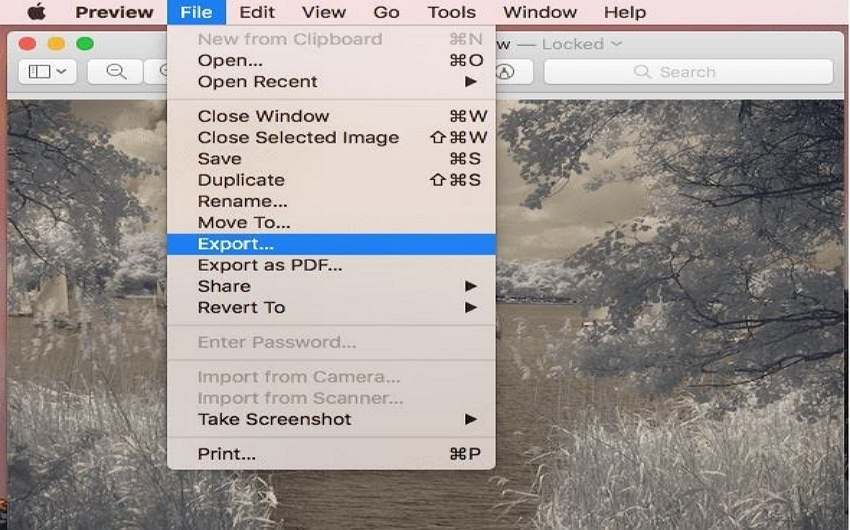
Given their proprietary and uncompressed nature, NEF files sometimes require specialized software to be fully appreciated and manipulated. However, their widespread adoption means that many standard image viewers and robust photography applications can indeed open them. On Windows, default photo viewers, sometimes with an additional codec pack, can often display NEF files. Similarly, macOS’s Preview application is typically capable of rendering them. For a more comprehensive experience, Nikon’s own NX Studio software is a reliable choice, providing native support and optimization for NEF files.
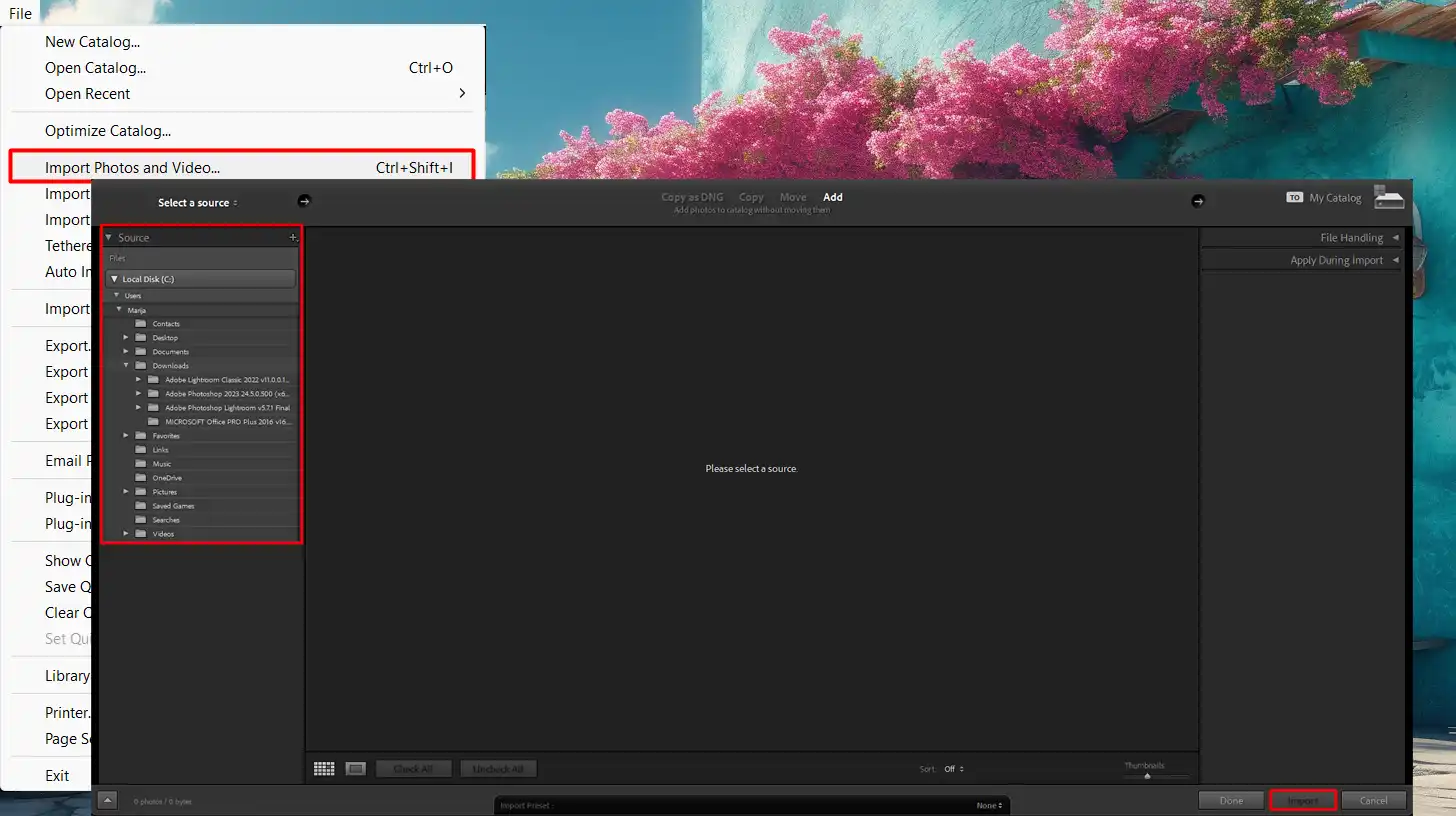
Beyond these basic viewers, a suite of powerful photo and graphic design tools offer extensive NEF compatibility. Industry-standard applications like Adobe Photoshop and Adobe Lightroom are top-tier choices, providing deep integration with raw formats, allowing photographers to access and manipulate every aspect of the NEF data. Other reputable software includes GIMP (a free, open-source alternative), IrfanView, Able RAWer, and AfterShot Pro. These tools are indispensable for anyone involved in “digital photography” or “photo manipulation,” as discussed on Tophinhanhdep.com.
For convenience, online platforms like Pics.io and Zamzar allow you to view NEF files without downloading any software. Mobile photographers are also well-served, with apps like Google Snapseed and Adobe Photoshop Express providing NEF viewing capabilities on both Android and iOS devices. When starting with NEF, it’s also prudent to avoid older transfer programs that might corrupt files; always use your operating system’s file explorer for copying NEF images. Tophinhanhdep.com encourages users to explore these various “image tools” to find the best fit for their workflow, ensuring their high-resolution images are always accessible.
Editing NEF Files for Visual Design: Unlocking Creative Potential
The true power of an NEF file comes alive in the editing suite. Because NEF files store a wide array of raw data and treat adjustments as a set of instructions rather than permanent changes, photographers have immense creative latitude. This non-destructive editing workflow is crucial for “visual design,” “graphic design,” and “digital art,” all central themes on Tophinhanhdep.com.
Within powerful editing software, photographers can fine-tune every parameter:
- White Balance: Correct color casts with precision, recreating the true colors of “nature photography” or setting a specific “aesthetic” mood for your image.
- Exposure and Contrast: Recover details in blown-out highlights or deep shadows, enhancing the dynamic range of high-resolution stock photos. This is particularly useful for challenging lighting conditions, allowing for dramatic “photo manipulation.”
- Color Correction and Grading: Adjust individual color channels, saturation, and vibrancy to achieve specific “editing styles,” from subtle enhancements for “beautiful photography” to bold transformations for “abstract” art.
- Sharpness and Noise Reduction: Apply sharpening without exaggerating grain and effectively reduce digital noise, especially important for “high-resolution” images that demand pristine clarity.
- Lens Corrections: Automatically or manually correct lens distortions, chromatic aberration, and vignetting, ensuring a polished look for all images, including those intended for “wallpapers” or “backgrounds.”
The ability to make these extensive adjustments without compromising the original image quality means that an NEF file is a perfect starting point for developing “creative ideas” and pushing photographic boundaries. For example, a single NEF file can be processed multiple times to create different moods or styles—one version could be a vibrant nature shot, another a desaturated, “sad/emotional” aesthetic. Tophinhanhdep.com values this versatility, providing inspiration and resources to help photographers transform their NEF captures into compelling visual stories, whether for a mood board or a thematic collection.
Transforming Your NEF: Conversion and Image Tools
While NEF files are indispensable for preserving maximum image quality and offering unparalleled editing flexibility, there are instances where converting them to other formats becomes necessary. Sharing images, publishing them online, or using them in applications that don’t natively support NEF often requires conversion. Fortunately, Tophinhanhdep.com understands this need and supports its users by highlighting the best “image tools” for conversion, compression, and optimization, ensuring that high-quality photography remains accessible and versatile across all platforms.
How to Convert an NEF File: Versatility and Compatibility
Converting an NEF file into a more universally compatible format like JPEG, PNG, or TIFF is a common practice, especially when the goal is widespread sharing or compatibility with specific platforms. This process can be achieved through various methods, directly linking to the “Image Tools” and “Converters” categories on Tophinhanhdep.com.
Many of the same software applications used to open and edit NEF files also offer robust conversion capabilities:
- Adobe Photoshop and Lightroom: These programs allow you to open an NEF file, make your desired edits, and then save the final image in a multitude of formats, including JPG, PNG, TIF/TIFF, GIF, and PSD. This provides complete control over the output quality and file type.
- Dedicated Raw Converters: Tools like Adobe’s DNG Converter (available for free) are excellent for batch converting NEF files to the Digital Negative (DNG) format. DNG is an open-source raw format that offers better long-term archiving and compatibility across various editing software, making it a powerful intermediate step for photographers.
- Specialized Photo Editors: Applications like IrfanView and AfterShot Pro also provide extensive conversion options, supporting less common formats alongside the popular ones. For example, IrfanView can convert NEF to PCX, TGA, PXM, PGM, PBM, JP2, and DCX, offering specialized utility for certain workflows.
- Online NEF Converters: For quick conversions without software installation, various online tools are invaluable. Platforms like Zamzar (which Tophinhanhdep.com may feature or recommend for general use) can convert NEF to BMP, GIF, JPG, PCX, PDF, TGA, and more. Tophinhanhdep.com also offers its own range of intuitive “converters” and “optimizers” to streamline this process, allowing users to effortlessly prepare their “high resolution” images for any purpose, from social media sharing to professional printing.
The key benefit of converting NEF files after editing is that you can leverage the full raw data for quality enhancements, then export a smaller, more accessible file for distribution, maintaining the visual integrity while optimizing for practical use. This flexibility supports various “photography” and “visual design” needs.
Addressing Common NEF Challenges: Troubleshooting and Best Practices
While NEF files offer significant advantages, photographers sometimes encounter challenges, primarily related to opening and managing them. Tophinhanhdep.com, a hub for all things visual, also aims to equip its users with solutions and best practices.
- File Extension Confusion: Sometimes, a file might appear to be an NEF due to a similar-looking extension (e.g., .NEX, .NET, .NES, .NEU). Always double-check the exact file extension to ensure you are indeed dealing with a Nikon Electronic Format file. Mistaking an NEF for another file type will lead to compatibility issues with NEF-specific software.
- Software Compatibility and Updates: If an NEF file fails to open in a compatible viewer or editor, the most common culprit is an outdated software version or missing plugin. For instance, Adobe Photoshop users might need to install the latest Camera Raw plugin to support newer Nikon camera models. Regularly checking for and applying updates for your chosen editing software is a simple yet effective troubleshooting step.
- Corrupted Files: In rare cases, NEF files can become corrupted during transfer from the camera’s memory card to a computer. To prevent this, always use reliable card readers and your operating system’s native file explorer for copying files, rather than outdated camera-specific transfer utilities that may inadvertently damage the raw data.
- Managing File Size: NEF files are large. Efficient storage solutions, including external hard drives or cloud storage, are essential for managing extensive collections of “high-resolution” photographs. Tophinhanhdep.com offers insights into storage strategies and “compressors” to help manage large image libraries effectively, which is vital for professional “digital photography” and “stock photos.”
Data Recovery: Safeguarding Your Digital Negatives
Accidental deletion of a precious NEF file can be a photographer’s nightmare. However, the unique structure of raw files, including NEF, often provides a ray of hope for recovery. When a file is “deleted,” typically it’s not the actual data that is immediately erased, but rather the link or pointer to that data in the file system. The data blocks themselves may remain on the storage device until they are overwritten by new information.
For Tophinhanhdep.com users, understanding this concept is crucial for safeguarding their “beautiful photography.” Recovery software can scan the storage device (memory card, hard drive) for these seemingly lost data blocks and reconstruct the NEF file. The success of recovery largely depends on how quickly action is taken and whether new data has been written to the same location. Specialized recovery tools, often discussed or reviewed on Tophinhanhdep.com, can delve into the intricate data structure of raw files, leveraging their uncompressed nature to retrieve as much information as possible.
The non-destructive editing paradigm of NEF files also plays a role in their resilience. Since original image data remains untouched, even if some instruction sets are damaged, the core photographic information might still be salvageable. For photographers who prioritize quality and consider each NEF file a valuable asset, investing in reliable backup practices and knowing about recovery options is paramount. Tophinhanhdep.com encourages a proactive approach, including regular backups and minimal use of storage devices after accidental deletion, to maximize the chances of recovering those irreplaceable “digital negatives” and preserving your “image inspiration & collections.”
Maximizing Your Photography with NEF and Tophinhanhdep.com
The journey with NEF files, from capture to final output, is one of precision, control, and immense creative freedom. As a digital darkroom for photographers and visual artists, Tophinhanhdep.com champions the use of raw formats like NEF to elevate the quality and artistic impact of every image. By understanding the advantages, addressing the challenges, and leveraging the right tools, photographers can consistently achieve outstanding results, whether creating stunning aesthetic images, impactful stock photos, or breathtaking nature scenes.
Limitations of NEF Files: Understanding the Trade-offs
While the benefits of NEF files are compelling, it’s also important to acknowledge their limitations. Every file format involves trade-offs, and for NEF, these primarily revolve around convenience and accessibility:
- Requirement for Specialized Software: As previously discussed, while some basic viewers can display NEF files, comprehensive editing and full control over the raw data typically require powerful applications like Adobe Photoshop or Lightroom. This can present barriers in terms of cost, learning curve, and software availability, especially for casual photographers. Tophinhanhdep.com helps mitigate this by offering guides and reviews for various “image tools” that support NEF, catering to different skill levels and budgets.
- Difficulty in Sharing and Distribution: The large file size and proprietary nature of NEF files make direct sharing and widespread distribution challenging. Many platforms, social media sites, and even some older software do not support NEF files. This necessitates conversion to more common formats like JPEG or PNG before sharing, adding an extra step to the workflow. This is where Tophinhanhdep.com’s “converters” and “optimizers” become invaluable, simplifying the process of preparing high-resolution images for online display or quick sharing, while retaining visual quality.
- Storage Requirements: NEF files consume significantly more storage space than their JPEG counterparts. A large volume of raw images requires robust storage solutions, whether external hard drives, network-attached storage (NAS), or cloud services. This is a practical consideration for all “digital photography” enthusiasts, and Tophinhanhdep.com offers resources on efficient storage management to support vast “image inspiration & collections.”
- Variations Between Camera Models: NEF, being a proprietary format, can exhibit subtle variations between different Nikon camera models. This means that an NEF file from a brand-new camera might not be immediately recognized by older versions of editing software, necessitating frequent updates to plugins or applications. This constant evolution is a factor photographers must consider.
Despite these limitations, for those who prioritize the ultimate control and quality in their “photography,” the NEF format remains an indispensable tool. The ability to extract maximum detail and achieve precise creative control far outweighs these inconveniences for many serious practitioners.
The NEF Advantage on Tophinhanhdep.com: A Catalyst for Creativity
On Tophinhanhdep.com, the world of NEF files opens up exciting possibilities for content creation across all its main categories.
- Images (Wallpapers, Backgrounds, Aesthetic, Nature, Abstract, Sad/Emotional, Beautiful Photography): Starting with NEF ensures that every wallpaper, background, or aesthetic image possesses the highest possible resolution and detail. This is crucial for large displays and for capturing the intricate beauty of “nature photography” or the nuanced emotional depth of “sad/emotional” and “abstract” art. NEF files allow artists to achieve the precise look and feel for “beautiful photography” that resonates with viewers.
- Photography (High Resolution, Stock Photos, Digital Photography, Editing Styles): NEF is the cornerstone of “high-resolution” photography and professional “stock photos.” It empowers “digital photography” with unparalleled flexibility in “editing styles,” allowing photographers to experiment and perfect their craft. Tophinhanhdep.com provides a platform to showcase and discover photography that leverages these high standards.
- Image Tools (Converters, Compressors, Optimizers, AI Upscalers, Image-to-Text): Tophinhanhdep.com’s suite of “image tools” directly complements the NEF workflow. From robust “converters” to prepare images for sharing, to “compressors” and “optimizers” for web use, and even “AI upscalers” that can enhance details in already rich NEF-derived images, the platform ensures that photographers have every resource to manage and perfect their visual content.
- Visual Design (Graphic Design, Digital Art, Photo Manipulation, Creative Ideas): For those involved in “graphic design,” “digital art,” and advanced “photo manipulation,” the extensive data in NEF files provides the perfect foundation. It allows for intricate adjustments and layering without degradation, fostering “creative ideas” and enabling the production of sophisticated visual content.
- Image Inspiration & Collections (Photo Ideas, Mood Boards, Thematic Collections, Trending Styles): The superior quality of images derived from NEF files naturally feeds into “image inspiration” and curated “thematic collections” on Tophinhanhdep.com. Photographers can draw inspiration from high-quality examples and then apply their learnings to their own raw captures, pushing the boundaries of “trending styles” and contributing to a rich visual ecosystem.
In conclusion, the NEF image file is a powerful asset for any Nikon photographer, offering the ultimate in image quality and editing flexibility. While it comes with specific handling requirements, the artistic control and superior results it enables are unmatched. Tophinhanhdep.com serves as an invaluable resource for navigating the NEF landscape, providing the knowledge, tools, and inspiration necessary to transform raw captures into stunning visual masterpieces, enriching the digital world with high-resolution, impactful, and beautifully crafted images. Embrace the NEF, and unleash the full potential of your photographic journey on Tophinhanhdep.com.