What is Considered a High-Resolution Image?

In an increasingly visual world, where images are the universal language of communication, the quality of our visual content is paramount. From breathtaking wallpapers on our digital devices to stunning prints adorning our walls, the sharpness, clarity, and detail of an image profoundly impact its effectiveness and aesthetic appeal. At the heart of this quality lies “resolution” – a fundamental concept that dictates how an image looks, whether on a screen or printed on paper. Understanding what constitutes a high-resolution image is not just for photographers and graphic designers; it’s essential for anyone who interacts with digital visuals, ensuring that every image shared, viewed, or printed achieves its maximum potential. Tophinhanhdep.com is dedicated to providing users with an unparalleled visual experience, offering a vast array of high-quality images, from aesthetic backgrounds to beautiful nature photography, and equipping them with the tools and knowledge to master image resolution for any purpose.
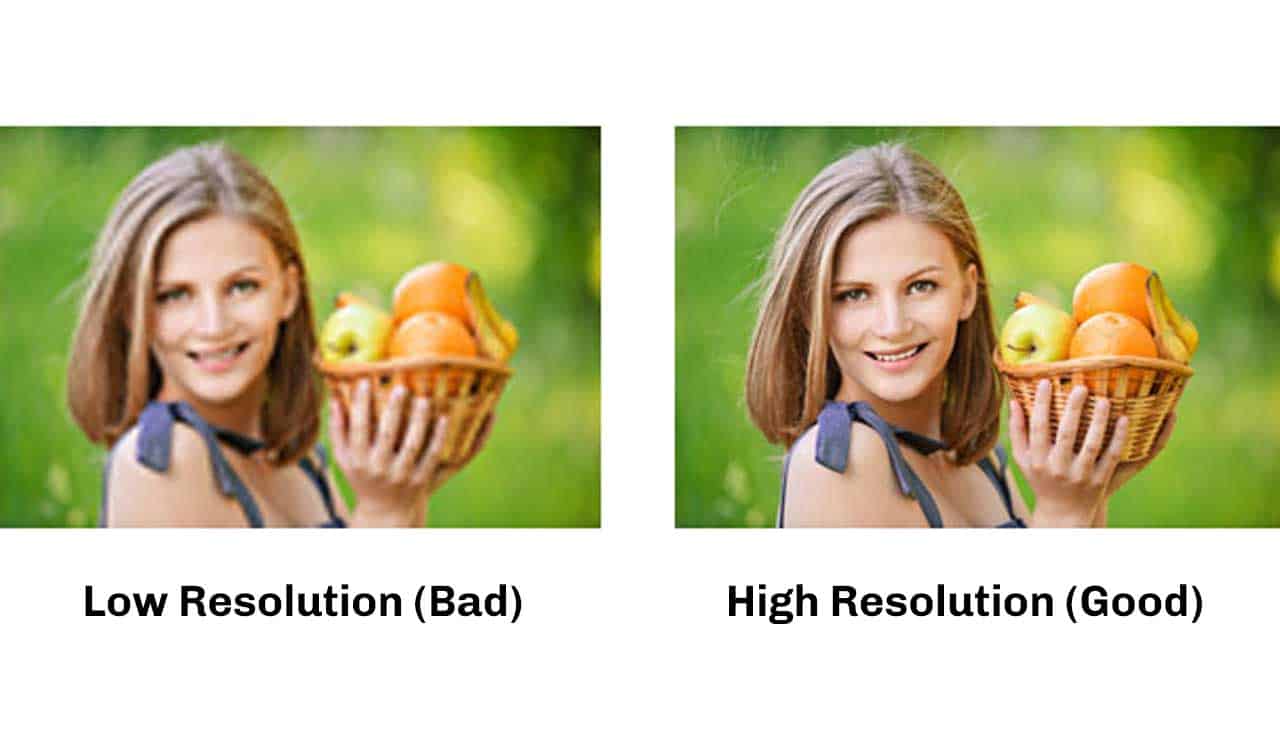
This comprehensive guide will demystify high resolution, exploring its core components, differentiating between its digital and print applications, and offering practical advice on how to manage and optimize image quality. Whether you’re curating a collection of abstract art, preparing stock photos for a commercial project, or simply looking for the perfect high-resolution background, mastering the nuances of image resolution will elevate your visual content and ensure it always looks its best.
Understanding Image Resolution: Pixels, DPI, and PPI
To truly grasp what a high-resolution image is, we must first delve into the foundational elements that define image quality: pixels, and the measurements used to quantify their density – DPI and PPI. These terms are often used interchangeably, but they refer to distinct aspects of an image’s detail, depending on whether it’s viewed digitally or in print.
The Fundamentals: Pixels and Detail
At its most basic level, a digital image is composed of tiny squares of color known as pixels (short for “picture elements”). Imagine a vast mosaic, where each tile is a pixel. When viewed from a distance, these individual squares blend seamlessly to form the complete picture we perceive. The more pixels an image contains, particularly within a given area, the more detail it holds, and the smoother its gradients and lines will appear.
Conversely, an image with too few pixels, especially when enlarged, will exhibit noticeable pixelation. This manifests as jagged lines and a blocky, unclear appearance, often reminiscent of retro video games where pixels were intentionally sparse due to memory limitations. This “pixelated” look is the hallmark of a low-resolution image stretched beyond its capacity, a visual pitfall that Tophinhanhdep.com strives to help its users avoid. Whether you’re selecting wallpapers, backgrounds, or detailed photography, the underlying pixel structure is the silent architect of its visual integrity.
DPI vs. PPI: What’s the Difference?
While both DPI and PPI relate to the density of these tiny color points, they serve different purposes and apply to different contexts:
-
PPI (Pixels Per Inch): This metric is predominantly used for digital displays such as computer monitors, smartphones, and televisions. PPI measures the number of pixels that can be displayed within one inch of screen space. A higher PPI on a digital screen means more pixels are packed into each inch, resulting in a sharper, more detailed image, provided the screen itself supports that density. For images intended for web use, such as those found in Tophinhanhdep.com’s extensive collections of aesthetic or thematic images, PPI is the relevant measurement. Standard screen resolution is often around 72 PPI, meaning that images optimized for the web don’t necessarily need an extremely high PPI to look good on most displays.
-
DPI (Dots Per Inch): This term is specifically related to print output. DPI measures the number of individual ink dots a printer can place within one linear inch on a piece of paper. The more dots a printer can lay down per inch, the finer the detail and smoother the color transitions in the printed image. For projects like creating professional prints, brochures, or even custom merchandise from Tophinhanhdep.com’s beautiful photography or digital art, DPI is the crucial factor. A higher DPI ensures that the physical print appears crisp, clear, and free from visible dots, maintaining the professional quality expected.
Understanding the distinction between PPI and DPI is vital for anyone managing visual content. An image might look perfect on your screen (high PPI for digital), but if its underlying DPI is too low, it will appear blurry and pixelated when printed. Tophinhanhdep.com emphasizes this knowledge, providing users with the insights needed to prepare their images correctly for both digital and print applications.
Defining High Resolution: Key Numbers for Different Outputs
The definition of “high resolution” isn’t a fixed numerical value; rather, it’s context-dependent, varying significantly based on whether an image is intended for digital display or physical print. What might be considered high-res for a website could be woefully inadequate for a billboard. Recognizing these standards is critical for anyone looking to produce professional-quality visual content, from digital artists creating graphic designs to photographers preparing their work for an exhibition.
High Resolution for Print Media
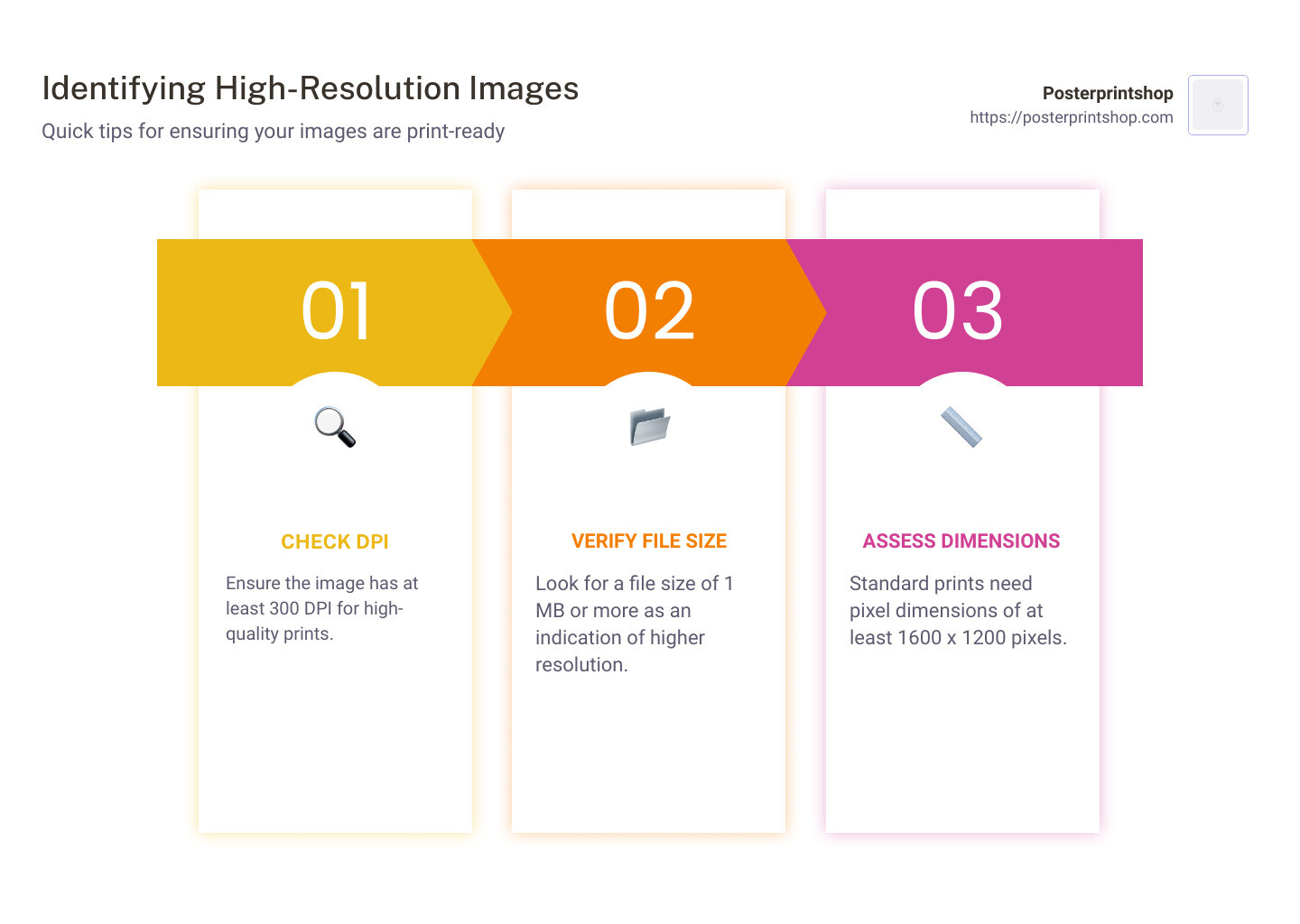
For any project destined for physical print – be it a striking poster from Tophinhanhdep.com’s nature collection, a vibrant page in a magazine, or a crisp business card – the benchmark for high resolution is considerably higher than for digital display. The industry standard dictates that images should be 300-350 DPI (dots per inch) at the final output size.
Why this specific range? At 300 DPI, the human eye, at a typical viewing distance, can no longer distinguish individual ink dots, resulting in a smooth, continuous, and highly detailed image. This ensures that text is sharp, photographs are lifelike, and intricate graphic designs retain their precision. While submitting files with resolutions higher than 350 DPI is generally acceptable, it’s often unnecessary and won’t visibly enhance the printed quality of your project; it merely results in larger file sizes without a tangible benefit.
It’s important to remember that increasing the size of an image for print directly impacts its effective DPI. A 350 DPI image might look sharp at 100% size, but if you attempt to print it much larger, the same number of pixels (or dots) will be spread over a greater area, causing a loss of sharpness and leading to a pixelated or blurry output. This highlights a crucial principle in image management: you can always decrease an image’s size or resolution without quality loss, but you cannot simply “upscale” a low-resolution image to high resolution by increasing the DPI in an editing program without sacrificing clarity. For print-ready materials, starting with a natively high-resolution image, such as those available through Tophinhanhdep.com’s high-resolution photography archives, is paramount.
High Resolution for Digital Displays (Web and Screen)
When it comes to images displayed on digital screens – whether they are wallpapers, website backgrounds, social media graphics, or digital art pieces from Tophinhanhdep.com – the resolution requirements are notably different and typically lower. The standard resolution for internet browsers and most digital screens is 72 PPI (pixels per inch).
The reason for this lower standard lies in how screens render images. Most computer monitors and mobile devices have a finite pixel density, and displaying an image with a PPI significantly higher than the screen’s native resolution won’t make it look any sharper; the screen simply cannot render the “extra” detail. Instead, providing excessively high-resolution images for digital platforms can be counterproductive:
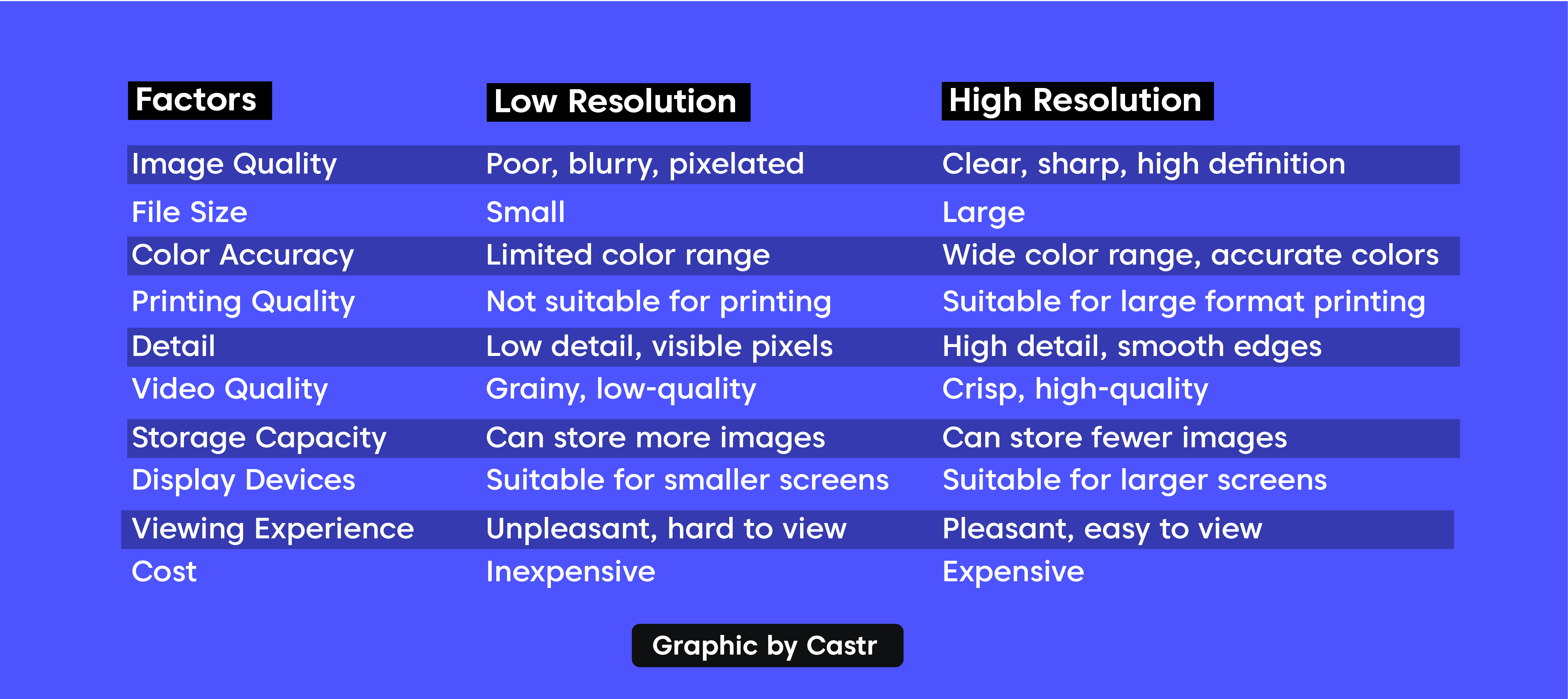
- Larger File Sizes: Higher PPI means more pixels, which translates directly to larger file sizes. This can slow down website loading times, consume more bandwidth, and take up unnecessary storage space on devices. For Tophinhanhdep.com, optimizing images for web display ensures a fast, seamless user experience without compromising perceived quality.
- No Perceptible Benefit: An image at 300 PPI will not appear three times sharper than an image at 72 PPI on a standard monitor. The visual difference is often negligible, if not entirely imperceptible, at typical viewing distances.
Therefore, for digital applications, a balance must be struck between sufficient detail and efficient file size. While 72 PPI is a common baseline, modern high-resolution displays (like “Retina” screens) can benefit from images with slightly higher PPIs (e.g., 96 or even 150 PPI) to appear crisper. However, resolutions comparable to print standards (300+ PPI) are rarely needed for purely digital content and are generally avoided to maintain optimal performance.
The Exception: Vector Graphics
An important exception to the pixel-based resolution rules lies in vector graphics. Unlike raster images (which are composed of a grid of pixels), vector graphics are built using mathematical equations that define points, lines, curves, and shapes.
The key advantage of vector files, often used in graphic design, digital art, and for creating logos or illustrations on Tophinhanhdep.com, is their scalability without loss of quality. Because they are not pixel-dependent, vector images can be resized to any dimension – from a tiny icon to a massive billboard – without ever becoming pixelated or blurry. This makes them “resolution independent.” Common vector file formats include SVG, AI (Adobe Illustrator), and EPS. While photography and complex digital paintings are almost always raster-based, understanding vector graphics is crucial for designers and artists who need flexible, scalable visual assets.
The Impact of Resolution on Your Visual Content
The resolution of an image is not merely a technical specification; it profoundly influences how your visual content is perceived and performs across various platforms. From conveying professionalism to affecting user experience, understanding this impact is essential for anyone creating, selecting, or managing images, especially in dynamic environments like Tophinhanhdep.com.
Quality and Professionalism
High-resolution images are synonymous with professionalism and attention to detail. A crisp, clear photograph or a precisely rendered graphic elevates the perceived quality of anything it accompanies. Imagine a website featuring beautiful photography; if the images are high-resolution, they create an immersive and engaging experience. Conversely, blurry or pixelated images immediately undermine credibility, regardless of the quality of the underlying content.
For Tophinhanhdep.com, a platform dedicated to aesthetic and high-resolution images, maintaining this standard is non-negotiable. Whether it’s a stunning nature wallpaper, an abstract background, or an emotional portrait, the clarity derived from high resolution ensures the visual integrity and artistic intent are preserved. This commitment to quality translates into a better user experience and reinforces the platform’s reputation as a source for premium visual content. In graphic design, photo manipulation, and creating compelling mood boards, starting with high-resolution source material is the first step towards achieving a polished, professional outcome.
File Size and Performance
While high resolution is desirable for quality, it comes with a trade-off: larger file sizes. More pixels or dots per inch mean more data needs to be stored and processed. This has significant implications, especially in today’s digital landscape:
- Storage: High-resolution image collections, like those offered by Tophinhanhdep.com, require substantial storage space. This is a primary concern for photographers with extensive digital photography portfolios.
- Bandwidth: Large image files consume more bandwidth when uploaded or downloaded. This can be a concern for websites, as slow loading times can lead to frustrated users and higher bounce rates. It’s why Tophinhanhdep.com often provides optimized versions of images for web use, balancing visual quality with performance.
- Processing Power: Editing and manipulating high-resolution images require more powerful hardware and software. Tasks like photo manipulation or applying complex editing styles can be sluggish on less capable devices.
This balance between quality and performance is why Tophinhanhdep.com offers various “Image Tools” such as compressors and optimizers. These tools allow users to reduce file size without drastically compromising visual quality, making images suitable for different contexts without sacrificing the inherent detail captured in the original high-resolution file.
Scaling and Editing Limitations
A crucial rule in image management is understanding the limitations of scaling. You can generally decrease an image’s size or resolution without significant loss of quality. Image editing software can intelligently discard unnecessary pixel information to create a smaller, optimized version.
However, the reverse is almost never true: you cannot increase a low-resolution image to a high-resolution one without severely degrading its quality. When you attempt to enlarge a low-resolution image, the software has to “guess” or interpolate new pixel information to fill the expanded space. This process often results in blurriness, pixelation, and a noticeable lack of detail – a printed result that will be a blurry mess.
This principle underscores the importance of always starting with the highest possible resolution source image for your creative projects. If you capture a low-resolution photo, it’s virtually impossible to transform it into a truly high-resolution image later. While advanced “Image Tools” like AI Upscalers (which Tophinhanhdep.com provides) can perform remarkable feats in reconstructing detail and improving the appearance of lower-resolution images, they are still limited by the original data and may not match the sharpness of a natively high-resolution image. Therefore, for all critical applications, from stock photos to beautiful photography intended for large prints, capturing or acquiring high-resolution files from the outset is non-negotiable.
Practical Applications: When to Choose High vs. Low Resolution
Navigating the world of visual content requires a keen understanding of when to deploy high-resolution images and when a lower resolution is not only acceptable but often preferable. This strategic choice impacts everything from print quality and website speed to the overall effectiveness of your visual communication. Tophinhanhdep.com offers a diverse range of images and tools, making it a valuable resource for fulfilling various resolution needs.
High Resolution: Essential Scenarios
There are specific contexts where the clarity and detail afforded by high-resolution images are absolutely indispensable:
- Professional Printing: Any material destined for a physical print format demands high resolution. This includes:
- Posters and Banners: Especially large-format prints, where even slight pixelation becomes glaringly obvious. Imagine a stunning nature photograph from Tophinhanhdep.com blown up for a gallery; it needs 300-350 DPI to impress.
- Brochures, Magazines, and Books: High-quality print publications rely on sharp images to convey professionalism and engage readers.
- Business Cards and Stationery: Small yet vital, these items require crisp logos and text to reflect a strong brand identity.
- Fine Art Prints: For artists and photographers showcasing their work, maximum resolution preserves every delicate nuance and texture.
- Large Displays and Projections: For content displayed on large HD screens, high-definition televisions, or projected in professional settings, high-resolution imagery ensures that the visuals remain crisp and impactful, even when viewed up close.
- Detailed Photography: Certain genres of photography inherently require high resolution to capture their essence:
- Macro Photography: Capturing intricate details of small subjects.
- Portrait Photography: Revealing subtle expressions and textures.
- Nature Photography: Documenting the delicate patterns of leaves or the fine feathers of a bird, as seen in Tophinhanhdep.com’s collections.
- Stock Photos: As versatile assets, stock photos from Tophinhanhdep.com are typically offered in high resolution to allow for diverse usage, from web to print.
- Digital Art and Graphic Design Master Files: When creating digital art, complex graphic designs, or photo manipulations, working with high-resolution source files provides maximum flexibility for future applications, whether for print, animation, or various digital platforms. These master files ensure that quality is maintained even through extensive editing.
Low Resolution: Optimal Scenarios
While the allure of high resolution is strong, there are many instances where lower resolution is perfectly adequate, and in fact, often more practical:
- Websites and Social Media: The most common application for low-resolution images. Optimized images (typically 72 PPI, sometimes slightly higher for retina displays) load much faster, consume less data, and contribute to a smoother browsing experience. This is crucial for Tophinhanhdep.com, where quick loading times are essential for users browsing vast collections of wallpapers, backgrounds, and aesthetic images.
- Email Attachments: Sending large, high-resolution files via email can clog inboxes and cause delays. Low-resolution images are ideal for quick sharing and previews.
- Internal Presentations and Drafts: When the primary goal is conveying information or soliciting feedback, high resolution may be overkill. Lower-resolution images can suffice for internal documents or preliminary drafts.
- Specific Device Backgrounds: While many modern devices can handle high-resolution wallpapers, optimizing for lower resolutions can save storage space and potentially improve device performance for users who prioritize efficiency.
Checking and Managing Image Resolution with Tophinhanhdep.com’s Tools
Knowing how to check an image’s resolution is a fundamental skill. For PC users, you can typically right-click on an image file, select “Properties,” and then navigate to the “Details” or “Summary” tab to view its pixel dimensions and often its DPI. On a Mac, select the image, then go to “File” > “Get Info,” and look under “More Info” for dimensions.
Tophinhanhdep.com empowers its users with a suite of “Image Tools” to effectively manage resolution:
- Converters: Change image formats while often allowing resolution adjustments.
- Compressors: Reduce file sizes without significant visual quality loss, ideal for web optimization.
- Optimizers: Fine-tune images for specific web or print applications, balancing quality and performance.
- AI Upscalers: Advanced tools that can intelligently enhance the resolution of lower-quality images, attempting to reconstruct detail. While not a perfect substitute for native high-resolution, they offer significant improvements for legacy or found images.
- Image-to-Text: While not directly resolution-related, this tool highlights Tophinhanhdep.com’s commitment to advanced image utility, processing even high-resolution text within images.
The best practice remains: always start with the highest resolution source image you can get. It provides the maximum flexibility for all subsequent uses, allowing you to downsize and optimize as needed without compromising the initial quality.
Mastering Image Resolution for Your Creative Journey with Tophinhanhdep.com
In the dynamic landscape of digital imagery and visual design, understanding and effectively managing image resolution is a cornerstone of success. It’s the difference between content that simply exists and content that captivates, informs, and inspires. Tophinhanhdep.com is more than just a repository of beautiful images; it’s a comprehensive ecosystem designed to empower your creative journey, offering both the high-quality assets and the essential knowledge to master image resolution.
Enhancing Your Visuals with Tophinhanhdep.com’s Resources
Tophinhanhdep.com is curated with the discerning user in mind, providing an extensive array of high-resolution images across diverse categories:
- Images (Wallpapers, Backgrounds, Aesthetic, Nature, Abstract, Sad/Emotional, Beautiful Photography): Every image in our collection is meticulously selected and often available in high resolution, ensuring that whether you’re personalizing your device or sourcing visuals for a professional project, you have access to unparalleled quality. From the intricate textures of nature photography to the subtle gradients of abstract art, the detail is preserved.
- Photography (High Resolution, Stock Photos, Digital Photography, Editing Styles): We understand that high resolution is the foundation of exceptional photography. Our platform emphasizes this, providing high-resolution stock photos suitable for any commercial or personal use. Furthermore, we delve into the nuances of digital photography and various editing styles, recognizing that resolution awareness is key to achieving desired artistic effects and professional finishes during photo manipulation.
- Visual Design (Graphic Design, Digital Art, Photo Manipulation, Creative Ideas): For graphic designers and digital artists, starting with high-resolution images is crucial. It provides the canvas for intricate detail and ensures that logos, illustrations, and manipulated photos retain their sharpness across different media. Tophinhanhdep.com supports your creative ideas by offering resources and inspiration that hinge on high-quality visuals.
- Image Inspiration & Collections (Photo Ideas, Mood Boards, Thematic Collections, Trending Styles): Building mood boards or exploring thematic collections requires a consistency of quality. Knowing about resolution allows you to select images that will seamlessly integrate, maintaining the visual integrity and impact of your creative vision. Trending styles often demand crisp, vibrant imagery to truly resonate.
The Future of High-Resolution: AI Upscaling
While the golden rule dictates starting with a high-resolution source, technological advancements are continually expanding what’s possible. Tophinhanhdep.com’s suite of “Image Tools” includes state-of-the-art AI Upscalers. These powerful tools leverage artificial intelligence to intelligently analyze and reconstruct lower-resolution images, adding detail and sharpness that was previously impossible. While they may not perfectly replicate a natively high-resolution image, they can dramatically improve the quality of older or found images, breathing new life into visuals that might otherwise be unusable for print or larger digital displays. This represents a significant leap forward in addressing the challenges of legacy content and opens new avenues for creative possibilities.
Beyond upscaling, Tophinhanhdep.com also offers tools like “Image-to-Text,” showcasing our commitment to integrating advanced AI capabilities that enhance every facet of image interaction. These innovations underscore our mission to provide cutting-edge solutions for all your visual content needs.
Conclusion
Understanding “what is considered a high-resolution image” is more than just learning a technical definition; it’s about making informed decisions that elevate the quality and effectiveness of your visual communication. We’ve explored how pixels form the building blocks of images, differentiated between PPI for digital screens and DPI for print, and established the crucial numerical standards that define high resolution in various contexts (72 PPI for web, 300-350 DPI for print).
The impact of resolution extends beyond mere aesthetics, affecting professionalism, file size, performance, and the very flexibility of your creative work. While high resolution is indispensable for print, large displays, and detailed photography, judicious use of optimized low-resolution images is essential for web performance and efficient sharing.
At Tophinhanhdep.com, we believe that exceptional visual content begins with exceptional resolution. We invite you to explore our vast collections of high-resolution images, from captivating nature scenes and abstract art to emotional photography and versatile stock photos. Equip yourself with our innovative “Image Tools” – including compressors, optimizers, and AI upscalers – to perfectly tailor your visuals for any platform. Embrace the knowledge and resources Tophinhanhdep.com offers to ensure that every image you create, share, or display radiates clarity, detail, and unparalleled quality. Master image resolution, and unlock the full potential of your visual journey.