What is a Digital Image?
In an increasingly visual world, digital images have become the universal language of communication, documentation, and artistic expression. From the high-resolution photography gracing the homepage of Tophinhanhdep.com to the aesthetic backgrounds adorning our personal devices, every visual we encounter on a screen owes its existence to the fundamental principles of digital imaging. Far from being a simple photograph, a digital image is a complex tapestry of numerical data, meticulously constructed and precisely rendered to create the vibrant, detailed visuals we experience daily. Understanding what a digital image truly is means delving into its core components, its journey from the analog world, and the sophisticated processes that allow us to capture, manipulate, and share these visual masterpieces. For enthusiasts and professionals alike who explore the vast collections of wallpapers, backgrounds, and creative ideas on Tophinhanhdep.com, grasping these fundamentals unlocks a deeper appreciation for the art and science behind every pixel.

At its heart, a digital image is a two-dimensional function, represented by a finite collection of discrete points. Unlike traditional analog images, which display continuous variations of shades and colors, a digital image breaks down this continuous information into a grid of individual picture elements, famously known as pixels. Each pixel holds specific information about brightness, color, and location, transforming a fluid visual into a structured dataset that computers can process, store, and display. This transformation is pivotal, enabling the myriad of possibilities that digital photography and graphic design offer, from subtle editing styles to advanced photo manipulation, all readily accessible through platforms like Tophinhanhdep.com.
The Anatomy of a Digital Image: Pixels, Resolution, and Bit Depth

To truly comprehend a digital image, we must dissect its core components: how it transitions from the physical world into digital data, the individual units that compose it, and the quantitative measures that define its quality and visual richness.
From Analog to Digital: Sampling and Quantization
The journey of an image from the real world, whether captured by a camera, microscope, or scanned from a film, begins in an analog state. Natural scenes present a continuous spectrum of light intensities and colors, blending seamlessly into one another. To convert these continuous-tone images into a computer-readable digital format, two crucial operational processes are applied: sampling and quantization.
Sampling involves dividing the continuous analog image into a discrete, two-dimensional array. Imagine overlaying a fine grid over a photograph; sampling measures the light intensity at specific, successive locations within each square of this grid. The more closely spaced these measurement points are, the more detail from the original analog image is captured.
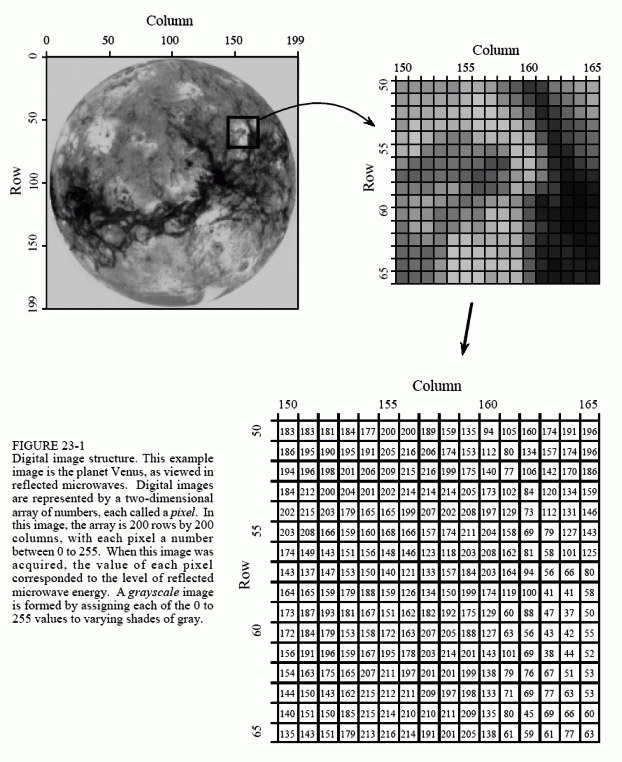
Following sampling, quantization takes place. The measured light intensities, which are still continuous analog values, are converted into a finite set of digital integer values. For example, if a system can only represent brightness using 256 levels, each sampled intensity will be assigned the closest integer value within that range. This process effectively translates the captured light information into numerical data that a computer can understand and manipulate. The objective is to represent the image as an array of discrete points, each containing specific information about its brightness or tonal range, described by a precise digital data value at a unique location (x,y). This foundational conversion is essential for any digital image, regardless of whether it’s a simple black and white graphic or a complex, full-color nature photograph destined for Tophinhanhdep.com.
The Pixel: Building Block of Digital Imagery
The culmination of sampling and quantization is the pixel—a portmanteau of “picture element.” A pixel is the smallest individual unit of a digital image, and collectively, these pixels form the entire visual. Each pixel is essentially a numerical representation of intensity and color at a specific point in the image’s grid.
Digital images are generally rectangular or square, and each pixel within this grid is identified by a unique coordinate-pair (x,y) in a Cartesian system. The ‘x’ coordinate specifies the horizontal position (column), and the ‘y’ coordinate indicates the vertical position (row). By convention, the top-left corner of an image is often considered (0,0). Thus, a digital image is a highly organized array of these individual data points, each carrying its unique brightness and color information. When you view a wallpaper or background on Tophinhanhdep.com, you are essentially looking at millions of these tiny, ordered numbers interpreted by your screen to create a coherent visual representation of the original scene.
Spatial Resolution: Clarity and Detail
The perceived quality of a digital image, often synonymously referred to as image resolution, is largely determined by its spatial resolution. Spatial resolution describes the number of pixels used to construct and render a digital image. Simply put, it’s about how finely the image was sampled during its acquisition or digitization. A higher spatial resolution means more pixels packed into the same physical dimensions, allowing the image to reproduce finer details present in the original scene. For platforms like Tophinhanhdep.com, offering high-resolution photography is paramount, as it ensures sharp, detailed visuals for wallpapers and backgrounds.
The sampling frequency, or the number of pixels generated, is critical. If an analog image is inadequately sampled, significant detail can be lost, a phenomenon known as aliasing. This occurs when details in the original image are sampled at a rate less than twice their spatial frequency (the Nyquist criterion or Shannon’s sampling theorem). Undersampling can cause high-frequency information to be misinterpreted as lower-frequency patterns, leading to distortions and the creation of spurious details that weren’t originally present. Conversely, if too many pixels are acquired (oversampling), no additional spatial information is gained, though it can sometimes improve the accuracy of feature measurements.
The most visible manifestation of low spatial resolution is pixelation, where individual pixels become distinctly visible, giving the image a blocky appearance and masking fine details. This is why high-resolution stock photos and beautiful photography on Tophinhanhdep.com require meticulous attention to spatial resolution during their capture and processing, ensuring that every subtle nuance is preserved and displayed with exceptional clarity.
Bit Depth and Brightness: The Spectrum of Tones
Beyond spatial arrangement, another crucial characteristic defining a digital image is its bit depth, which directly relates to the brightness or tonal range available for each pixel. Bit depth refers to the binary range of possible grayscale or color values an analog-to-digital converter uses to translate analog image information into discrete digital values.
In the simplest terms, bit depth determines how many distinct shades of gray or specific colors a pixel can represent. For grayscale images, a 1-bit image can only represent two values (black or white). A 4-bit image can display 16 different brightness levels, and an 8-bit image can represent 256 shades of gray. The relationship is exponential: $2^{\text{bit depth}}$ equals the number of possible values. For color images, bit depth typically refers to the combined bits for all color channels (e.g., 24-bit for “true color” means 8 bits each for red, green, and blue).
A higher bit depth translates to a greater dynamic range, meaning the image can capture and display a wider spectrum of intensities, from the darkest blacks to the brightest whites, with more subtle gradations in between. This is vital for rendering aesthetic and nature photography with rich, smooth tonal transitions. Low bit depth can lead to gray-level contouring or posterization, where continuous tonal gradients appear as distinct, stair-stepped bands of color or gray, an undesirable artifact that compromises visual fidelity. For the stunning beautiful photography featured on Tophinhanhdep.com, adequate bit depth ensures that the intricate play of light and shadow, the delicate nuances of color, and the overall emotional depth are conveyed without compromise.
Color in the Digital Realm: Models and Representation
While grayscale images offer a foundational understanding, the true expressive power of digital imagery often lies in its ability to reproduce a vast spectrum of colors. This requires specific color models and methods for representing and analyzing color data.
Understanding Color Spaces
Digital color images are constructed using three independent brightness components, typically corresponding to the primary colors. When displayed on a monitor, three separate color emitters (red, green, blue) combine to generate the visible spectrum. This concept leads to various color space models, each serving different purposes in image acquisition, processing, and display.
The most common is the RGB (Red, Green, Blue) color space. This additive model is used by image sensors in digital cameras and monitors, where varying intensities of red, green, and blue light combine to produce all other colors. For instance, combining all three at full intensity yields white. Many digital art and photo manipulation techniques on Tophinhanhdep.com primarily operate within the RGB space.
For printing, the CMYK (Cyan, Magenta, Yellow, Black) subtractive color space is utilized. Here, colors are created by absorbing certain wavelengths of light. An RGB image must be converted to CMYK before being sent to a printer.
Another important model is HSI (Hue, Saturation, Intensity), which aligns more closely with human perception of color. Hue defines the pure color (e.g., red, blue, green). Saturation describes the color’s purity or vividness (how much gray is mixed in). Intensity (or brightness/lightness/value) determines how bright or dark the color appears. The HSI model is particularly useful for certain image processing algorithms because it separates the color information (hue and saturation) from the brightness component, making it easier to adjust colors intuitively without affecting luminance, crucial for refining abstract and aesthetic images. Understanding these color spaces is fundamental for photographers and graphic designers aiming to achieve specific color palettes and moods, whether for nature images or trending styles found on Tophinhanhdep.com.
Pseudocolor and Histograms: Visualizing Image Data
To analyze and adjust the brightness and color characteristics of digital images, powerful tools like histograms are indispensable. An image histogram is a graphical representation that maps the number of pixels at each gray level or color intensity present in an image. For an 8-bit grayscale image, the horizontal axis might represent brightness values from 0 (black) to 255 (white), while the vertical axis indicates the count of pixels at each specific level.
Histograms provide a quick overview of an image’s tonal distribution, revealing whether it is high-contrast (pixels grouped at extremes), low-contrast (pixels clustered in the middle), or well-balanced. This information is invaluable for contrast adjustment and evaluating the image’s dynamic range. For color images, a histogram is typically a composite of three individual histograms for the red, green, and blue channels, allowing for detailed analysis of color balance and intensity distribution. Editors frequently use histograms to ensure that beautiful photography and other images have optimal exposure and contrast before being featured on Tophinhanhdep.com.
Pseudocolor imaging is a technique applied to grayscale images, where specific gray-level ranges are assigned to particular color values. While not true color, it can be highly effective for highlighting regions of interest, as the human eye is more adept at discriminating between different shades of color than between varying shades of gray. This can be used in scientific imaging to emphasize details that might otherwise be overlooked, providing new creative ideas for visual design.
Processing and Managing Digital Images
The true power of digital images lies in their manipulability. Once an image is digitized, it becomes a flexible dataset that can be enhanced, restored, analyzed, and stored efficiently using a variety of tools and techniques.
Digital Image Processing: Enhancing and Transforming Visuals
Digital Image Processing (DIP) encompasses the use of computer algorithms and mathematical models to perform operations on a digital image. The goal is often to enhance the image quality, extract meaningful information, or transform it for specific applications. The processes involved are broad and varied, contributing significantly to the high standards of images seen on Tophinhanhdep.com.
Key phases and techniques in DIP include:
- Image Acquisition: The initial capture of the image from a sensor or scanner.
- Image Enhancement: Improving the visual quality, such as adjusting contrast, sharpening details, or reducing noise, to make hidden information more apparent. This aligns with many “editing styles” offered or demonstrated on Tophinhanhdep.com.
- Image Restoration: Reversing degradations like blurring, noise, or distortion, often based on a mathematical model of the degradation process. For instance, repairing old or damaged photos.
- Image Segmentation: Dividing an image into multiple regions or objects, which is critical for tasks like object recognition.
- Morphological Processing: Analyzing and modifying shapes and structures within an image by adding or removing pixels, useful for extracting specific components.
- Color Image Processing: Handling color models and transformations, ensuring accurate and vibrant color reproduction for nature and aesthetic images.
- Image Compression: Reducing file size for efficient storage and transmission, a vital consideration for wallpapers and backgrounds on Tophinhanhdep.com.
- Object Detection and Recognition: Identifying specific objects within an image, a cornerstone of computer vision and AI applications.
Tophinhanhdep.com’s “Image Tools” category directly addresses many of these processing needs, offering “Converters,” “Compressors,” “Optimizers,” and “AI Upscalers” to empower users in managing and enhancing their digital visuals.
Types of Digital Images: Raster vs. Vector
Digital images broadly fall into two main categories, each with distinct characteristics and ideal applications:
-
Raster Digital Images (Bitmap Images): These are the most common type of digital image, formed by a grid of individual pixels. Each pixel has its own color and brightness value. Photographs, scanned images, and most images displayed on the web (including the wallpapers and backgrounds on Tophinhanhdep.com) are raster images.
- Pros: Excellent for representing complex tonal variations and realistic details, making them ideal for high-resolution photography.
- Cons: Resolution-dependent. When zoomed in excessively, individual pixels become visible (pixelation), and image quality degrades. File sizes can be large, especially for uncompressed, high-detail images.
- File Formats: JPEG, PNG, GIF, TIFF, BMP.
-
Vector Digital Images: Unlike raster images, vector images are made up of mathematical equations that define lines, curves, and shapes (called paths). These paths have properties like node locations, colors, and thickness.
- Pros: Infinitely scalable without any loss of quality or pixelation. The file size is typically much smaller than raster images, as only the mathematical descriptions need to be stored. Ideal for logos, illustrations, digital art, and graphic design (a key topic on Tophinhanhdep.com).
- Cons: Not suitable for representing photographic realism or complex tonal gradients.
- File Formats: SVG, AI (Adobe Illustrator), EPS.
For platforms like Tophinhanhdep.com, understanding this distinction is crucial for image inspiration and collections, guiding users on whether a “digital art” piece is best created as a vector for crispness or a “beautiful photography” piece as a raster for realism.
Storage, Compression, and Display
The efficient handling of digital images requires careful consideration of storage requirements, file formats, and display technologies. The numerical size of a digital image (in bytes) is determined by its pixel dimensions (width x height) and its bit depth. For example, a 640x480 pixel image with 8-bit depth would require approximately 302 kilobytes of storage. A high-resolution 1280x1024 true color (24-bit) image, however, would demand over 3.8 megabytes.
To manage these sizes, especially for the vast number of images on a site like Tophinhanhdep.com, image compression is essential.
- Lossless Compression: Reduces file size without discarding any image data, allowing for perfect reconstruction of the original image. Formats like PNG and some TIFF options use lossless compression. This is critical for medical imaging and scenarios where absolute fidelity is paramount.
- Lossy Compression: Achieves significantly smaller file sizes by permanently removing some image data. JPEG is the most common lossy format. While it sacrifices some quality, the reduction in file size is often imperceptible to the human eye, making it ideal for web images, wallpapers, and backgrounds where fast loading times are crucial. Tophinhanhdep.com’s “Compressors” and “Optimizers” tools directly address this need.
The display of digital images also involves technical considerations. Modern computer monitors utilize progressive scan technology, displaying the entire video buffer in a single pass to eliminate flicker and reduce motion artifacts, providing the steady, high-quality viewing experience expected for high-resolution images. Ensuring compatibility with various aspect ratios (e.g., 4:3, 16:9 widescreen) prevents image distortion, allowing users to enjoy nature, abstract, and aesthetic images as intended.
The Evolving Landscape of Digital Image Technology
The world of digital images is constantly advancing, with new technologies pushing the boundaries of what’s possible in visual creation and processing.
AI and Advanced Processing
The integration of Artificial Intelligence (AI) and Machine Learning (ML) has revolutionized digital image processing. AI-powered algorithms, particularly Convolutional Neural Networks (CNNs), are now at the forefront of various image-based tasks, from object recognition and facial authentication to advanced image enhancement and generation.
CNNs, a type of neural network specifically designed for analyzing visual data, comprise layers such as:
- Convolutional Layers: These layers apply filters (kernels) to the input image, detecting features like edges, textures, and patterns.
- Pooling Layers: These layers reduce the spatial dimensions of the processed data, retaining only the most essential information, which helps in making the model more robust and reducing computational load.
- Fully Connected Layers: These layers take the high-level features extracted by previous layers and use them for tasks like image classification, assigning labels or probabilities to objects within the image.
This advanced processing capability fuels innovative tools like “AI Upscalers” offered by Tophinhanhdep.com, which can intelligently increase the resolution of an image without introducing significant pixelation or artifacts. Beyond upscaling, AI is transforming “Image-to-Text” conversion, advanced photo manipulation, and creating unique “creative ideas” for digital art, paving the way for unprecedented levels of image creation and analysis.
Tophinhanhdep.com: Your Gateway to Digital Image Mastery
The journey through the fundamentals of what constitutes a digital image – from the precise mathematical conversion of analog signals to the intricate dance of pixels, bit depths, and color spaces – underscores the complexity and artistry involved in every visual we consume. This foundational knowledge is not merely academic; it is the bedrock upon which all aspects of digital imaging, from casual browsing to professional graphic design, are built.
Tophinhanhdep.com stands as a testament to the power and potential of digital imagery. By offering an extensive array of resources, tools, and inspiration, the platform empowers users to navigate this rich visual landscape. Whether you are seeking high-resolution wallpapers to personalize your desktop, exploring diverse image collections spanning nature, abstract, and aesthetic themes, or diving into the world of digital photography and creative visual design, Tophinhanhdep.com provides the assets and insights you need.
Through its curated collections of “Beautiful Photography” and “Trending Styles,” Tophinhanhdep.com serves as a constant source of “Image Inspiration & Collections,” fueling “Photo Ideas” and aiding in the creation of “Mood Boards.” Furthermore, the “Image Tools” section, featuring “Converters, Compressors, Optimizers,” and cutting-edge “AI Upscalers,” provides practical solutions for enhancing, managing, and preparing images for any purpose. By understanding the core principles of digital images, every interaction with Tophinhanhdep.com becomes a more informed, appreciative, and creatively fertile experience, solidifying its role as a premier destination for all things digital image.