What is a Favicon Image? Your Website's Tiny Visual Powerhouse
In the vast and visually-driven landscape of the internet, every detail contributes to a website’s overall impact. While Tophinhanhdep.com is dedicated to providing an expansive universe of stunning images, wallpapers, backgrounds, and exceptional photography—from high-resolution nature shots to captivating abstract art and beautiful photography—there’s one minuscule yet mighty element often overlooked: the favicon.
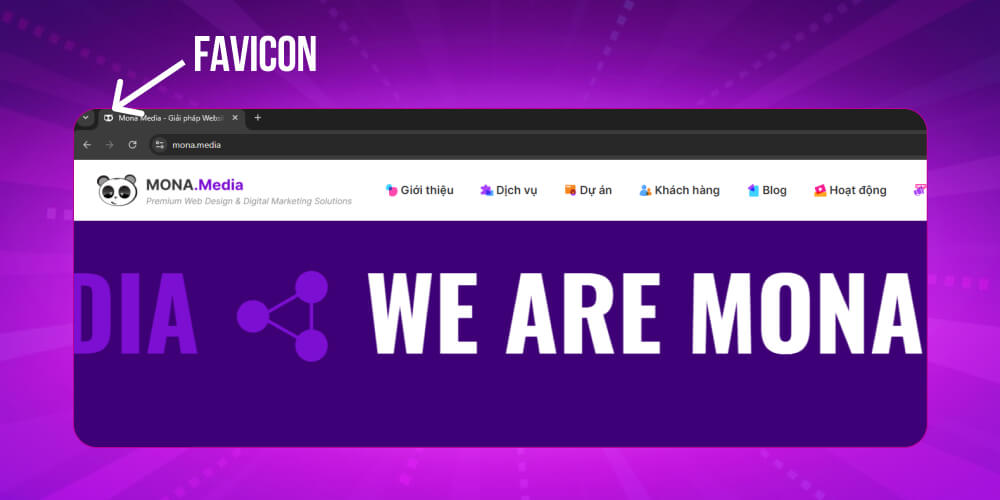
Have you ever noticed that tiny, often square, icon nestled in your browser tab, next to a website’s title? Or perhaps spotted it on your bookmark bar, or even beside a URL in mobile search results? That’s a favicon, short for “favorite icon,” and despite its diminutive size, it holds immense power in establishing brand identity, enhancing user experience, and even indirectly bolstering your site’s SEO. At Tophinhanhdep.com, we understand that visual communication is paramount, and a favicon is the ultimate miniature expression of your online presence. It’s a testament to how even the smallest visual design elements can make a monumental difference.
This comprehensive guide will delve deep into the world of favicons, exploring their origins, their crucial role in modern web browsing, best practices for their design and implementation, and how you can leverage image tools and creative ideas from Tophinhanhdep.com to craft a favicon that truly represents your brand.
What is a Favicon?
A favicon, an abbreviation for “favorite icon,” is a small, iconic image specifically designed to represent a website or web page. It’s a visual shorthand, typically appearing next to the website’s name in a browser’s address bar, on tabs, within bookmark lists, and across other user interface elements. Its fundamental purpose is to bestow a unique visual identity upon a website, enabling users to rapidly recognize and distinguish it, especially when navigating a sea of open tabs. For a platform like Tophinhanhdep.com, rich in diverse images and photography, the favicon becomes a critical, condensed representation of its vast visual offerings. It’s not merely a decorative element; it’s a vital piece of digital art that acts as a miniature logo, enhancing immediate brand recall and user engagement.
Favicon History and Standardization
The concept of the favicon dates back to 1999, when Microsoft first introduced it with Internet Explorer 5. Initially, the favicon’s role was to provide an icon that would appear when a user added a site to their “Favorites” (bookmarks). This origin story gives the favicon its name: a blend of “favorite” and “icon.” As the internet grew and evolved, so did the favicon’s application. Its presence quickly became ubiquitous as other browsers adopted the feature, expanding its display to tabs, address bars, and eventually, even search results. With the proliferation of smartphones and varying screen resolutions, favicons adapted to new platforms, paving the way for app icons and other variations that serve similar visual identification purposes.
Standardization became crucial to ensure consistent display across a myriad of platforms and browsers. Initially, the .ico format was the standard, valued for its ability to contain multiple images of different sizes within a single file, allowing browsers to select the most appropriate one. However, with the rise of high-resolution displays and diverse devices, other formats such as .png and .svg (Scalable Vector Graphics) were adopted for their superior scalability and clarity. The .png format, for instance, supports transparency, which is a key consideration for many graphic design elements. For web developers, the standard method for linking a favicon involves placing a <link> element in the HTML head, pointing to the favicon’s location. Over the years, additional specifications, such as Apple Touch Icons for iOS devices and the manifest.json for Android, further broadened the scope of favicon implementation, underscoring its pivotal role in a consistent visual presence.

Where Can You See the Favicon?
Favicons are the silent workhorses of web navigation, providing essential visual cues that streamline user interaction. Their omnipresence across various user interface elements makes them indispensable for quick identification and brand reinforcement. At Tophinhanhdep.com, where aesthetic images and a seamless browsing experience are paramount, understanding these visibility points is key.
When you access a website through a web browser, the favicon is prominently displayed. In the address bar, it sits discreetly next to the site’s URL. More notably, in modern browsers that heavily rely on tabs, the favicon appears on each individual tab. This visual representation allows users to instantly discern which website is open in a particular tab, a feature invaluable when juggling multiple open pages of wallpapers, backgrounds, or beautiful photography. It reduces cognitive load, enabling rapid navigation based on visual memory rather than reading each tab title.
Beyond active browsing, favicons extend their utility to organizational features. When you save a website to your browser’s bookmark bar, the favicon typically appears alongside the site’s name. This visual marker makes it significantly easier to spot and click on a desired bookmarked site, enhancing the browsing experience. Some users even prefer a favicon-only view on their bookmark bar to save space, relying solely on these tiny icons for identification. Similarly, when you delve into your browser’s history—a chronological list of visited websites—the favicon for each site is displayed next to its name or URL. This transforms a potentially overwhelming list into an intuitive visual timeline, allowing users to quickly locate and revisit specific pages of high-resolution images or digital art.
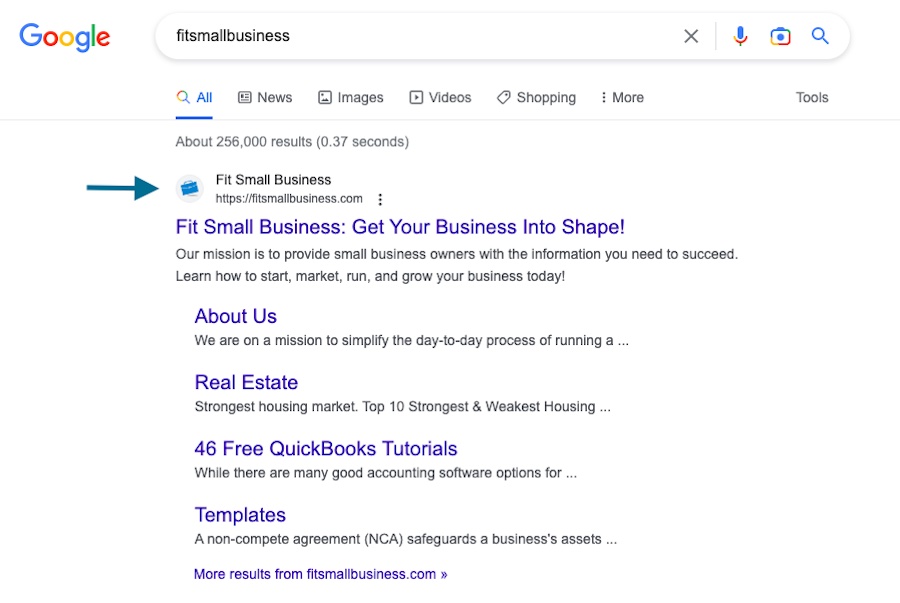
In an increasingly mobile-first world, favicons have gained even greater prominence. Search engines like Google now often display favicons next to search results on mobile devices. This feature helps users swiftly identify familiar websites or brands while scrolling through search engine results pages (SERPs). For Tophinhanhdep.com, a distinct and memorable favicon in search results can be the difference between a user choosing our site over a competitor’s, driven by immediate brand recognition and trust conveyed through a clean, professional visual. When users save a website as a shortcut to their mobile device’s home screen, the favicon morphs into an app-like icon, maintaining a consistent brand presence across different device interfaces. This ubiquitous visibility solidifies the favicon’s status as a critical element of visual design and user engagement.
Why do Favicons Matter?
Favicons, though diminutive in size, wield significant influence within the broader ecosystem of web design, branding, and user experience. Their importance far transcends their small pixel count, impacting how users perceive and interact with a website. For a platform like Tophinhanhdep.com, dedicated to exceptional images and visual design, favicons are not merely an afterthought but a strategic element in cultivating a strong online presence.
At their core, favicons serve as a potent visual representation of a brand or website. Much like companies invest heavily in crafting impactful logos, a favicon acts as a miniature, highly distilled logo, reinforcing brand identity across all touchpoints. Over time, consistent exposure to a unique favicon builds brand recognition and fosters a sense of familiarity and trust among repeat visitors. This consistent visual language is crucial, especially when our users encounter Tophinhanhdep.com’s content on various devices and platforms.
Beyond branding, favicons significantly enhance the User Experience (UX). In today’s browsing habits, users often have numerous tabs open simultaneously. A distinctive favicon allows them to instantly identify and switch to the desired tab without the need to read each tab title. It acts as an intuitive visual cue, saving time and effort and streamlining navigation. This efficiency directly contributes to a more pleasant and productive browsing journey for those exploring aesthetic images or stock photos on our website.
A website sporting a meticulously designed favicon inherently projects an image of credibility and professionalism. Conversely, the absence of a favicon or the reliance on a generic default icon can inadvertently signal that a site is either incomplete, unprofessional, or lacks attention to detail. In a competitive digital landscape, every element that builds trust and conveys competence is invaluable. Tophinhanhdep.com’s commitment to beautiful photography and high-resolution visuals extends to every aspect of its online presentation, including this tiny icon.
Favicons also ensure cross-platform consistency. From desktop browsers to mobile home screens where websites can be saved as shortcuts, these icons adapt to various environments. They guarantee that a website or web app maintains a uniform identity, further solidifying brand recognition regardless of the access point. Moreover, in contexts where users can share or recommend websites, such as certain social media platforms or web directories, a well-designed favicon can act as a miniature advertisement, capturing attention and enticing clicks. In essence, the favicon is a small but mighty ambassador for a brand, making its impact on user perception and interaction undeniable.
Favicons and SEO: The Indirect Impact
The relationship between favicons and SEO (Search Engine Optimization) isn’t a direct one in terms of algorithmic ranking factors; search engines don’t explicitly rank sites higher because they have a favicon. However, their indirect influence on user behavior and overall site performance can significantly contribute to SEO outcomes. For Tophinhanhdep.com, which thrives on visual appeal and user engagement, understanding these nuanced connections is vital.
Favicons play a crucial role in brand authority and click-through rates (CTR). When users are scrolling through search results, particularly on mobile devices where favicons are displayed by some search engines, a familiar and professionally designed favicon can make a website stand out. If a user recognizes a favicon associated with a brand they trust—perhaps from having browsed Tophinhanhdep.com for wallpapers or digital art before—they are inherently more likely to click on that search result. This increased CTR is a strong signal to search engines that a website is relevant and valuable, which can positively influence search rankings over time. Consistent branding through a favicon strengthens brand recall, encouraging repeat visits and fostering loyalty, which are indirect SEO benefits.
Furthermore, favicons significantly impact user experience (UX) metrics, which are increasingly factored into search engine algorithms. A recognizable favicon improves navigation efficiency in browser tabs, allowing users to quickly locate and switch between desired pages, such as an ongoing search for nature photography or abstract images. This seamless interaction can lead to longer dwell times and deeper engagement with content. Similarly, a distinct favicon encourages bookmarking and makes it easier for users to revisit bookmarked sites. Repeat visits and reduced bounce rates—where users quickly leave a site—are positive signals to search engines. For Tophinhanhdep.com, an intuitive and visually appealing favicon helps ensure that users who find the perfect background or aesthetic image have a smooth, positive experience, indirectly telling search engines that our content is valuable and our site is user-friendly, especially important in a mobile-first indexing environment. While not a direct ranking signal, a favicon’s power to enhance branding and user experience creates a ripple effect that ultimately supports a website’s overall SEO health.
Crafting Your Signature Icon: Design, Sizes, and Implementation
Creating an effective favicon for Tophinhanhdep.com requires a blend of visual design expertise, an understanding of technical specifications, and a commitment to brand consistency. Given the favicon’s minuscule canvas, every pixel matters, and the process mirrors the precision involved in crafting high-resolution photography or intricate digital art.
What Size is a Favicon? Understanding Dimensions and File Formats
The size of a favicon has evolved considerably from its origins as a simple 16x16 pixel icon for browser tabs. Today, optimal display across diverse devices and resolutions necessitates providing multiple sizes and appropriate file formats.
- Classic Favicon: The fundamental size, still widely used in browser tabs, remains 16x16 pixels.
- Larger Browsers & Retina Displays: For modern browsers and high-DPI (Retina) screens, sizes like 32x32 and 64x64 pixels ensure crisp clarity.
- Mobile Devices: When a website like Tophinhanhdep.com is saved as a shortcut on a smartphone or tablet home screen, larger sizes such as 152x152, 180x180 (for Apple Touch Icons), 192x192, and even 512x512 pixels are commonly used across iOS and Android devices.
- Web App Manifest: For Progressive Web Apps (PWAs), icon sizes can range widely, from 96x96 to 384x384 pixels, specified within a
manifest.jsonfile.
Regarding file formats, .ico is the traditional standard, notable for its ability to contain multiple image sizes within a single file. However, .png is now widely favored for its excellent support for transparency, making it ideal for graphic design elements with irregular shapes. .svg (Scalable Vector Graphics) offers infinite scalability without loss of quality, perfect for ensuring Tophinhanhdep.com’s favicon looks sharp on any screen. Newer formats like .webp offer superior compression and faster load times. For optimal performance, Tophinhanhdep.com often recommends utilizing image compressors and optimizers to reduce file size without sacrificing visual fidelity.
Tips for Designing a Favicon
Designing a favicon is an exercise in extreme simplification, much like distilling the essence of a complex beautiful photography piece into a single powerful visual.
- Simplicity is Key: Given the tiny dimensions, intricate details from a nature photography piece or a detailed logo will be lost. Opt for bold, simple shapes or a single, highly recognizable letter or symbol from your brand, reflecting the concise nature of abstract images.
- Maintain Brand Consistency: The favicon should still instantly resonate with the overall visual design and branding of Tophinhanhdep.com. Use colors, motifs, or elements that are consistent with your logo and website aesthetic.
- Limit Color Usage: Too many colors can make a favicon appear muddy. Stick to 2-3 dominant brand colors that offer good contrast and ensure visibility against various backgrounds, including light and dark browser themes.
- Avoid Text: Full words are typically unreadable. If text is essential, use a single, bold, and highly stylized character.
- Vector Design: Always start your design in vector software (e.g., Adobe Illustrator). This allows for perfect scalability, ensuring your icon remains crisp and clean at all required sizes, which is fundamental for digital art.
- Test on Different Backgrounds and Devices: Preview your favicon on light and dark backgrounds, and across various browsers and mobile devices. What looks great on a desktop might not be clear on a smartphone, highlighting the importance of thorough testing, a practice akin to perfecting editing styles for large image collections.
- Consider Semantic Meaning: Beyond aesthetics, think about what your favicon communicates. Does it convey the essence of Tophinhanhdep.com’s focus on images and photography?
How to Create a Favicon and Leverage Tophinhanhdep.com’s Image Tools
Creating a favicon can be approached in several ways, often leveraging the same principles and image tools Tophinhanhdep.com offers for broader photo manipulation and digital photography needs.
- Favicon Generators: Online tools like Favicon.io or Favicon.ico & App Icon Generator simplify the process. You can upload an existing logo or image (e.g., a simplified element from a stock photo or aesthetic image), and the generator will output a complete set of favicons in various sizes and formats. These tools are excellent for quick creation without specialized design software.
- Image Editing Software: For greater control, you can use professional image editing software such as Adobe Photoshop, GIMP, or Canva. Start by designing on a larger canvas (e.g., 512x512 pixels), focusing on the simplicity and brand consistency discussed earlier. Once the master design is complete, export it in all necessary sizes and formats. If you have a high-resolution source image that needs to be scaled down and simplified, these tools are indispensable for precise photo manipulation and applying specific editing styles.
- Utilizing Tophinhanhdep.com’s Image Tools: To bridge the gap between a design and a perfectly optimized favicon, our platform provides essential image tools. Need to convert a PNG to an ICO? Our converters can help. Worried about file size impacting load times? Our compressors and optimizers ensure your favicon is lightweight without compromising quality. If your starting image for the favicon is too small, our AI upscalers might even help you enhance its resolution before you simplify it into an iconic form. These tools ensure that your favicon adheres to best practices for performance and visual clarity.
How to Add a Favicon to Your Website
Once your favicon is designed and properly formatted, the next step is to integrate it into your website. The method varies slightly depending on your website’s architecture.
1. Adding a Favicon in HTML:
The most universal method involves adding a <link> tag within the <head> section of your HTML document. Ensure your favicon file (e.g., favicon.ico or favicon-32x32.png) is uploaded to your website’s root directory or a designated images folder.
For an .ico file:
<link rel="icon" href="/favicon.ico" type="image/x-icon">For a .png file (recommended for modern browsers and mobile):
<link rel="icon" type="image/png" sizes="32x32" href="/images/favicon-32x32.png">
<link rel="apple-touch-icon" href="/images/apple-touch-icon.png"> <!-- For iOS devices -->
Remember to replace /favicon.ico or /images/favicon-32x32.png with the actual path to your favicon files.
2. Adding a Favicon to Your WordPress Site: For WordPress users, the process is streamlined:
- Log in to your WordPress dashboard.
- Navigate to Appearance > Customize.
- Click on Site Identity.
- Under the ‘Site Icon’ section, click ‘Select site icon’ and upload your favicon. WordPress typically recommends a 512x512 pixel image, which it will automatically resize for various uses, including as an app icon when your site is saved to a mobile home screen.
- Publish your changes.
3. Testing and Validation: After implementation, it’s crucial to test your favicon across various environments.
- Clear Browser Cache: Browsers often cache favicons, so you may need to clear your browser’s cache and cookies to see the new icon immediately.
- Test Across Browsers and Devices: Check your website in Chrome, Firefox, Safari, Edge, and on different mobile devices (iOS and Android).
- Utilize Online Favicon Checker Tools: Tools like Sitechecker.pro’s Favicon Checker can scan your website and show how your favicon appears on different platforms and devices, helping you identify any display issues. Tophinhanhdep.com encourages this thoroughness to ensure your visual design is consistently excellent.
Favicon Challenges: Navigating Complexity for Visual Consistency
While seemingly simple, favicons present several visual design and technical challenges that require careful consideration, especially for a site like Tophinhanhdep.com that prioritizes visual perfection.
One primary challenge is managing multiple sizes and resolutions. What looks crisp at 16x16 pixels might blur when scaled up for a mobile home screen. Designers must create various versions, each optimized to retain clarity and brand elements, often simplifying complex photography or digital art into its most fundamental forms. This can be intricate, as each version needs to adhere to the core visual design of the brand.
Cross-browser consistency also poses difficulties. Although most modern browsers support a range of formats and sizes, subtle differences in rendering can lead to variations. Updating favicons can also be tricky; browsers aggressively cache favicons, meaning users might continue to see an old icon even after an update. Technical workarounds are often needed to force browsers to recognize the new favicon.
Choosing the optimal file formats for different scenarios is another hurdle. While .ico is traditional, .png is often preferred for transparency and larger sizes, and .svg for its vector scalability. New formats like .webp add another layer of consideration for web optimization. Transparency issues can also arise, where favicons with transparent backgrounds might render unpredictably against specific browser themes or platform interfaces, underscoring the need for careful photo manipulation and editing styles during creation.
Finally, maintaining brand integrity at such small sizes is paramount. Intricate logos or detailed brand emblems (like those found in beautiful photography or digital art) may not scale down well. Designers often need to simplify or modify the branding without losing recognizability, a creative challenge in itself. Furthermore, platform-specific requirements (e.g., Apple Touch Icons) demand additional design and development work. Addressing these challenges effectively ensures that Tophinhanhdep.com’s favicon, like all its images and visual design elements, always presents a polished, consistent, and professional image.
Conclusion
Favicons are a powerful reminder that in the world of web design, no detail is too small to make a significant impact. These tiny icons, often overlooked, are crucial for enhancing user experience, cementing brand identity, and even subtly boosting a website’s SEO. For Tophinhanhdep.com, a platform dedicated to the richness of images, photography, and visual design, a favicon is more than just an accessory; it’s a condensed ambassador of our commitment to visual excellence.
By understanding their history, appreciating their ubiquitous visibility, and meticulously crafting them with tools and design principles, websites can leverage favicons to create an indelible mark. From ensuring consistent branding across browser tabs and bookmarks to making a lasting first impression in mobile search results, the favicon plays a pivotal role. Investing the time and creative effort into designing a high-quality favicon, perhaps drawing inspiration from Tophinhanhdep.com’s vast image collections and employing our advanced image tools, is a testament to a brand’s dedication to quality, user-centric design, and a strong online presence. Make your favicon a masterpiece, and let it be the tiny visual powerhouse that elevates your website.